
Fully virtualized
No waiting on big data
ReoGrid V5 reads and draws only what is on screen. Fill in 1,000,000 rows and the first screen is up in 455 ms (V4: 10.4 s). Open a 1,000,000-row xlsx virtualized and it shows in 650 ms. Measured on the shipped V4 and V5, same PC, same data.
23×
faster to fill and show 1M rows
650 ms
to show a 1M-row xlsx, virtualized (V4: 8.37 s)
10.3 ms
to show a 1M-row data source
57.8 MB
app memory at that point
How it works
Work only on what is visible
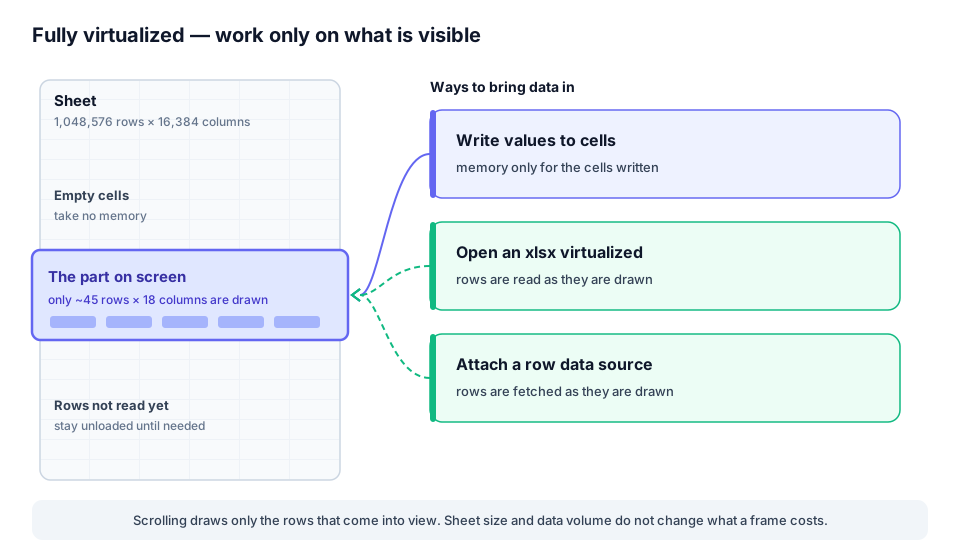
A sheet may have a million rows, but a screen shows a few dozen. V5 fits drawing, memory and reading data to that visible window, so a bigger sheet or more data adds almost nothing to what it takes to put the screen up.
- Drawing — only the visible cells are painted, so scrolling a million-row sheet is as light as a small one (ultra-fast rendering).
- Memory — only the cells you write take memory; empty cells take none (memory-efficient by design).
- Reading — an xlsx opened virtualized, or a sheet attached to a data source, reads only the rows it draws (this page).
Data size
Fill the grid, show the first screen
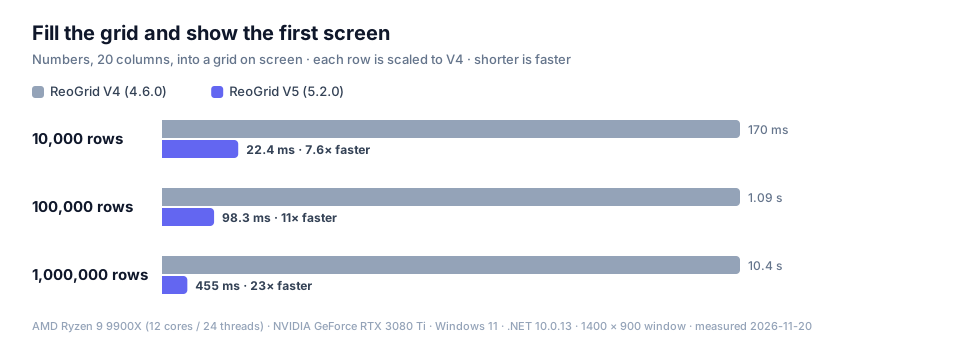
The time to fill 20 columns of numbers into a grid on screen and paint the first frame. V4 takes 170 ms for 10,000 rows and 10.4 s for 1,000,000. V5 takes 455 ms for 1,000,000 rows, so users can start working the moment the data is in.
Writing values still takes time in proportion to the data in V5 too, but each cell costs so little that the gap widens as the data grows: 7.6× at 10,000 rows, 23× at 1,000,000. V4 is measured on its fastest path, a 2-D array written to a range in one call.
| Data | V4 | V5 GDI+ | V5 Direct2D | Speed-up |
|---|---|---|---|---|
| 10,000 rows 10,000 rows × 20 columns | 170 ms 144 MB | 22.4 ms 65.7 MB | 25.4 ms 98.8 MB | 7.6× |
| 100,000 rows 100,000 rows × 20 columns | 1.09 s 741 MB | 98.3 ms 107 MB | 98.7 ms 139 MB | 11× |
| 1,000,000 rows 1,000,000 rows × 20 columns | 10.4 s 6.46 GB | 455 ms 390 MB | 475 ms 426 MB | 23× |
Time to the first screen, with the app's memory (peak working set) below it. Median of 3 runs. Speed-up is V4 ÷ V5 (GDI+).
xlsx
Open a million-row xlsx and look right away
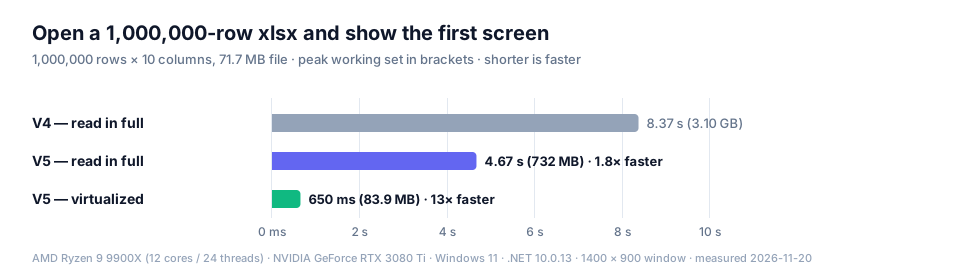
The time to open a 1,000,000 × 10 xlsx (71.7 MB) and show the first screen. Reading every cell, V4 takes 8.37 s and V5 4.67 s, and memory goes from 3.10 GB to 732 MB.
V5 can also open the file virtualized. The sheet is usable at once and cells are read from the file as they are drawn: 650 ms to the first screen, 83.9 MB of memory. It suits opening a large log or export to check it.
What a virtualized sheet can do
A virtualized sheet holds only the rows that have been shown. Viewing, scrolling, sorting and copying read the rows they need on the spot. Formulas, filters, the aggregate kinds of conditional formatting and anything that uses the used range (copying everything, auto-fitting columns) treat rows not read yet as empty.
Call MaterializeAll() to read everything before you edit or save. To edit a file of ordinary size, XlsxReader.Read, which reads every cell, is the better fit. See Working with large data.
using unvell.ReoGrid.IO.Excel;

// cells are read from the file as they are drawn
using var book = XlsxReader.OpenVirtual(
    "large.xlsx", SheetLoadMode.OnDemand);
grid.LoadWorkbook(book.Workbook);

// read everything before saving
book.MaterializeAll();
XlsxWriter.Write(book.Workbook, "out.xlsx");
Data source
A million database rows, straight into a list
However many rows the database holds, none of them has to be loaded up front. Attach a data source to the sheet and the control asks it, just before drawing, for the rows on screen. A 1,048,576 × 20 sheet reached its first screen in 10.3 ms, with the app using 57.8 MB.
While scrolling, rows that come into view are fetched and drawn on the spot, and a frame still takes 6.06 ms (GDI+) / 2.18 ms (Direct2D) — the same as a sheet with all million rows filled in (6.13 ms / 2.18 ms). V4 has no counterpart: the app had to swap values in and out of the visible range itself.
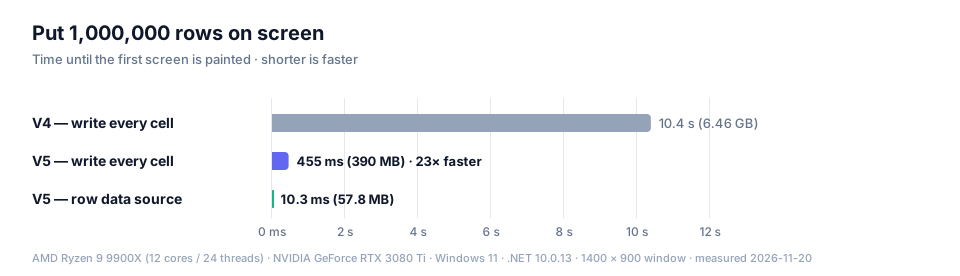
The data source makes its values in memory; the time a real database takes to answer is not included.
Where it fits
It suits browsing a list, scrolling and jumping to a row. Sorting reads every row of the range on the spot, so it takes time with many rows; formulas that total the whole sheet and filters only see the rows loaded into the sheet. When you need totals, sorting or filtering, do them in the database and show the result, or fill the sheet in full.
Skip rows you have already supplied. See Working with large data.
using unvell.ReoGrid.Core.Data;

public sealed class QueryRowSource : IRowDataSource
{
    private readonly Worksheet _sheet;
    private readonly HashSet<int> _loaded = new();

    public QueryRowSource(Worksheet sheet) => _sheet = sheet;

    // called just before drawing, with the rows on screen
    public void EnsureRows(int firstRow, int lastRow)
    {
        for (int r = firstRow; r <= lastRow; r++)
        {
            if (!_loaded.Add(r)) continue;  // already supplied
            foreach (var (col, value) in FetchRow(r))
                _sheet.SetObjectValue(r, col, value);
        }
    }

    // reads one row from the database (omitted)
    private IEnumerable<(int Col, object? Value)> FetchRow(int row) => ...;
}

ws.RowDataSource = new QueryRowSource(ws);
Sheet size
A big sheet stays light
How we measured
| CPU | AMD Ryzen 9 9900X (12 cores / 24 threads) |
|---|---|
| GPU | NVIDIA GeForce RTX 3080 Ti |
| OS | Windows 11 |
| Runtime | .NET 10.0.13 (V4 and V5) |
| Versions | ReoGrid V4 4.6.0 / ReoGrid V5 5.2.0 (WinForms, shipped packages) |
| Window | 1400 × 900 px (100%) |
| Measured | 2026-11-20 |
- Time to the first screen runs from starting to put data into a control on screen until its first frame is painted. Figures are the median of three runs.
- V4 runs in its most favorable configuration: values go in as a 2-D array written to a range, with screen updates and events suspended. The xlsx is opened with the control's own load function.
- The xlsx has 1,000,000 rows × 10 columns (one header row, two text and eight number columns) and was made by a generator that depends on neither version.
- The data source makes its values in memory; the time a database takes to answer is not included.
- Memory is the process's peak working set after the first frame. 1 MB = 1,048,576 bytes.
- Measured with a license applied (no watermark).
- This is a separate run from the rendering benchmarks, so the same "fill 1,000,000 rows and show" comes out slightly different there.
- Results vary with your hardware, window size and data.
For V4 customers
The difference between V4 and V5 is a difference of design generation. V4 remains on sale and supported. A ReoGrid One license is not tied to a version, so the same license and key cover both V4 and V5 — you can try V5 on the screens with the largest data and keep V4 where you need a feature V5 does not have yet.
Try it with your own data
The 30-day free trial has every feature, so you can check how fast your own database or xlsx files come up. One license covers both V4 and V5.