
Memory-efficient by design
Measured against V4
ReoGrid V5 keeps a number in 16.4 B per cell — 18× less than V4's 290.2 B. An app showing 1,000,000 rows × 20 columns goes from 6.47 GB to 407 MB. Measured on the shipped V4 and V5, same PC, same data.
16.4 B
per number cell (V4: 290.2 B)
407 MB
app showing 1M rows (V4: 6.47 GB)
36.4 KB
per empty sheet (V4: 102 MB)
129 MB
after opening a 2M-cell xlsx (V4: 506 MB)
Cells
Memory per cell
The memory a sheet keeps once the values are written, divided by the number of cells. A number costs 16.4 B per cell, 18× less than V4's 290.2 B. Columns where the same strings come back again and again — categories, product names, regions — cost the same 16.4 B as numbers.
When every string is different, as in an ID or code column, the strings themselves add to it: 113.3 B per cell. Values scattered across a sheet cost more per cell than a dense table, 151.9 B, but 100,000 of them still come to 14.5 MB in total. In every case V5 uses less than V4 — between 2.5× and 18× less.
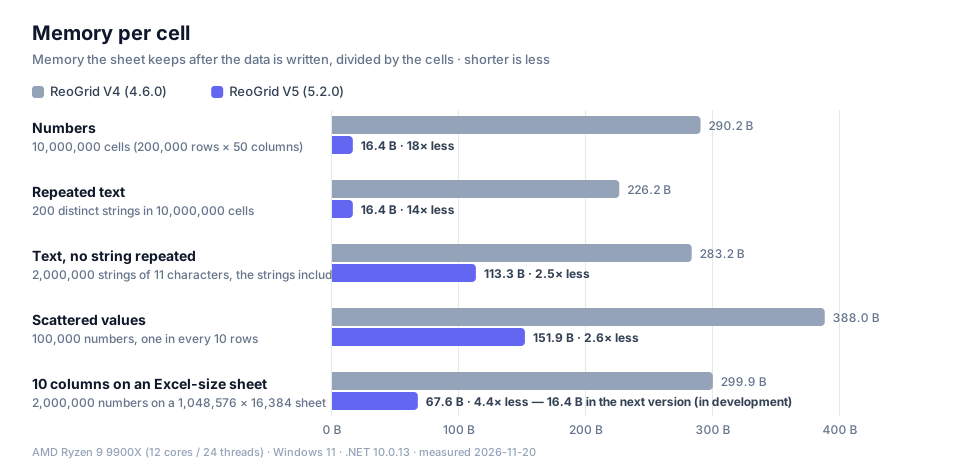
| Data | V4 per cell | V5 per cell | V4 total | V5 total | Reduction |
|---|---|---|---|---|---|
| Numbers 10,000,000 cells (200,000 rows × 50 columns) | 290.2 B | 16.4 B | 2.70 GB | 156 MB | 18× less |
| Repeated text 200 distinct strings in 10,000,000 cells | 226.2 B | 16.4 B | 2.11 GB | 156 MB | 14× less |
| Text, no string repeated 2,000,000 strings of 11 characters, the strings included | 283.2 B | 113.3 B | 540 MB | 216 MB | 2.5× less |
| Scattered values 100,000 numbers, one in every 10 rows | 388.0 B | 151.9 B | 37.0 MB | 14.5 MB | 2.6× less |
| 10 columns on an Excel-size sheet 2,000,000 numbers on a 1,048,576 × 16,384 sheet | 299.9 B | 67.6 B | 572 MB | 129 MB | 4.4× less |
Growth of the managed heap after writing the data, divided by the cells (median of 3 runs). Shorter is less.
A narrow table on an Excel-size sheet (5.2.0)
In 5.2.0, a table with few columns on a sheet as wide as Excel's 16,384 columns costs more per cell: 67.6 B for a 10-column table (V4: 299.9 B). The Sheet1 the control starts with, and a sheet opened from xlsx, are that size. Create the sheet with the rows and columns your data needs and it is 16.4 B.
In the next version, now in development, it is 16.4 B whatever the sheet size, and the memory after opening a 2-million-cell xlsx drops from 129 MB to 31.4 MB — we measured both on the development build.
using unvell.ReoGrid.Core;

// Large, narrow tables on 5.2.0:
// create the sheet with the rows and columns the data needs
var wb = new Workbook();
var ws = wb.AddWorksheet("Data", rows: 200_000, cols: 10);

// ...write the values...

grid.LoadWorkbook(wb);
Your app
Memory of an app showing the grid
The memory of the whole process (peak working set) after a control in a window has shown and scrolled a 100,000 × 20 sheet. It includes the .NET runtime and the window itself, so it is close to what Task Manager shows. For a sheet of numbers, V4 uses 760 MB and V5 122 MB.
Drawing with Direct2D takes more than GDI+ for what the GPU needs (194 MB for the same sheet). On a formatted table the gap narrows to 3.4× less, because most of its cells carry a number format — Formatting and memory explains why.
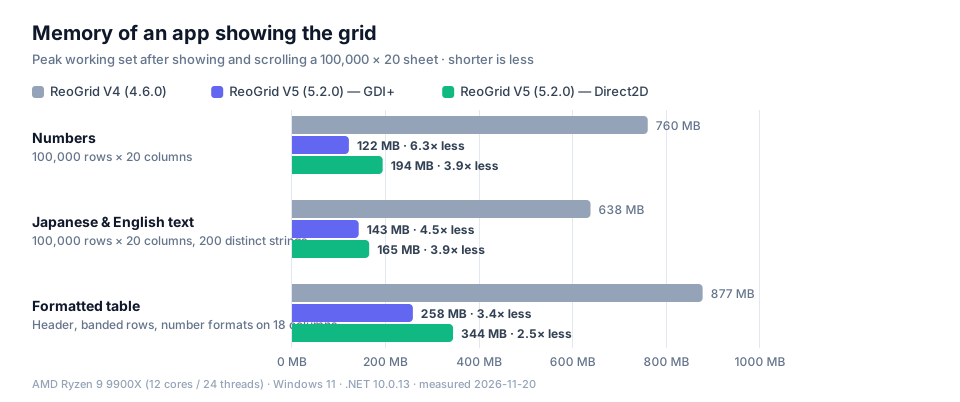
| Sheet | V4 | V5 GDI+ | V5 Direct2D |
|---|---|---|---|
| Numbers 100,000 rows × 20 columns | 760 MB heap 564 MB | 122 MB heap 31.7 MB | 194 MB heap 34.0 MB |
| Japanese & English text 100,000 rows × 20 columns, 200 distinct strings | 638 MB heap 442 MB | 143 MB heap 31.8 MB | 165 MB heap 33.8 MB |
| Formatted table Header, banded rows, number formats on 18 columns | 877 MB heap 648 MB | 258 MB heap 118 MB | 344 MB heap 120 MB |
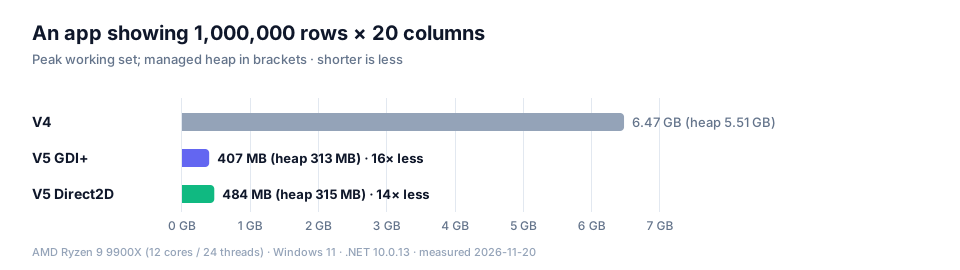
| 1,000,000 rows 1,000,000 rows × 20 columns of numbers | 6.47 GB heap 5.51 GB | 407 MB heap 313 MB | 484 MB heap 315 MB |
Peak working set, with the managed heap below it (median of 3 runs).
Under 0.5 GB for 1,000,000 rows × 20 columns
Do the same with 1,000,000 rows × 20 columns (20 million cells) and V4 uses 6.47 GB. V5 uses 407 MB with GDI+ and 484 MB with Direct2D — small enough to keep a million-row table open on a laptop or a virtual desktop with limited memory.
Sheets
An empty sheet costs almost nothing
The memory of adding ten sheets the size of Excel's, 1,048,576 rows × 16,384 columns, without writing anything. V5 spends memory only on the cells you write, so however many sheets you add, the parts you don't use cost nothing. Templates full of blank areas and workbooks with many sheets stay small.
V4 · 10 sheets
1.00 GB
102 MB per sheet
V5 · 10 sheets
364 KB
36.4 KB per sheet
Reduction
2,867× less
1,048,576 rows × 16,384 columns
Formatting
Formatting and memory
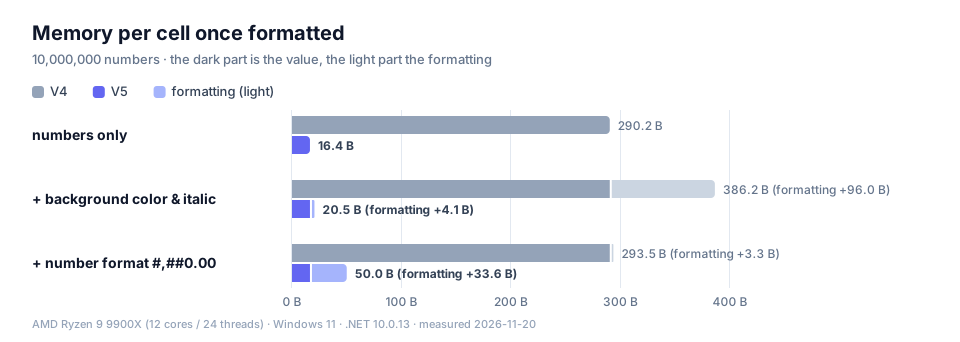
Give 10 million cells of data a background color and italics, and V5 grows by 4.1 B per cell (V4: 96.0 B). The same formatting is kept once, so millions of cells add nothing more unless the number of different formats grows. Formatting an entire column (1,048,576 rows) costs 1.1 KB however many cells it covers (V4: 72.8 KB).
Number formats (#,##0.00 and the like) are different: each formatted cell grows by 33.6 B, more than V4's 3.3 B — here V4 is the lighter one. A formatted number cell as a whole is still 50.0 B in V5 against 293.5 B in V4, 5.9× less.
Colors, fonts and other styles set on whole columns or rows stay small however many cells they cover — see Style inheritance.
Scrolling
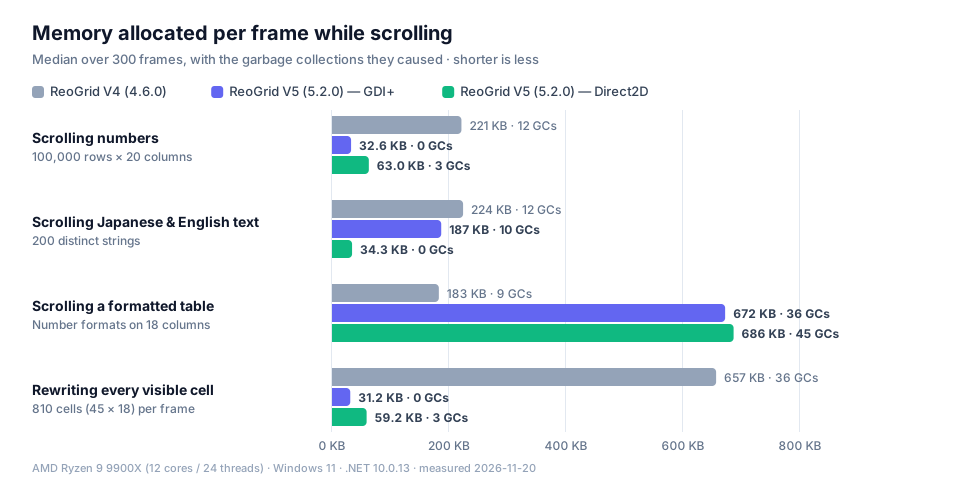
Memory allocated while scrolling
Memory allocated for a frame and dropped afterwards is collected by .NET's garbage collector (GC). The less a frame allocates, the fewer collections run, and the less often scrolling pauses for one. On a sheet of numbers, V4 allocates 221 KB a frame and triggered 12 GCs over 300 frames; V5 allocates 32.6 KB with 0 GCs on GDI+, and 63.0 KB with 3 GCs on Direct2D. In a live update that rewrites every visible cell each frame, V4 allocates 657 KB and V5 31.2 KB (GDI+).
Scrolling a formatted table is the other way round: V5 allocates more (672 KB against V4's 183 KB). Drawing Japanese text with GDI+, V5 allocates close to what V4 does (187 KB against 224 KB); the same sheet on Direct2D allocates 34.3 KB.
For rendering speed, see the ultra-fast rendering benchmarks.
Design
How V5 saves memory
Empty cells take no memory
Memory goes only to the cells you write. An empty Excel-size sheet is 36.4 KB.
Repeated strings are kept once
A string that comes back is stored once, so 10 million cells drawn from 200 strings cost the same 16.4 B per cell as numbers.
So is repeated formatting
The same style on 10 million cells adds 4.1 B per cell. Formatting whole columns and rows costs the same however many cells they hold.
Only the visible range is drawn
Only the cells on screen are painted, so a 1,000,000-row sheet allocates the same 33.0 KB per frame while scrolling as a 100,000-row one (GDI+).
How to write code for large sheets: Performance and memory and Working with large data.
How we measured
| CPU | AMD Ryzen 9 9900X (12 cores / 24 threads) |
|---|---|
| GPU | NVIDIA GeForce RTX 3080 Ti |
| OS | Windows 11 |
| Runtime | .NET 10.0.13 (V4 and V5) |
| Versions | ReoGrid V4 4.6.0 / ReoGrid V5 5.2.0 |
| Measured | 2026-11-20 |
- We measure what the sheet keeps. After writing the data, a garbage collection runs to completion while the sheet is still referenced, and the growth of the managed heap is measured. Memory used briefly and dropped is not counted; data the sheet holds always is.
- Each item runs in its own process; figures are the median of three runs.
- V4 runs in its most favorable configuration, with events and formula calculation suspended for bulk loading.
- Per-cell figures use sheets created with the rows and columns the data needs (except "10 columns on an Excel-size sheet").
- App memory is measured after a WinForms control in a 1400 × 900 window has shown and scrolled the sheet, using the shipped packages with a license applied.
- 1 KB = 1,024 bytes; 1 MB = 1,048,576 bytes.
- "Next version" figures come from the same measurement on the development build as of 2026-11-20.
- Results vary with the kind and layout of your data and how it is formatted.
For V4 customers
The difference between V4 and V5 is a difference of design generation. V4 remains on sale and supported. A ReoGrid One license is not tied to a version, so the same license and key cover both V4 and V5 — you can try V5 on the projects with the largest data and keep V4 where you need a feature V5 does not have yet.
Try it with your own data
The 30-day free trial has every feature, so you can check memory and speed on your own data. One license covers both V4 and V5.