
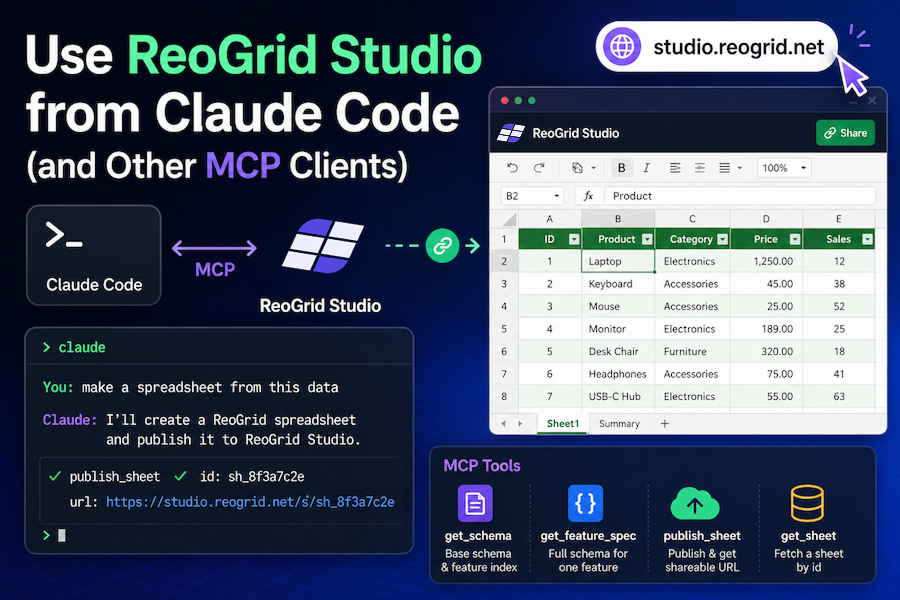
This guide walks through connecting ReoGrid Studio to your AI tooling. By the end of it you will be able to say “make a spreadsheet from this data” in Claude Code and get back a live studio.reogrid.net URL.
If you have not seen ReoGrid Studio yet, the short version: it is a browser-hosted spreadsheet at studio.reogrid.net with a public MCP endpoint. AI agents publish ReoGridJsonDocuments and receive shareable short URLs. See Introducing ReoGrid Studio for the why.
The endpoint
There is one endpoint to know:
POST https://api-studio.reogrid.net/studio/mcpIt speaks JSON-RPC 2.0 (the standard MCP transport). No auth, anonymous, rate-limited to 30 calls per hour per IP. Four tools are exposed:
| Tool | Purpose |
|---|---|
get_schema | Returns the base ReoGridJsonDocument schema and an index of advanced features |
get_feature_spec | Returns the full schema fragment for one feature (filter, frozen, cellTypes, etc.) |
publish_sheet | Publishes a document and returns { id, url, createdAt } |
get_sheet | Fetches a previously published document by id |
The two-step discovery (get_schema → get_feature_spec) keeps the public schema compact enough to fit any agent’s context window while preserving access to the full feature surface on demand. AI clients pick it up naturally — they call get_feature_spec when they need a feature they haven’t seen yet.
From Claude Code (recommended)
Claude Code is Anthropic’s CLI. It supports remote MCP servers out of the box. Add the Studio MCP with one command:
claude mcp add --transport http --scope user reogrid-studio https://api-studio.reogrid.net/studio/mcpThe --scope user flag makes it available across every project on your machine. Drop the flag (or use --scope local) to scope it to the current directory only.
Verify it’s registered:
claude mcp listYou should see reogrid-studio in the list with the HTTP URL.
First conversation
Open Claude Code in any project and ask:
“I have Q1 sales numbers: Tokyo 1200/1450/1600, Osaka 900/1100/1250, Nagoya 700/850/950 across Jan/Feb/Mar. Make a clean spreadsheet with monthly totals and a Q1 total column. Publish it via reogrid-studio.”
Claude Code will use the Studio tools autonomously. A typical trace looks like:
mcp__reogrid-studio__get_schema()— reads the base shape and the feature indexmcp__reogrid-studio__get_feature_spec({ feature: "frozen" })— fetches the detailed spec for the one feature it wants to usemcp__reogrid-studio__publish_sheet({ doc, title })— publishes; receives the URL
The reply ends with the public URL. Click it, you have your spreadsheet.
Useful prompt patterns
- Visualize analyzed data: “Take the rows we just computed and publish them as a Studio sheet with the right number formats.”
- Build from a description: “Generate a realistic 15-item product backlog and publish it with a header filter.”
- Convert from a file: “Read
data.csv, summarize by region, and publish the summary as a Studio sheet with conditional formatting on the totals column.”
Claude will pick up the schema and features it needs on the fly — you do not need to spell out the JSON shape.
From Claude Desktop
Claude Desktop speaks the same MCP protocol. Edit your config file:
- macOS:
~/Library/Application Support/Claude/claude_desktop_config.json - Windows:
%APPDATA%\Claude\claude_desktop_config.json
Add the Studio server:
{
  "mcpServers": {
    "reogrid-studio": {
      "type": "http",
      "url": "https://api-studio.reogrid.net/studio/mcp"
    }
  }
}
Restart Claude Desktop. The tools appear in the conversation’s tool list. Prompt the same way as in Claude Code.
If your Claude Desktop version doesn’t yet support native HTTP MCP servers, fall back to the mcp-remote bridge:
{
  "mcpServers": {
    "reogrid-studio": {
      "command": "npx",
      "args": ["-y", "mcp-remote", "https://api-studio.reogrid.net/studio/mcp"]
    }
  }
}
From Cursor
Cursor supports MCP via ~/.cursor/mcp.json (global) or .cursor/mcp.json (per-project):
{
  "mcpServers": {
    "reogrid-studio": {
      "url": "https://api-studio.reogrid.net/studio/mcp"
    }
  }
}
Reload the window. Studio appears as an available tool in the Composer. Same prompt patterns apply.
From the Anthropic API (for app developers)
If you’re building an application that talks to Claude programmatically, use the API-level MCP connector. This avoids running an MCP client yourself — Anthropic handles the loop server-side.
import Anthropic from "@anthropic-ai/sdk"

const client = new Anthropic() // reads ANTHROPIC_API_KEY from env

const response = await client.beta.messages.create({
  model: "claude-opus-4-7",
  max_tokens: 16000,
  system:
    "You are a data visualization assistant. Use the reogrid-studio MCP to " +
    "publish data as live spreadsheets. End your reply with the URL.",
  messages: [
    {
      role: "user",
      content:
        "Q1 support tickets — Email Jan 423 Feb 401 Mar 456, " +
        "Chat Jan 612 Feb 689 Mar 745, Phone Jan 234 Feb 220 Mar 198. " +
        "Build a clean spreadsheet with monthly totals and publish it.",
    },
  ],
  mcp_servers: [
    {
      type: "url",
      url: "https://api-studio.reogrid.net/studio/mcp",
      name: "studio",
    },
  ],
  tools: [{ type: "mcp_toolset", mcp_server_name: "studio" }],
  betas: ["mcp-client-2025-11-20"],
})

// response.content includes interleaved text + mcp_tool_use + mcp_tool_result
// blocks. The published URL appears in the last mcp_tool_result for
// publish_sheet, and (typically) in the final text block.
Notes:
- The beta header
mcp-client-2025-11-20is required — set it viabetas:and callclient.beta.messages.create(...). - The server-side loop has a default ceiling. If you hit it the response returns
stop_reason: "pause_turn"— appendresponse.contentto the messages array as anassistantturn and re-send to continue. - Cost runs roughly USD 0.15–0.20 per scenario at Opus 4.7 rates (the schema response is around 16 KB which dominates the input tokens). Use
claude-sonnet-4-6for cheaper iteration. - The same pattern works in Python — see the Anthropic SDK MCP connector docs.
Inspecting what got published
Every publish returns { id, url, createdAt }. You can fetch the stored document back via get_sheet:
curl -sS -X POST https://api-studio.reogrid.net/studio/mcp \
  -H 'Content-Type: application/json' \
  -d '{"jsonrpc":"2.0","id":1,"method":"tools/call","params":{"name":"get_sheet","arguments":{"id":"YOUR_SHORT_ID"}}}'
Or call get_sheet directly from Claude Code: “Fetch sheet 9mkzWpAibo4K34 and tell me how many cells it has.”
Troubleshooting
HTTP 405 on a GET to /studio/mcp — expected. The endpoint is POST-only; the streaming SSE half of MCP isn’t implemented because none of the four tools needs server-pushed events. Clients that POST work fine.
HTTP 429 / JSON-RPC code: -32000 "rate limit exceeded" — you’re past the 30-publish-per-hour limit on your IP. Wait an hour or batch your work. Read-only calls (get_schema, tools/list, get_sheet) share the same bucket.
JSON-RPC code: -32602 "doc.format must be \"reogrid-json\"" — your AI client tried to publish a document with the wrong envelope. Make sure the doc has format: "reogrid-json", version: 1, and a non-empty workbook.sheets[] with exactly one sheet (Phase 1 is single-sheet).
code: -32602 "Unknown feature: …" — your client called get_feature_spec with a feature name not in the index. Call get_schema first and pick a feature.name from the returned list (conditionalFormats, cellTypes, filter, outlines, protection, alternateRows, view, frozen, numberFormats, richText).
The published sheet renders blank in the browser — check the response of publish_sheet. If it returned a URL but the sheet looks empty, fetch the doc back via get_sheet and inspect doc.workbook.sheets[0].cells. If cells are missing, the AI built a doc with the wrong cell-coordinate field names (use r and c, 0-based, not row/col).
What’s next
ReoGrid Studio Phase 1 is single-sheet, anonymous, rate-limited, and free. Phase 2 ideas on the roadmap:
- Multi-sheet workbooks
- API-key-based quotas and a commercial plan
- Programmatic update / delete on previously published sheets
- Server-Sent Events for long-running publishes (large datasets, server-side aggregation)
If you have a Phase 2 use case driving a specific feature, open an issue or get in touch — concrete demand shapes priority.
Recap
# Claude Code — one command, then prompt
claude mcp add --transport http --scope user reogrid-studio https://api-studio.reogrid.net/studio/mcp
// Claude Desktop / Cursor — drop into the MCP config
{
"mcpServers": {
"reogrid-studio": { "type": "http", "url": "https://api-studio.reogrid.net/studio/mcp" }
}
}// Anthropic API — beta MCP connector
client.beta.messages.create({
model: "claude-opus-4-7",
mcp_servers: [{ type: "url", url: "https://api-studio.reogrid.net/studio/mcp", name: "studio" }],
tools: [{ type: "mcp_toolset", mcp_server_name: "studio" }],
betas: ["mcp-client-2025-11-20"],
// ...
})After that, the AI does the work. Send a prompt, get a URL, share the URL.