
Styles inherit across four levels. The lower level wins where it sets something; a property
it leaves unset (null) comes from above.
Cell < Row < Column < Sheet (RootStyle)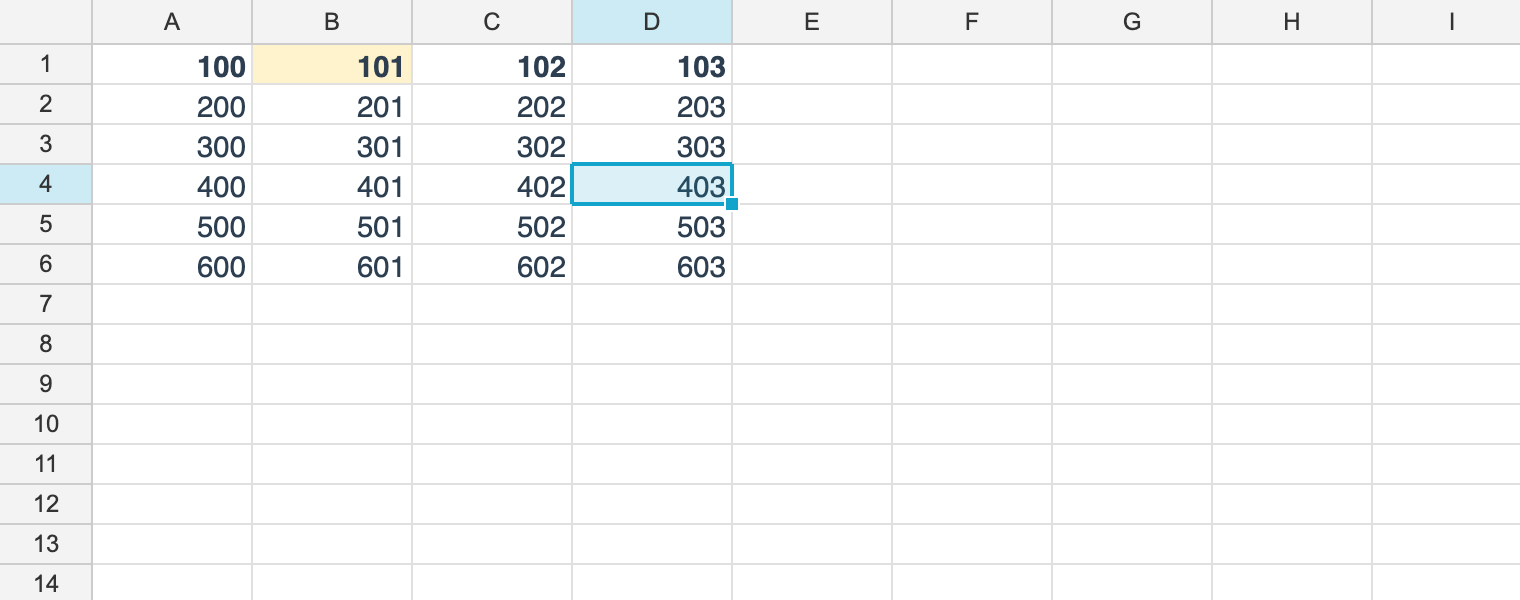
The four levels
using unvell.ReoGrid.Core;
using unvell.ReoGrid.Core.Style;

ws.RootStyle = ws.RootStyle with { FontFamily = "Segoe UI", FontSize = 11f };
ws.SetColumnStyle(1, new StyleRecord { TextAlign = HAlign.Right });
ws.SetRowStyle(0, new StyleRecord { Bold = true });
ws.SetCellStyle(0, 1, new StyleRecord { BackgroundColor = 0xFFFFF3CD });

// the effective style of B1:
//   FontFamily = "Segoe UI"      <- sheet
//   TextAlign  = Right            <- column
//   Bold       = true             <- row
//   Background = 0xFFFFF3CD       <- cell
StyleRecord effective = ws.GetEffectiveStyle(0, 1);| Level | Set with | Read with |
|---|---|---|
| Cell | ws.SetCellStyle(r, c, style) | ws.GetCellStyle(r, c) |
| Row | ws.SetRowStyle(row, style) | ws.GetRowStyle(row) |
| Column | ws.SetColumnStyle(col, style) | ws.GetColumnStyle(col) |
| Sheet | ws.RootStyle | same |
Rows beat columns. When a row and a column both set the same property, the row’s value wins — unless the range API applied the column later, which follows Excel’s “last format wins” (see Where a row style and a column style cross).
Overriding to cancel inheritance
ws.SetRowStyle(0, new StyleRecord { Bold = true });

// the row is bold, but not this one cell
ws.SetCellStyle(0, 3, new StyleRecord { Bold = false });
false is not “do not inherit” — it is “explicitly off”. To inherit, use null.
Getting the effective style
GetEffectiveStyle(r, c) returns the result of resolving all four levels. Rendering,
printing and export all go through it.
Note how it differs from GetCellStyle(r, c).
| Method | Returns |
|---|---|
GetCellStyle(r, c) | Only what was set directly on that cell (null when nothing was) |
GetEffectiveStyle(r, c) | The resolved result (never null) |
How one level combines with the next
A single step of inheritance is MergeOver.
var baseStyle = new StyleRecord { FontSize = 11f, Bold = true };
var over = new StyleRecord { Bold = false, Italic = true };

// whatever `over` sets wins; where it is null, baseStyle survives
StyleRecord result = baseStyle.MergeOver(over);
// → FontSize = 11, Bold = false, Italic = true
Why this matters for performance
Inheritance is what lets whole-row and whole-column formatting cost nothing per cell.
// the good way - one entry
ws.SetColumnStyle(2, new StyleRecord { TextAlign = HAlign.Right });

// the bad way - a million entries get materialized
for (int r = 0; r < ws.RowCount; r++)
	ws.SetCellStyle(r, 2, new StyleRecord { TextAlign = HAlign.Right });
The result looks the same, but memory use and running time do not. Always use the row and column APIs for whole-row and whole-column formatting.
Applying a style to a range
SetRangeStyle / MutateRangeStyle decide which level to write from the shape of the range,
so the caller does not have to.
// A sub-range -> one write per cell
ws.SetRangeStyle("B2:D5", new StyleRecord { BackgroundColor = 0xFFFFF3CD });

// Whole columns -> the column default style (one write per column)
ws.SetRangeStyle("A:C", new StyleRecord { TextAlign = HAlign.Right });

// The whole sheet -> a single RootStyle write
ws.SetRangeStyle(new RangePosition(0, 0, ws.RowCount, ws.ColumnCount),
	new StyleRecord { FontFamily = "Meiryo UI" });

// To change one property and keep the rest, use MutateRangeStyle
ws.MutateRangeStyle("A:C", s => s with { Bold = true });| Shape of the range | Written to | Writes | RangeStyleScope |
|---|---|---|---|
| A sub-range | the cells | one per cell | Cells |
Whole columns (A:C) | the column default style | one per column | Columns |
Whole rows (3:5) | the row default style | one per row | Rows |
| The whole sheet | RootStyle | one | Sheet |
SetRangeStyle replaces what the target level held; MutateRangeStyle hands you the current
style and updates it with what you return. The whole sheet is the one exception: RootStyle is
always fully populated, so even SetRangeStyle merges over it.
Asking where a write will land
GetRangeStyleScope reports which level a range would be written to, before you write it —
useful when the UI needs to know how many cells an operation would materialize.
// ask where a write would land, before making it
RangeStyleScope scope = ws.GetRangeStyleScope(RangePosition.Parse("A:C"));
// -> RangeStyleScope.Columns (three writes, to the column defaults)

if (ws.GetRangeStyleScope(range) == RangeStyleScope.Cells)
{
	// this path materializes cells, so confirm first when the range is large
}

// the shape tests are available on their own too
bool wholeCols = ws.IsWholeColumns(range);
bool wholeRows = ws.IsWholeRows(range);
bool wholeSheet = ws.IsWholeSheet(range);

_ = (scope, wholeCols, wholeRows, wholeSheet);
Whole-sheet wins over whole-columns, which wins over whole-rows; anything left is Cells. The
shape tests are also available individually as IsWholeColumns / IsWholeRows /
IsWholeSheet. All of them test against the sheet’s declared dimensions, so a range like
A:C counts as whole columns whatever RowCount happens to be.
Writing to a row / column / sheet default means a cell’s own settings stay put: a cell with a background colour of its own keeps it when its column is filled. Crossings are the one exception.
Where a row style and a column style cross
Rows outrank columns, so “make row 5 red, then make column C blue” would leave C5 red. Excel’s rule
is that the last format applied wins, so SetRangeStyle / MutateRangeStyle materialize only the
cells where a row style and a column style cross, and line those up with the later write.
- Only the properties the other line actually sets are pinned to the cell; everything else keeps inheriting, so a crossing never freezes a whole style onto the cell.
- The cost is the number of styled lines on the other axis, not the number of cells. A sheet with no row or column styles pays nothing at all.
- A whole-sheet write folds into the styled rows and columns instead — one write per styled line, and no new cells.
Writing SetRowStyle / SetColumnStyle / RootStyle directly does none of this: those resolve
purely by the fixed order Root ◁ Column ◁ Row ◁ Cell.
When formatting a selection from the UI, the control’s helpers (SetSelectionBackColor and
friends) go through the same API, so whole-row, whole-column and whole-sheet selections are routed
the same way.
Relationship to conditional formatting
Conditional formatting sits outside the inheritance chain and is layered on top of the effective style. Only cells whose condition matches are overridden, and the model’s styles are not changed.