
边框可以通过直接调用工作表 API 或通过执行操作来编程设置。
边框样式
以下边框样式受当前版本的 ReoGrid 支持。
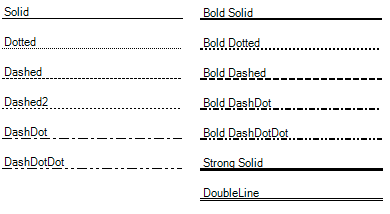
边框样式定义为 BorderLineStyle 枚举。
边框位置
边框必须围绕范围设置,即使范围只包含一个单元格。要指定边框位置,使用 BorderPositions 枚举及其按位组合值。
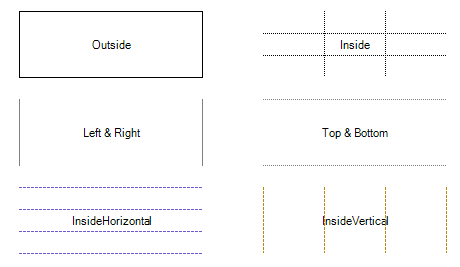
设置边框
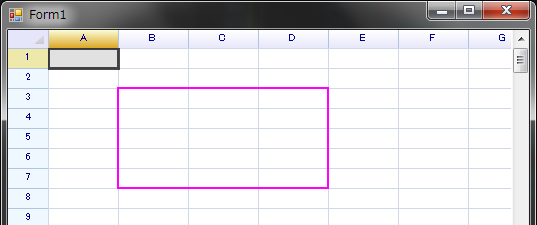
要在工作表中为特定范围应用边框,使用 SetRangeBorders 方法:
var sheet = reoGridControl.CurrentWorksheet;

// 使用自定义样式为指定范围的外侧应用边框
sheet.SetRangeBorders("B3:D7", BorderPositions.Outside,
  new RangeBorderStyle
  {
    Color = SolidColor.Magenta,
    Style = BorderLineStyle.BoldSolid,
  });
通过 Actions 设置边框
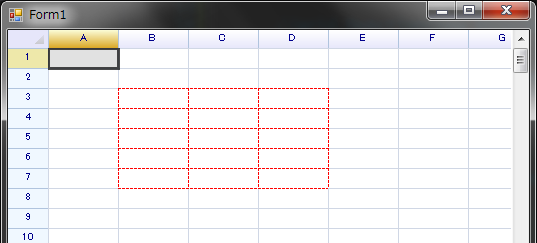
要通过操作在范围内应用边框(允许撤销),使用以下方法:
reoGridControl.DoAction(reoGridControl.CurrentWorksheet,
  new SetRangeBorderAction(new RangePosition(2, 1, 5, 3),
    BorderPositions.All,
    new RangeBorderStyle {
      Color = SolidColor.Red,
      Style = BorderLineStyle.Dashed
    })
);
获取边框信息
要获取工作表中特定范围的边框详细信息,使用 GetRangeBorders 方法:
// 获取指定范围的边框信息
RangeBorderInfoSet borderInfoSet = sheet.GetRangeBorders("A1:D5");
GetRangeBorders 方法分析指定范围内的边框并返回 RangeBorderInfoSet。该集合包含在整个范围内一致应用的边框样式实例。
要识别范围内具有不同样式的边框,请检查 RangeBorderInfoSet 的 NonUniformPos 属性。该属性标识边框样式与主要样式不同的位置。
遍历边框
要枚举指定范围内的所有边框,使用工作表的 IterateBorders 方法。
方法定义
IterateBorders(RowOrColumn direction, RangePosition range, Func<int, int, int, RangeBorderStyle, bool> iterator);参数
direction- 指定遍历模式:RowOrColumn.Row遍历所有水平边框。RowOrColumn.Column遍历所有垂直边框。RowOrColumn.Both遍历所有边框,包括行和列。
range:要遍历边框的目标范围。iterator:由用户代码提供的回调函数,用于检查从工作表中获取的所有边框。该函数接受以下参数:intRow:边框所在的行号。intColumn:边框所在的列号。intSpan:从此起始位置开始具有相同样式的连续边框数量。RangeBorderStyle- 包含边框的颜色和样式详细信息。bool返回值:返回true继续遍历;返回false终止遍历。
此方法允许在特定范围内对边框属性进行详细检查和操作,可以根据遍历过程中遇到的边框特征应用自定义逻辑。
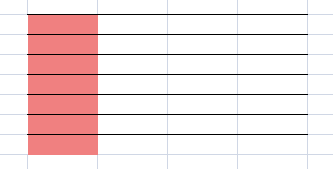
例如,遍历所有水平边框,如果单元格位置有边框则用红色背景标记单元格。
// 在指定范围内设置水平边框
worksheet.Ranges["C3:F10"].BorderInsideHorizontal = RangeBorderStyle.BlackSolid;

// 遍历整个工作表范围中的水平边框
worksheet.IterateBorders(RowOrColumn.Row, RangePosition.EntireRange, (r, c, span, border) =>
{
  // 为有边框的单元格应用红色背景
  worksheet.Cells[r, c].Style.BackColor = Color.LightCoral;

  return true; // 继续遍历
});
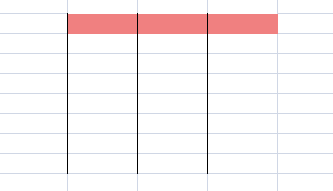
遍历所有垂直边框:
// 设置边框
worksheet.Ranges["C3:F10"].BorderInsideVertical = RangeBorderStyle.BlackSolid;

// 遍历边框
worksheet.IterateBorders(RowOrColumn.Column, RangePosition.EntireRange, (r, c, span, border) =>
{
  worksheet.Cells[r, c].Style.BackColor = Color.LightCoral;
  return true;
});
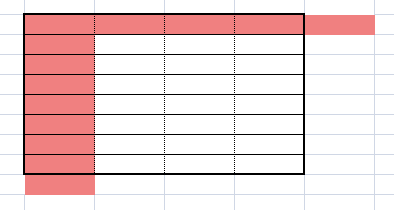
遍历所有边框,包括行和列边框:
// 设置边框
worksheet.Ranges["C3:F10"].BorderOutside = RangeBorderStyle.BlackBoldSolid;
worksheet.Ranges["C3:F10"].BorderInsideHorizontal = RangeBorderStyle.BlackSolid;
worksheet.Ranges["C3:F10"].BorderInsideVertical = RangeBorderStyle.BlackDotted;

// 遍历边框
worksheet.IterateBorders(RowOrColumn.Both, RangePosition.EntireRange, (r, c, span, border) =>
{
  worksheet.Cells[r, c].Style.BackColor = Color.LightCoral;
  return true;
});
移除边框
要从工作表中移除边框,使用 RemoveRangeBorders 方法:
// 从工作表中指定范围移除所有边框
sheet.RemoveRangeBorders(new RangePosition(2, 1, 5, 1), BorderPositions.All);
或者,将边框样式设置为 RangeBorderStyle.Empty 也可以移除边框:
// 将指定范围的边框样式设置为 'Empty' 以移除边框
sheet.SetRangeBorders(new RangePosition(2, 1, 5, 3), BorderPositions.All, RangeBorderStyle.Empty);
通过 Actions 移除边框
要移除边框并支持撤销操作,使用 DoAction 方法如下:
reoGridControl.DoAction(reoGridControl.CurrentWorksheet,
  new RemoveRangeBorderAction(new RangePosition(2, 1, 5, 1), ReoGridBorderPos.All));
可以通过调用 Undo 方法撤销此操作:
// 撤销边框移除操作
reoGridControl.Undo();