
创建并使用 WorksheetRangeStyle 对象将样式项传递给单元格或范围。在工作表上调用 SetRangeStyles 方法来应用样式对象。ReoGrid 使用名为 PlainStyleFlag 的枚举来决定应应用哪些样式。
命名空间
using unvell.ReoGrid;设置样式
有几种方式可以设置单元格或范围的样式:
- 调用工作表方法
- 使用 Cell 或 Range 实例
- 使用 Actions
调用工作表方法
sheet.SetRangeStyles("B1:E5", new WorksheetRangeStyle
{
    Flag = PlainStyleFlag.FillColor,
    BackColor = Color.SkyBlue,
});
SetRangeStyles 重载
| 签名 | 说明 |
|---|---|
SetRangeStyles(string addressOrName, WorksheetRangeStyle style) | 通过地址或命名范围设置样式 |
SetRangeStyles(int row, int col, int rows, int cols, WorksheetRangeStyle style) | 通过行/列/大小设置样式 |
SetRangeStyles(RangePosition range, WorksheetRangeStyle style) | 通过范围位置设置样式 |
使用 Cell 或 Range 实例
// Cell
var cell = sheet.Cells["B3"];
cell.Style.BackColor = Color.SkyBlue;

// Range
var range = sheet.Ranges["B1:C3"];
range.Style.BackColor = Color.LightYellow;
使用 Actions
使用 Action 设置样式以启用撤销、重做和重复操作。
sheet.DoAction(new SetRangeStyleAction("B1:E5", new WorksheetRangeStyle
{
    Flag = PlainStyleFlag.FillColor,
    BackColor = Color.SkyBlue,
}));
获取样式
调用工作表方法
// 从单个单元格获取样式
WorksheetRangeStyle style = sheet.GetCellStyle("B3");
WorksheetRangeStyle style = sheet.GetCellStyle(new CellPosition("B3"));
WorksheetRangeStyle style = sheet.GetCellStyle(2, 1);
使用 Cell 或 Range 实例
// Cell
var backColor = sheet.Cells["B3"].Style.BackColor;

// Range
var backColor = sheet.Ranges["B1:C3"].Style.BackColor;
WorksheetRangeStyle
WorksheetRangeStyle 类持有要应用的样式属性。Flag 属性决定包含哪些样式项。
属性
| 属性 | PlainStyleFlag 值 | 类型 | 说明 |
|---|---|---|---|
Flag | — | PlainStyleFlag | 决定此对象中包含哪些样式 |
BackColor | BackColor | SolidColor | 背景色 |
FillPatternColor | FillPatternColor | SolidColor | 背景图案颜色(仅 WinForms) |
FillPatternStyle | FillPatternStyle | HatchStyles | 背景图案样式(仅 WinForms) |
TextColor | TextColor | SolidColor | 文本颜色(默认:黑色) |
FontName | FontName | string | 字体名称 |
FontSize | FontSize | float | 字体大小(默认:10) |
Bold | FontStyleBold | bool | 粗体 |
Italic | FontStyleItalic | bool | 斜体 |
Strikethrough | FontStyleStrikethrough | bool | 删除线 |
Underline | FontStyleUnderline | bool | 下划线 |
HAlign | HorizontalAlign | ReoGridHorAlign | 水平对齐 |
VAlign | VerticalAlign | ReoGridVerAlign | 垂直对齐 |
TextWrapMode | TextWrap | TextWrapMode | 文本换行模式 |
Indent | Indent | ushort | 文本缩进(0–65535) |
Padding | Padding | PaddingValue | 单元格内边距 |
RotationAngle | RotationAngle | float | 文本旋转角度(-90° 到 90°) |
方法
| 方法 | 说明 |
|---|---|
WorksheetRangeStyle() | 创建空的样式集 |
WorksheetRangeStyle(WorksheetRangeStyle source) | 复制构造函数 |
Clone(WorksheetRangeStyle source) | 静态方法:克隆样式对象 |
CopyFrom(WorksheetRangeStyle source) | 从另一个对象复制样式 |
HasStyle(PlainStyleFlag flag) | 检查是否存在所有指定的标志 |
HasAny(PlainStyleFlag flag) | 检查是否存在任一指定的标志 |
注意: 始终设置
Flag属性 — 它决定哪些样式项将被应用。未设置对应标志的样式属性将被忽略。
PlainStyleFlag
PlainStyleFlag 枚举(long 类型,标志位)指定要应用或移除的样式项。
单项标志
| 值 | 十六进制 | 说明 |
|---|---|---|
None | 0x0 | 无样式 |
FontName | 0x1 | 字体名称 |
FontSize | 0x2 | 字体大小 |
FontStyleBold | 0x4 | 粗体 |
FontStyleItalic | 0x8 | 斜体 |
FontStyleStrikethrough | 0x10 | 删除线 |
FontStyleUnderline | 0x20 | 下划线 |
TextColor | 0x40 | 文本颜色 |
BackColor | 0x80 | 背景色 |
HorizontalAlign | 0x2000 | 水平对齐 |
VerticalAlign | 0x4000 | 垂直对齐 |
FillPatternColor | 0x80000 | 背景图案颜色 |
FillPatternStyle | 0x100000 | 背景图案样式 |
TextWrap | 0x200000 | 文本换行模式 |
Indent | 0x400000 | 缩进 |
Padding | 0x800000 | 内边距 |
RotationAngle | 0x1000000 | 文本旋转角度 |
组合标志
| 值 | 组合 |
|---|---|
FontStyleAll | FontStyleBold | FontStyleItalic | FontStyleStrikethrough | FontStyleUnderline |
FontAll | FontName | FontSize | FontStyleAll |
AlignAll | HorizontalAlign | VerticalAlign |
FillPattern | FillPatternColor | FillPatternStyle |
BackAll | BackColor | FillPattern |
LayoutAll | TextWrap | Padding | RotationAngle |
All | FontAll | TextColor | BackAll | AlignAll | LayoutAll |
对齐枚举
ReoGridHorAlign
| 值 | 说明 |
|---|---|
General | 自动对齐(数字右对齐,文本左对齐) |
Left | 左对齐 |
Center | 居中 |
Right | 右对齐 |
ReoGridVerAlign
| 值 | 说明 |
|---|---|
General | 默认对齐 |
Top | 顶部对齐 |
Middle | 居中对齐 |
Bottom | 底部对齐 |
TextWrapMode
| 值 | 说明 |
|---|---|
NoWrap | 不换行(默认) |
WordBreak | 正常单词换行 |
BreakAll | 在任意字符处换行 |
背景色
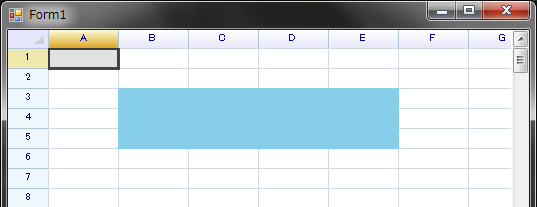
设置范围 B1:E5 的背景色:
sheet.SetRangeStyles("B1:E5", new WorksheetRangeStyle
{
    Flag = PlainStyleFlag.FillColor,
    BackColor = Color.SkyBlue,
});
背景图案颜色
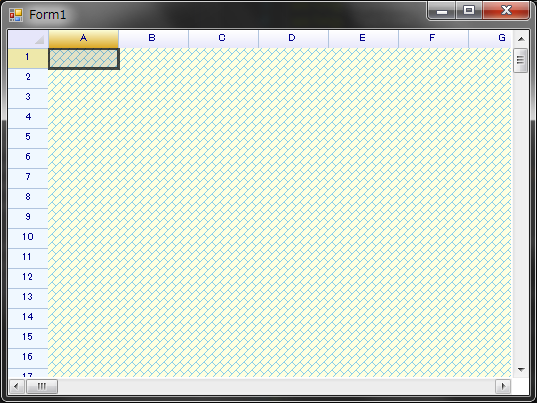
设置整个网格的背景图案颜色(仅 WinForms):
sheet.SetRangeStyles(RangePosition.EntireRange,
    new WorksheetRangeStyle
    {
        Flag = PlainStyleFlag.FillPattern | PlainStyleFlag.FillColor,
        BackColor = Color.LightYellow,
        FillPatternColor = Color.SkyBlue,
        FillPatternStyle = System.Drawing.Drawing2D.HatchStyle.DiagonalBrick,
    });
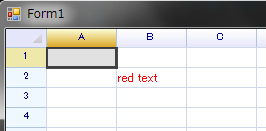
文本颜色
sheet.SetRangeStyles("B2:B2", new WorksheetRangeStyle
{
    Flag = PlainStyleFlag.TextColor,
    TextColor = Color.Red,
});
文本对齐
文本对齐可以在水平和垂直两个方向上指定。
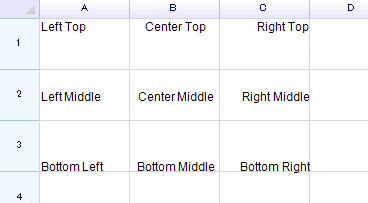
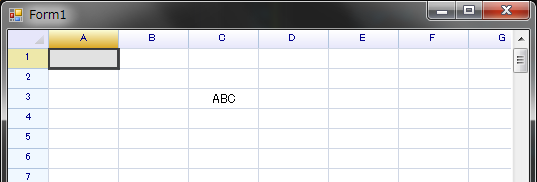
将单元格的水平文本对齐设置为 Center:
sheet.SetRangeStyles("A1:C3", new WorksheetRangeStyle
{
    Flag = PlainStyleFlag.HorizontalAlign,
    HAlign = ReoGridHorAlign.Center,
});
文本换行
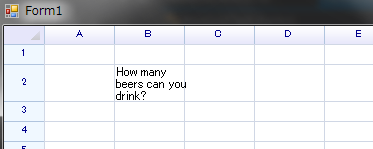
将文本换行模式设置为 WordBreak(默认为 NoWrap):
sheet[1, 1] = "How many beers can you drink?";
sheet.SetRangeStyles("B2:B2", new WorksheetRangeStyle
{
    Flag = PlainStyleFlag.TextWrap,
    TextWrapMode = TextWrapMode.WordBreak,
});
文本旋转
设置 RotationAngle 属性以旋转单元格内的文本(-90° 到 90°):
var cell = sheet.Cells["A1"];
cell.Data = "Hello World";
cell.Style.RotationAngle = 90;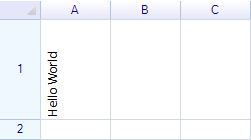
字体
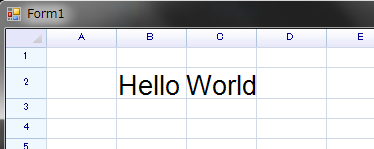
更改字体名称和大小:
sheet.SetRangeStyles("B2:B2", new WorksheetRangeStyle
{
    Flag = PlainStyleFlag.FontSize | PlainStyleFlag.FontName,
    FontName = "Arial",
    FontSize = 20,
});
更改字体样式:
// 使用 SetRangeStyles
sheet.SetRangeStyles("B2", new WorksheetRangeStyle
{
    Flag = PlainStyleFlag.FontStyleBold,
    Bold = true,
});

sheet.SetRangeStyles("C2", new WorksheetRangeStyle
{
    Flag = PlainStyleFlag.FontStyleItalic,
    Italic = true,
});

// 使用单元格实例
sheet.Cells["B3"].Style.Underline = true;
sheet.Cells["C3"].Style.Strikethrough = true;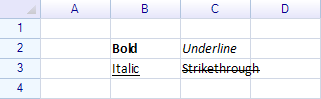
一次设置多个样式
使用按位或运算符组合多个 PlainStyleFlag 值,以在一次调用中设置多个样式:
sheet.SetRangeStyles("A1:D4", new WorksheetRangeStyle
{
    Flag = PlainStyleFlag.FillColor | PlainStyleFlag.TextColor
         | PlainStyleFlag.FontStyleBold | PlainStyleFlag.HorizontalAlign,
    BackColor = Color.LightYellow,
    TextColor = Color.DarkBlue,
    Bold = true,
    HAlign = ReoGridHorAlign.Center,
});
移除样式
始终从范围中移除样式,即使是单个单元格也是如此。
使用工作表方法
指定 PlainStyleFlag 来决定应移除哪些样式:
sheet.RemoveRangeStyles(new RangePosition(2, 2, 3, 3), PlainStyleFlag.BackAll);RemoveRangeStyles 重载
| 签名 | 说明 |
|---|---|
RemoveRangeStyles(string addressOrName, PlainStyleFlag flags) | 通过地址或命名范围移除 |
RemoveRangeStyles(RangePosition range, PlainStyleFlag flags) | 通过范围位置移除 |
使用 Actions
sheet.DoAction(new RemoveRangeStyleAction(new RangePosition(2, 2, 3, 3), PlainStyleFlag.BackAll));根样式
工作表上的 RootStyle 属性定义所有单元格的默认样式:
sheet.RootStyle.FontName = "Consolas";
sheet.RootStyle.FontSize = 12;
交替行样式
应用交替行颜色以提高可读性:
sheet.AlternateNormalRowColor = SolidColor.White;
sheet.AlternateAccentRowColor = new SolidColor(240, 240, 250);
sheet.AlternateRowRange = new RangePosition("A1:F100");
sheet.AlternateRowStyleMode = AlternateRowStyleMode.ByVisibleRow;
AlternateRowStyleMode
| 值 | 说明 |
|---|---|
None | 无交替行样式 |
ByVisibleRow | 按可见行交替(跳过隐藏行) |
ByPhysicalRow | 按物理行索引交替 |
事件
| 事件 | EventArgs | 说明 |
|---|---|---|
RangeStyleChanged | RangeEventArgs | 当范围上的样式被更改时触发 |
ReferenceCellStyle
ReferenceCellStyle 类由 cell.Style 返回。在此对象上设置属性会自动将样式应用到单元格并设置正确的标志。
| 属性 | 类型 | 说明 |
|---|---|---|
BackColor | SolidColor | 背景色 |
TextColor | SolidColor | 文本颜色 |
FontName | string | 字体名称 |
FontSize | float | 字体大小 |
Bold | bool | 粗体 |
Italic | bool | 斜体 |
Strikethrough | bool | 删除线 |
Underline | bool | 下划线 |
HAlign | ReoGridHorAlign | 水平对齐 |
VAlign | ReoGridVerAlign | 垂直对齐 |
TextWrap | TextWrapMode | 文本换行模式 |
Indent | ushort | 文本缩进 |
Padding | PaddingValue | 单元格内边距 |
RotationAngle | float | 文本旋转角度 |
ReferenceRangeStyle
ReferenceRangeStyle 类由 range.Style 返回。设置属性会将样式应用到整个范围。
| 属性 | 类型 | 说明 |
|---|---|---|
BackColor | SolidColor | 背景色 |
TextColor | SolidColor | 文本颜色 |
FontName | string | 字体名称 |
FontSize | float | 字体大小 |
Bold | bool | 粗体 |
Italic | bool | 斜体 |
Underline | bool | 下划线 |
Strikethrough | bool | 删除线 |
HorizontalAlign | ReoGridHorAlign | 水平对齐 |
VerticalAlign | ReoGridVerAlign | 垂直对齐 |
TextWrap | TextWrapMode | 文本换行模式 |
Padding | PaddingValue | 单元格内边距 |
Indent | ushort | 文本缩进 |