
ReoGrid 提供了名为 IterateCells 的方法,用于遍历所有有效单元格。ReoGrid 使用分页索引的二维数组来管理内存中的所有单元格。IterateCells 方法可以跳过空单元格、空索引页和合并单元格,以获得更好的性能。
定义:
public void IterateCells(string addressOrName, Func<int, int, ReoGridCell, bool> iterator);
public void IterateCells(RangePosition range, Func<int, int, ReoGridCell, bool> iterator);
public void IterateCells(int row, int col, int rows, int cols, Func<int, int, ReoGridCell, bool> iterator);
用法(C#):
sheet.IterateCells(range, (row, col, cell) =>
{
  // 返回 true 继续遍历,返回 false 中止遍历
  return true;
});
用法(VB.NET):
sheet.IterateCells(range, Function(row, col, cell)
  ' 返回 true 继续遍历,返回 false 中止遍历
  Return True
End Function)
跳过条件
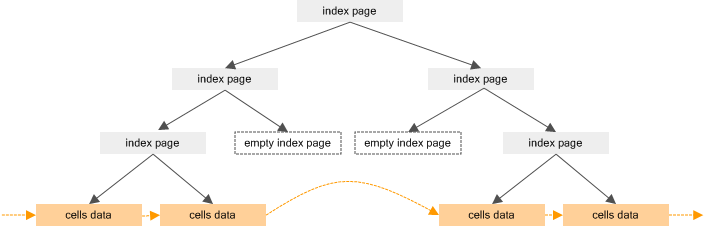
IterateCells 方法会跳过以下对象:
- 空单元格 - 没有数据且没有自定义样式的单元格在遍历时将被跳过。
- 空索引页 - 没有附加单元格的索引页在遍历时将被跳过。
- 无效单元格 - 被合并到其他单元格中的单元格变为无效,此方法会跳过它们。
示例
一个对指定范围内的值求和的示例(sum 函数的后台代码):
public static double Sum(Worksheet sheet, RangePosition range)
{
  double val = 0;

  sheet.IterateCells(range, (row, col, cell) =>
  {
    if (ScriptRunningMachine.IsNumber(cell.Data))
    {
      val += ScriptRunningMachine.GetDoubleValue(cell.Data);
    }
    return true;
  });

  return val;
}