ReoGridの範囲は、開始位置とサイズによって定義されます。範囲は1つ以上のセルを含みます。範囲は交差することがあり、範囲は結合セルとは異なります(ただし、範囲を結合することは可能です)。
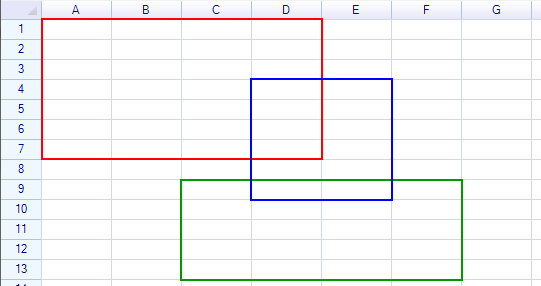
ReoGridは2つの主要な型で範囲を表現します:
- RangePosition — 位置とサイズを保持する軽量な構造体。特定のワークシートには紐づきません。
- ReferenceRange — 特定のワークシートにバインドされたクラスで、データ、スタイル、操作への直接アクセスを提供します。
RangePosition
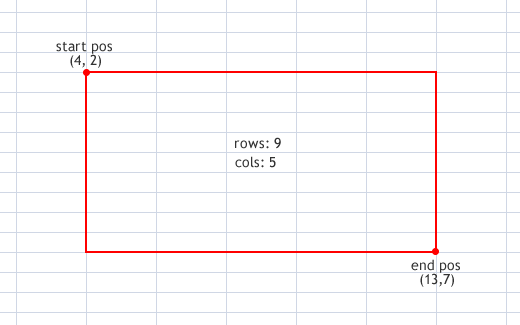
RangePosition 構造体は、範囲を識別するための数値情報(開始行、開始列、行数、列数)を格納します。すべてのインデックスはゼロベースです。
// From an address string
var range = new RangePosition("C5:H14");

// From row, column, rows, columns
var range = new RangePosition(4, 2, 10, 6);

// From start and end positions
var range = new RangePosition(new CellPosition("C5"), new CellPosition("H14"));

// From two address strings
var range = new RangePosition("C5", "H14");

// Single cell
var range = new RangePosition(new CellPosition("A1"));
プロパティ
| プロパティ | 型 | 説明 |
|---|---|---|
Row | int | 開始行インデックス |
Col | int | 開始列インデックス |
Rows | int | 行数 |
Cols | int | 列数 |
EndRow | int | 終了行インデックス |
EndCol | int | 終了列インデックス |
StartPos | CellPosition | 開始位置 |
EndPos | CellPosition | 終了位置 |
IsEmpty | bool | 行数または列数がゼロかどうか |
IsEntire | bool | 範囲が行と列全体をカバーしているか |
IsSingleCell | bool | 範囲が正確に1つのセルを含むか |
メソッド
| メソッド | 戻り値 | 説明 |
|---|---|---|
Contains(CellPosition pos) | bool | セル位置が範囲内にあるか確認 |
Contains(int row, int col) | bool | 行/列が範囲内にあるか確認 |
Contains(RangePosition range) | bool | 別の範囲が完全に含まれているか確認 |
ContainsRow(int row) | bool | 行が範囲内にあるか確認 |
ContainsColumn(int col) | bool | 列が範囲内にあるか確認 |
IntersectWith(RangePosition range) | bool | 2つの範囲が重なるか確認 |
Offset(int rows, int cols) | RangePosition | 行と列でオフセットした新しい範囲を作成 |
Offset(CellPosition pos) | RangePosition | セル位置でオフセットした新しい範囲を作成 |
ToAddress() | string | アドレス文字列に変換(例:"A1:B10") |
ToAbsoluteAddress() | string | 絶対アドレスに変換(例:"$A$1:$B$10") |
ToRelativeAddress() | string | 相対アドレスに変換 |
SetRows(int rows) | void | 行数を設定 |
SetCols(int cols) | void | 列数を設定 |
静的メンバー
| メンバー | 説明 |
|---|---|
RangePosition.Empty | 空の範囲 (0, 0, 0, 0) |
RangePosition.EntireRange | ワークシート全体の範囲 |
RangePosition.IsValidAddress(string) | 文字列が有効な範囲アドレスかどうかを確認 |
RangePosition.Union(range1, range2) | 両方の範囲を含む最小の範囲を取得 |
RangePosition.FromCellPosition(startRow, startCol, endRow, endCol) | セル座標から作成 |
安全な範囲の取得
範囲がワークシートの境界を超える可能性がある場合は、FixRange を使用します:
var safeRange = sheet.FixRange(range);
ReferenceRange
ReferenceRange は特定のワークシートにバインドされており、その範囲のデータ、スタイル、罫線、書式、操作への直接アクセスを提供します。
ReferenceRangeの取得
ワークシートの Ranges コレクションを使用します:
var range = sheet.Ranges["B2:D3"];
var range = sheet.Ranges[1, 1, 2, 3];         // row, col, rows, cols
var range = sheet.Ranges[new RangePosition(1, 1, 2, 3)];
var range = sheet.Ranges[new CellPosition("B2"), new CellPosition("D3")];
プロパティ
位置
| プロパティ | 型 | 説明 |
|---|---|---|
Position | RangePosition | ワークシート上の範囲位置 |
Worksheet | Worksheet | 親ワークシート |
Row | int | 開始行インデックス |
Column | int | 開始列インデックス |
Rows | int | 行数 |
Cols | int | 列数 |
EndRow | int | 終了行インデックス |
EndColumn | int | 終了列インデックス |
StartPos | CellPosition | 開始位置 |
EndPos | CellPosition | 終了位置 |
データとコンテンツ
| プロパティ | 型 | 説明 |
|---|---|---|
Data | object | 範囲全体のデータを取得または設定 |
Cells | CellCollection | 範囲内のセルインスタンスのコレクション |
// Set range data
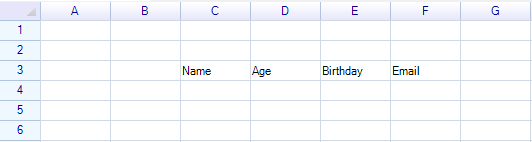
range.Data = new object[] { "Product", "Price", "Quantity" };
スタイル
| プロパティ | 型 | 説明 |
|---|---|---|
Style | ReferenceRangeStyle | 範囲のスタイルアクセス |
Border | RangeBorderProperty | 罫線プロパティのラッパー |
range.Style.BackColor = Color.LightBlue;
range.Style.Bold = true;
罫線のショートカット
| プロパティ | 型 | 説明 |
|---|---|---|
BorderOutside | RangeBorderStyle | 外側の罫線 |
BorderAll | RangeBorderStyle | すべての罫線(外側+内側) |
BorderLeft | RangeBorderStyle | 左罫線 |
BorderTop | RangeBorderStyle | 上罫線 |
BorderRight | RangeBorderStyle | 右罫線 |
BorderBottom | RangeBorderStyle | 下罫線 |
BorderInsideAll | RangeBorderStyle | すべての内側の罫線 |
BorderInsideHorizontal | RangeBorderStyle | 内側の水平罫線 |
BorderInsideVertical | RangeBorderStyle | 内側の垂直罫線 |
range.BorderOutside = RangeBorderStyle.BlackSolid;
range.Border.Outside = RangeBorderStyle.BlackSolid;  // equivalent
データ書式
| プロパティ | 型 | 説明 |
|---|---|---|
DataFormat | CellDataFormatFlag | 範囲内のすべてのセルのデータ書式タイプ |
DataFormatArgs | object | 書式引数 |
CustomDataFormatter | IDataFormatter | カスタムフォーマッター |
保護
| プロパティ | 型 | 説明 |
|---|---|---|
IsReadonly | bool | 範囲内のすべてのセルを読み取り専用に設定 |
IsLocked | CellLock | 範囲内のすべてのセルのロック状態(設定のみ) |
IsMergedCell | bool | 範囲が単一の結合セルかどうか(読み取り専用) |
バリデーション
| プロパティ | 型 | 説明 |
|---|---|---|
Validator | IValidator | 範囲の入力検証ルール |
メソッド
| メソッド | 説明 |
|---|---|
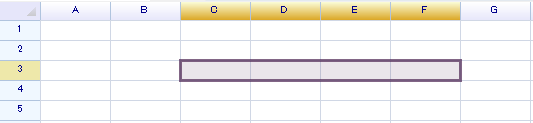
Select() | ワークシート上でこの範囲を選択 |
Merge() | 範囲を単一のセルに結合 |
Unmerge() | 範囲の結合を解除 |
GroupRows() | 範囲内のすべての行をグループ化 |
GroupColumns() | 範囲内のすべての列をグループ化 |
UngroupRows() | 範囲内のすべての行のグループ化を解除 |
UngroupColumns() | 範囲内のすべての列のグループ化を解除 |
Contains(CellPosition pos) | セルが範囲内にあるか確認 |
Contains(RangePosition range) | 範囲が完全に含まれているか確認 |
Contains(ReferenceRange range) | 別の参照範囲が含まれているか確認 |
IntersectWith(RangePosition range) | 2つの範囲が重なるか確認 |
IntersectWith(ReferenceRange range) | 2つの参照範囲が重なるか確認 |
ToAddress() | アドレス文字列に変換 |
ToAbsoluteAddress() | 絶対アドレス文字列に変換 |
IterateCells(iterator) | 範囲内のすべてのセルを反復処理 |
セルの反復処理
var range = sheet.Ranges["A1:C3"];

range.IterateCells((row, col, cell) =>
{
    Console.WriteLine($"Cell [{row},{col}]: {cell?.Data}");
    return true;  // continue iterating
});
型の変換
// RangePosition → ReferenceRange
var refRange = sheet.Ranges[rangePosition];

// ReferenceRange → RangePosition
RangePosition pos = refRange.Position;

// Implicit conversion (ReferenceRange to RangePosition)
RangePosition pos = refRange;

// Both work in assignments
sheet.SelectionRange = rangePosition;
sheet.SelectionRange = refRange;
範囲のコンテンツをクリア
ClearRangeContent を使用して、範囲から選択的に要素をクリアします:
// Clear only data
sheet.ClearRangeContent("A1:B5", CellElementFlag.Data);

// Clear only formulas
sheet.ClearRangeContent("A1:B5", CellElementFlag.Formula);

// Clear everything
sheet.ClearRangeContent("A1:B5", CellElementFlag.All);
CellElementFlag列挙型(フラグ)
| 値 | 説明 |
|---|---|
Data | セルデータ値 |
Formula | セルの数式 |
Body | セルボディ(ボタン、チェックボックスなど) |
DataFormat | データ書式設定 |
Style | セルスタイル |
Border | セルの罫線 |
All | 上記すべて |
使用範囲
データを含む範囲を取得します:
RangePosition usedRange = sheet.UsedRange;
名前付き範囲
名前付き範囲は、名前が付けられた特別な ReferenceRange インスタンスです。名前付き範囲を参照してください。