セルはワークシート内の基本単位です。各セルはデータ、数式、スタイル、カスタムレンダリングボディ、データ検証ルールを保持できます。
主な機能
- データ格納 — テキスト、数値、日付、ブール値、カスタムオブジェクトなどを保持
- スタイル — フォント、色、罫線、配置、パディング、回転を適用
- データ書式 — 通貨、日付、パーセントなどの表示形式
- 数式 — Excel互換の数式で値を計算
- カスタマイズ — カスタムセルボディ(ドロップダウン、ボタン、チェックボックス)をホスト
- データ検証 — ユーザー入力の検証
- 結合 — セルを結合して大きなセルに
- 保護 — セルをロックして編集を防止
セルの参照
セルは3つの方法で参照できます。
// By address string
sheet["D5"] = "hello";

// By row and column index (zero-based)
sheet[4, 3] = "hello";

// By CellPosition structure
var pos = new CellPosition("D5");  // or new CellPosition(4, 3)
sheet[pos] = "hello";
CellPosition構造体
// Create from address
var pos = new CellPosition("D5");

// Create from indices
var pos = new CellPosition(4, 3);  // row: 4, col: 3

// Convert to address string
string address = pos.ToAddress();  // "D5"

// Validate an address
CellPosition.IsValidAddress("D5");       // true
CellPosition.IsValidAddress("A1:D5");    // false (this is a range)
CellPosition.IsValidAddress("myrange");  // false (but sheet["myrange"] works for named ranges)
セルインスタンス
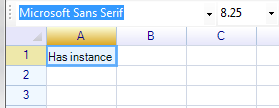
ReoGridはセルインスタンスをオンデマンドで作成します。データ、スタイル、その他のプロパティが設定されたときにのみ作成されます。これにより、大きなワークシートでのメモリ使用量を節約できます。
セルインスタンスの取得
// Always creates an instance if it doesn't exist
var cell = sheet.Cells["A1"];
var cell = sheet.Cells[1, 2];
var cell = sheet.Cells[new CellPosition("C2")];
var cell = sheet.Cells["myNamedRange"];  // First cell in named range
注意:
Cells[...]へのアクセスは、セルインスタンスが存在しない場合に新しいインスタンスを作成します。このコレクションを使用してすべてのセルを反復処理することは避けてください。多くの空のインスタンスが作成され、メモリを消費します。
作成せずに取得
// Returns null if the cell doesn't exist
var cell = sheet.GetCell("A1");
var cell = sheet.GetCell(0, 0);
var cell = sheet.GetCell(new CellPosition("A1"));

if (cell != null)
{
    // Process existing cell
}
作成して取得
// Creates if needed (same behavior as Cells[...])
var cell = sheet.CreateAndGetCell("A1");
var cell = sheet.CreateAndGetCell(0, 0);
var cell = sheet.CreateAndGetCell(new CellPosition("A1"));
結合セルの取得
セルが結合範囲の一部である場合、結合範囲の左上のセルを取得します。
var mergedCell = sheet.GetMergedCellOfRange("B3");
var mergedCell = sheet.GetMergedCellOfRange(new CellPosition(2, 1));
var mergedCell = sheet.GetMergedCellOfRange(2, 1);
var mergedCell = sheet.GetMergedCellOfRange(cell);
セルのプロパティ
コアプロパティ
| プロパティ | 型 | 説明 |
|---|---|---|
Data | object | セルの値(テキスト、数値、日付、カスタムオブジェクト) |
Formula | string | 数式(例: "=A1+B1") |
HasFormula | bool | セルに数式があるかどうか(読み取り専用) |
FormulaStatus | FormulaStatus | 数式の評価状態(読み取り専用) |
DisplayText | string | セルに表示されるレンダリングテキスト(読み取り専用) |
Style | ReferenceCellStyle | 外観を設定するためのスタイルオブジェクト |
CalcedStyle | WorksheetRangeStyle | 完全に解決された計算済みスタイル(読み取り専用) |
Body | ICellBody | カスタムセルボディ(ボタン、チェックボックスなど) |
位置プロパティ
| プロパティ | 型 | 説明 |
|---|---|---|
Row | int | ゼロベースの行インデックス(読み取り専用) |
Column | int | ゼロベースの列インデックス(読み取り専用) |
Position | CellPosition | 構造体としてのセル位置(読み取り専用) |
Address | string | "A1"のようなセルアドレス文字列(読み取り専用) |
PositionAsRange | RangePosition | 1x1範囲としてのセル位置(読み取り専用) |
RangePosition | RangePosition | 結合領域を含む範囲(該当する場合)(読み取り専用) |
Worksheet | Worksheet | 親ワークシート(読み取り専用) |
結合プロパティ
| プロパティ | 型 | 説明 |
|---|---|---|
IsMergedCell | bool | このセルが結合範囲の開始点かどうか |
IsValidCell | bool | セルが有効かどうか(結合によって消費されていない) |
InsideMergedRange | bool | セルが結合範囲内にあるかどうか |
GetRowspan() | short | このセルがまたがる行数 |
GetColspan() | short | このセルがまたがる列数 |
データ書式プロパティ
| プロパティ | 型 | 説明 |
|---|---|---|
DataFormat | CellDataFormatFlag | データ書式タイプ(Number、Currency、Dateなど) |
DataFormatArgs | object | 書式固有の引数 |
CustomDataFormatter | IDataFormatter | カスタムデータフォーマッター実装 |
保護プロパティ
| プロパティ | 型 | 説明 |
|---|---|---|
IsLocked | CellLock | ロック状態: Locked、Unlocked、または Inherit |
IsReadOnly | bool | セルが読み取り専用かどうか |
IsVisible | bool | セルが表示されているかどうか(非表示の行/列にない) |
その他のプロパティ
| プロパティ | 型 | 説明 |
|---|---|---|
Tag | object | ユーザー定義データストレージ |
DataInputUnit | int | データ入力ユニット識別子 |
Validator | IValidator | データ検証ルール |
HighlightColor | SolidColor? | セルのハイライト色 |
Border | CellBorderProperty | 罫線プロパティ(読み取り専用) |
ConditionalStyles | List<WorksheetRangeStyle> | 適用された条件付きスタイル(読み取り専用) |
セルメソッド
| メソッド | 戻り値 | 説明 |
|---|---|---|
GetData<T>() | T | セルデータを型Tにキャストして取得 |
SetDataFormat(format, args) | void | データ書式と引数を設定 |
BindStyle(style) | void | スタイルオブジェクトをセルにバインド |
StartEdit() | void | このセルの編集モードに入る |
EndEdit(data) | void | 編集モードを終了し、オプションでデータを設定 |
ExpandRowHeight() | void | このセルの内容に合わせて行の高さを拡張 |
ExpandColumnWidth() | void | このセルの内容に合わせて列の幅を拡張 |
Clone() | Cell | このセルのコピーを作成 |
GetBounds() | Rectangle | このセルの境界矩形を取得 |
セルデータ
単一セルのデータ設定
// By address
sheet["A1"] = 10;

// By index
sheet[0, 0] = 10;            // number
sheet[0, 1] = "text";        // string
sheet[0, 2] = DateTime.Now;  // datetime
sheet[0, 3] = true;          // boolean

// By CellPosition
sheet[new CellPosition("A1")] = 10;

// By named range
sheet.DefineNamedRange("mycell", new RangePosition("A1"));
sheet["mycell"] = 10.12345d;

// By method call
sheet.SetCellData(5, 2, "hello world");

// Custom data type
public class MyData {
    public override string ToString() { return "custom display"; }
}
sheet["D1"] = new MyData();
範囲データの設定
// Horizontal fill within range
sheet["A1:C1"] = new object[] { "A", "B", "C" };

// Vertical fill
sheet["A1:A3"] = new object[] { 10, 11, 12 };

// Two-dimensional array
sheet[1, 1] = new object[,] { { "a", "b", "c" }, { 1, 2, 3 } };

// Using method
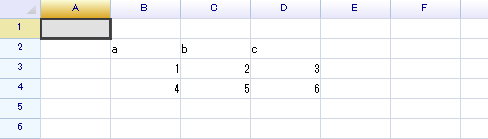
sheet.SetRangeData(new RangePosition(1, 1, 3, 3),
    new object[,] { { "a", "b", "c" }, { 1, 2, 3 }, { 4, 5, 6 } });
セルデータの取得
// Get raw data (object)
object value = sheet["A1"];

// Get typed data from a cell instance
int intValue = sheet.Cells["A1"].GetData<int>();
string textValue = sheet.Cells["A1"].GetData<string>();
元に戻す機能付きのデータ設定
sheet.DoAction(new SetCellDataAction("B5", "hello world"));

// Undo
grid.Undo();

// Redo
grid.Redo();
自動データ書式
ReoGridは入力時にデータ型を自動的に検出し、適切な書式(数値の配置、日付書式など)を適用します。
自動書式の無効化
sheet.SetSettings(WorksheetSettings.Edit_AutoFormatCell, false);
自動データ型変換
数値書式のセルに文字列データが入力されると、自動的に変換されます。
sheet[3, 1] = "10"; // Converted to numeric 10
元の文字列型を保持するには、セルの書式を Text に設定します。
sheet.SetRangeDataFormat(3, 2, 1, 1, CellDataFormatFlag.Text, null);
sheet[3, 2] = "10";  // Preserved as string "10"
詳細はデータ書式を参照してください。
セルの有効性と表示
// Check if a position is valid
bool valid = sheet.IsValidCell("A1");
bool valid = sheet.IsValidCell(0, 0);

// Check if a cell is a merged cell
bool merged = sheet.IsMergedCell("B3");
bool merged = sheet.IsMergedCell(new RangePosition(1, 1, 2, 2));

// Check if a cell is visible
bool visible = sheet.IsCellVisible(3, 2);
bool visibleToUser = sheet.IsCellVisibleToUser(3, 2);

// Via cell instance
var cell = sheet.Cells["A1"];
bool isVisible = cell.IsVisible;
使用範囲とコンテンツ境界
// Get the range that contains data
RangePosition usedRange = sheet.UsedRange;

// Get maximum row/column with content
int maxRow = sheet.MaxContentRow;
int maxCol = sheet.MaxContentCol;
テキストのオーバーフロー
デフォルトでは、セルのテキストは隣接する空のセルにオーバーフローできます。
// Disable text overflow
sheet.DisableSettings(WorksheetSettings.View_AllowCellTextOverflow);

// Re-enable
sheet.EnableSettings(WorksheetSettings.View_AllowCellTextOverflow);