
Derive from CellTypeDescriptor to build your own cell type. Drawing goes through
IGridGraphics, so the same code runs on WinForms, WPF, Avalonia and PDF.
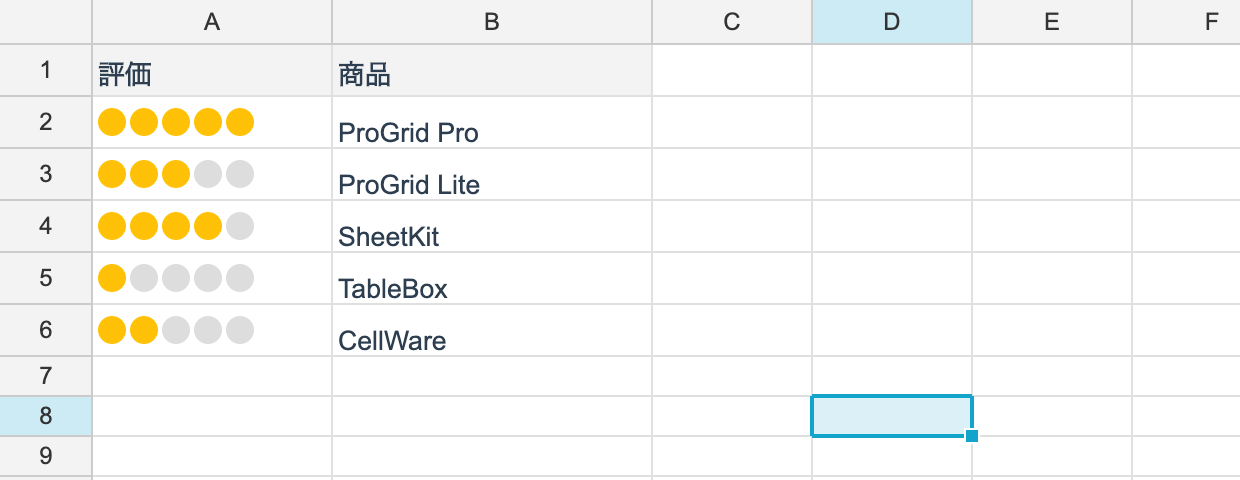
Implementing one
using unvell.ReoGrid.Core;
using unvell.ReoGrid.Core.CellTypes;
using unvell.ReoGrid.Core.Data;

/// <summary>A cell type that shows the value as five dots.</summary>
public sealed class RatingCellType : CellTypeDescriptor
{
	private readonly uint _color;

	public RatingCellType(uint color = 0xFFFFC107) => _color = color;

	public override string TypeName => "rating";

	// we draw dots, so don't draw the cell text
	public override bool ReplacesText => true;

	// no free typing; a click changes the value
	public override bool AllowsTextEditing => false;

	public override bool Paint(in CellTypePaintContext ctx)
	{
		int filled = (int)Math.Clamp(ctx.Value.AsNumber, 0, 5);
		double size = Math.Min(ctx.Height - 4, 14);
		double y = ctx.Y + (ctx.Height - size) / 2;

		for (int i = 0; i < 5; i++)
		{
			double x = ctx.X + 3 + i * (size + 2);
			uint color = i < filled ? _color : 0xFFDDDDDD;
			ctx.Graphics.FillEllipse(x, y, size, size, color);
		}

		return true;   // we painted it, so the default is not needed
	}

	public override CellTypeClickResult OnClick(in CellTypeClickContext ctx)
	{
		int star = (int)(ctx.LocalX / 16) + 1;
		return CellTypeClickResult.SetValue(CellValue.Number(Math.Clamp(star, 0, 5)));
	}

	// settings that round-trip through reogrid-json
	public override void WriteConfig(IDictionary<string, object?> config)
		=> config["color"] = _color;
}
Members you can override
| Member | Default | What it does |
|---|---|---|
TypeName | (required) | The type name used when saving; the registry key |
ReplacesText | true | Skip drawing the cell’s text |
AllowsTextEditing | true | Whether the cell editor may be opened on it |
Paint(ctx) | false | Drawing. Returning true skips the default |
OnClick(ctx) | Unhandled | What a click does |
OnActivate(ctx) | Unhandled | What activation (Enter, F2) does |
HitRegion(...) | 0 | Which hover region the pointer is in (for several hit areas) |
WriteConfig(config) | does nothing | The settings to save |
The paint context
What CellTypePaintContext carries.
| Property | What it is |
|---|---|
Graphics | IGridGraphics, the drawing target |
Row / Col | The cell position |
X / Y / Width / Height | The cell rectangle in logical pixels |
Style | The effective style |
Value | The cell value (CellValue) |
Text | The display string after formatting |
TextColor | The text color |
HoverRegion | The region number HitRegion returned |
MakeTextStyle(h, v) builds text-drawing settings from the cell’s style.
What a click returns
OnClick / OnActivate return an abstract result. The core knows nothing about UI, so the
control layer is what makes it happen.
| Return value | What the control does |
|---|---|
CellTypeClickResult.Unhandled | nothing |
SetValue(value) | updates the cell value (and records it in the history) |
OpenDropdown(options) | shows a dropdown |
Navigate(url) | opens the default browser |
RaiseButton() | raises CellButtonClicked |
Using it
ws.SetCellType(RangePosition.Parse("C2:C100"), new RatingCellType());
ws.SetNumber(1, 2, 4);      // four dots in C2
Saving and restoring
To round-trip through reogrid-json, register a factory under TypeName.
// let the loader rebuild this type from its name
CellTypeRegistry.Register("rating",
	config => new RatingCellType(config.GetColor("color") ?? 0xFFFFC107));

bool ok = CellTypeRegistry.IsRegistered("rating");
Whatever WriteConfig wrote arrives as config. Read it with GetString, GetNumber,
GetBool, GetColor or GetStringArray.
Registration is on CellTypeRegistry, so it is shared across the process. Do it at
start-up, before loading any file. An unregistered type name is ignored on load (the cell
values survive).
Where state belongs
Do not put per-cell state on the descriptor. One descriptor is shared across the whole range it was assigned to, so anything written to an instance field shows up on every cell.
Whatever varies per cell belongs in the cell value; only settings common to the entire range belong on the descriptor.