
Row and column metadata lives in ws.Rows and ws.Columns (both AxisIndex).
Only rows and columns that differ from the default take up space, so even on a
million-row sheet the real memory is proportional to how many you actually touched.
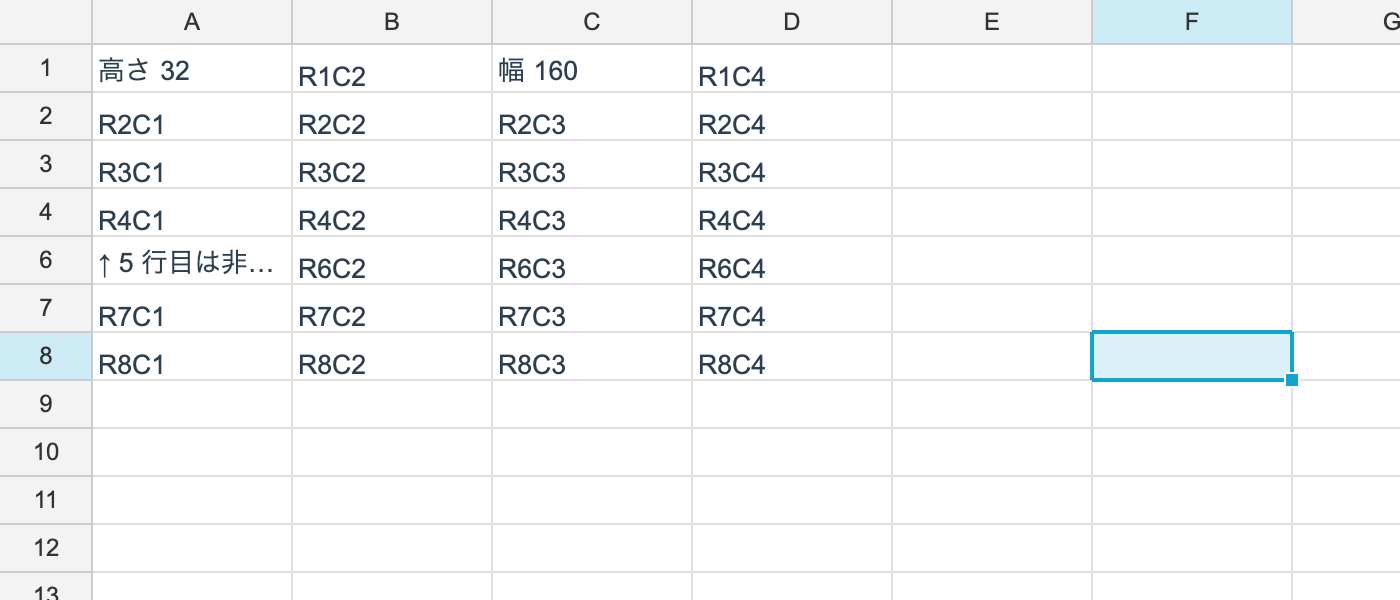
Sizes
using unvell.ReoGrid.Core;
using unvell.ReoGrid.Core.Style;

ws.Rows.SetSize(0, 32);        // height of row 1 (logical pixels)
ws.Columns.SetSize(2, 160);    // width of column C

double h = ws.Rows.GetSize(0);
double w = ws.Columns.GetSize(2);

// default sizes are per sheet; rows and columns you never sized use them
ws.SetDefaultSizes(rowHeight: 24, columnWidth: 100);
The unit is logical pixels (at 96 DPI). Scaling for high-DPI displays is the renderer’s job, so the model’s numbers do not depend on the screen.
The defaults are 20 for rows and 80 for columns (Worksheet.DefaultRowHeight /
DefaultColumnWidth).
Automatic vs. manual sizes
Each row and column remembers whether nobody has sized it yet (automatic) or the user
decided its size (manual). This is the same distinction as Excel’s customHeight /
customWidth.
| Call | Result |
|---|---|
SetSize(i, size) | becomes manual; the height no longer changes on its own |
SetAutoSize(i, size) | stays automatic; keeps being recomputed from the content |
IsCustomSize(i) | is it manual? |
An automatic row is re-fitted when a cell edit is committed — it grows when you add a line
break and shrinks when you remove one. Double-clicking a row header boundary goes through
SetAutoSize, so it is the operation that puts a manual row back on automatic (as in
Excel).
XLSX round-trips this as the customHeight attribute. reogrid-json has no field for the
distinction (the format stays byte-compatible with reogrid-web), so sizes loaded from JSON
are treated as manual — it is safer for a saved layout not to shift while editing.
Hidden rows and columns
ws.Rows.SetHidden(4, true);
bool hidden = ws.Rows.IsHidden(4);

// rows hidden by a filter are tracked apart from user-hidden ones
bool byUser = ws.Rows.IsUserHidden(4);
bool byFilter = ws.Rows.IsFilterHidden(4);

double effective = ws.Rows.EffectiveSize(4);   // 0 when hidden
There are two independent reasons a line can be hidden: the user hid it, or a filter did.
IsHidden is true for either; SetHidden only touches the user side.
They are kept apart so that clearing a filter does not bring back rows the user hid deliberately. The filter side is managed by Filtering.
Per-row and per-column styles
// the default style for a row or column - no need to walk the cells
ws.SetRowStyle(0, new StyleRecord { Bold = true, BackgroundColor = 0xFFEFEFEF });
ws.SetColumnStyle(3, new StyleRecord { TextAlign = HAlign.Right });

StyleRecord? rowStyle = ws.GetRowStyle(0);
StyleRecord? colStyle = ws.GetColumnStyle(3);
Always use these for whole-row or whole-column formatting. Setting it cell by cell makes both the work and the memory proportional to the sheet’s dimensions. Set it once on the row or column and every cell in it inherits (Cell ◁ Row ◁ Column ◁ Sheet).
See Style Inheritance for the details.
Inserting and deleting
ws.InsertRows(3, 2);
ws.DeleteColumns(5, 1);
AxisIndex has InsertLines / DeleteLines too, but use the Worksheet methods. They
keep the other tables consistent — cell values, merges, borders, formula references, cell
types and the rest.
Checking how much is materialized
// only rows that differ from the default exist; this stays small even on a million-row sheet
int sized = ws.Rows.SizeOverrideCount;
int styled = ws.Rows.StyleOverrideCount;
int hiddenCount = ws.Rows.HiddenCount;
These are mainly diagnostic. If one is larger than you expect, look for a place that iterates rows or columns setting things individually.
Members of AxisIndex
| Member | What it does |
|---|---|
GetSize(i) / SetSize(i, size) | The size (SetSize marks it manual) |
SetAutoSize(i, size) / IsCustomSize(i) / SetCustomSize(i, custom) | Automatic vs. manual |
DefaultSize | The default size (change it with Worksheet.SetDefaultSizes) |
EffectiveSize(i) | 0 when hidden, GetSize otherwise |
IsHidden(i) / IsUserHidden(i) / IsFilterHidden(i) | Hidden state |
SetHidden(i, hidden) | Hide or show as the user |
Count | Number of rows or columns |
SizeOverrideCount / StyleOverrideCount / HiddenCount | How many lines are materialized |
HiddenSorted() | The hidden positions |