
StyleRecord is an immutable record describing a cell’s formatting. It replaces V4’s
WorksheetRangeStyle plus PlainStyleFlag.
The namespace is unvell.ReoGrid.Core.Style.
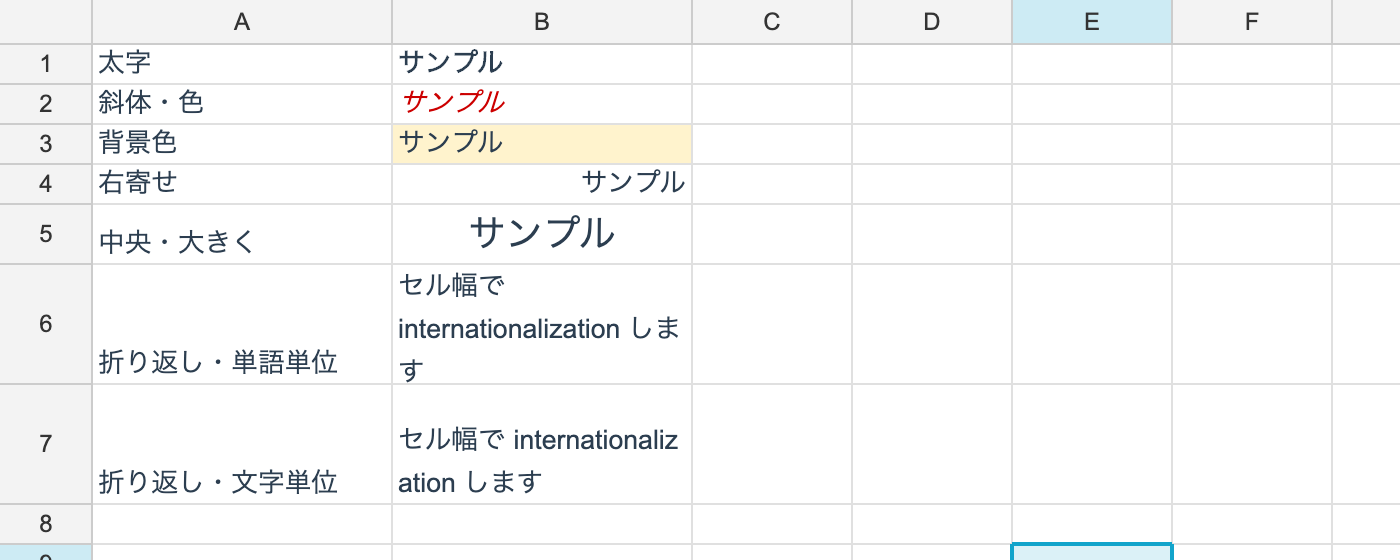
The basics
using unvell.ReoGrid.Core;
using unvell.ReoGrid.Core.Style;

ws.SetCellStyle(0, 0, new StyleRecord
{
	FontFamily = "Segoe UI",
	FontSize = 12f,
	Bold = true,
	Color = 0xFF333333,             // text color, ARGB
	BackgroundColor = 0xFFEFEFEF,   // background color, ARGB
	TextAlign = HAlign.Center,
	VerticalAlign = VAlign.Middle,
});
Properties
Every one is nullable. null means “not set — inherit from the level above”.
| Property | Type | What it is |
|---|---|---|
FontFamily | string? | Font name |
FontSize | float? | Font size in points |
Bold / Italic / Underline / Strikethrough | bool? | Text decoration |
Color | uint? | Text color (ARGB) |
BackgroundColor | uint? | Background color (ARGB) |
TextAlign | HAlign? | General / Left / Center / Right |
VerticalAlign | VAlign? | Bottom / Middle / Top |
TextWrapMode | TextWrap? | None / Wrap / BreakWord |
Indent | ushort? | Indent steps |
RotationAngle | float? | Text rotation in degrees (-90..90); TextRotation.Stacked (255) for vertical text |
General in TextAlign means what it does in Excel: numbers right, text left.
Colors are uint ARGB
Not System.Drawing.Color. Keeping the core and the I/O independent of System.Drawing is
what makes PDF export and headless use on Linux possible.
0xFFEFEFEF
  ^^        alpha (FF = opaque)
    ^^^^^^  RGB
To turn one into a Color in the WinForms layer, use
Color.FromArgb(unchecked((int)argb)).
Applying a change
// StyleRecord is immutable; build a variant with a with-expression
var current = ws.GetCellStyle(0, 0) ?? StyleRecord.Default;
ws.SetCellStyle(0, 0, current with { Bold = true });
GetCellStyle returns only what was set directly on that cell — nothing inherited — and
null when nothing was. For the resolved result, use GetEffectiveStyle.
null is not false
// null means "not set" - inherit from above. That is not the same as false
var s = new StyleRecord { Bold = true, Italic = null };

var cleared = s with { Bold = null };   // drop the bold setting entirely
var explicitOff = s with { Bold = false };   // not bold, even though the level above is
V4’s PlainStyleFlag tracked which fields were in effect separately. In V5 being nullable
is that mechanism, so the flags can never drift out of sync with the values.
Wrapping and placement
ws.SetCellStyle(0, 0, new StyleRecord { TextWrapMode = TextWrap.Wrap });
ws.SetCellStyle(1, 0, new StyleRecord { TextWrapMode = TextWrap.BreakWord });
ws.SetCellStyle(2, 0, new StyleRecord { Indent = 2 });
ws.SetCellStyle(3, 0, new StyleRecord { RotationAngle = 45f });
Wrap breaks between words; BreakWord breaks between characters. Text in a cell with no
wrap setting overflows into the neighbour when that neighbour is empty (as in Excel). A
newline (\n) always breaks the line, wrapping or not.
Line breaking is done by the core, so WinForms, WPF, Avalonia and PDF all break at the same
place. Text without spaces — Japanese, for instance — breaks between characters, with
kinsoku rules applied so that a line never starts with 。」) or ends with 「(.
Rotated and vertical text
// degrees counter-clockwise: 45 tilts up to the right, -45 down
ws.SetCellStyle(0, 0, new StyleRecord { RotationAngle = 45f });
ws.SetCellStyle(0, 1, new StyleRecord { RotationAngle = -90f });

// stacked text (one glyph per line, upright, top to bottom) — a marker, not an angle
ws.SetCellStyle(0, 2, new StyleRecord { RotationAngle = TextRotation.Stacked });

// back to level text
ws.SetCellStyle(0, 3, new StyleRecord { RotationAngle = 0f });

// the helpers
var st = ws.GetEffectiveStyle(0, 2);
bool rotated = TextRotation.IsRotated(st.RotationAngle);       // true for stacked too
bool stacked = TextRotation.IsStacked(st.RotationAngle ?? 0f); // true only for stacked

// clamp into -90..90; Stacked (255) passes through untouched
float safe = TextRotation.Normalize(120f);   // -> 90

_ = (rotated, stacked, safe);
RotationAngle is degrees counter-clockwise, valid from -90 to 90 — the same numbers
Excel’s alignment dialog shows. Anything outside that range is clamped by
TextRotation.Normalize.
Stacked text is not an angle
TextRotation.Stacked (255) is not an angle at all: it is Excel’s vertically stacked
text. Glyphs stay upright and are laid one per line, reading top to bottom.
That 255 is OOXML’s own value (<alignment textRotation="255"/>), so keeping it as-is lets a
stacked cell round-trip through xlsx untouched, with no second style property that only one
file format would ever set.
Stacking works on runes, not chars, so a surrogate pair — an emoji, a rare kanji — stays one glyph instead of splitting across two lines.
How it is drawn
Rotated text is laid out horizontally in its own frame and then turned as a block about its centre. Line breaking, measurement and baselines therefore go through the same shared path as unrotated text, and the four surfaces (WinForms, WPF, Avalonia, PDF) agree.
- The rotated bounding box is placed by the cell’s alignment and then clipped to the cell, so rotated text never spills into a neighbour.
- Wrapping measures the room along the rotated direction (the cell’s width at 0°, its height at 90°, interpolated in between).
- Stacked text is always centred horizontally.
- Row-height and column-width auto-fit measure the rotated size too, so a cell fits the way it is drawn.
Rich-text cells are not rotated — they are drawn level.
I/O and UI
- reogrid-json —
rotationAngle(a V5 extension), omitted when0. - XLSX — round-trips as
textRotation. OOXML packs three meanings into that one attribute (0-90counter-clockwise,91-180as “90 plus the clockwise angle”,255for stacked), and both the reader and the writer unpack it. - All three controls expose
SetSelectionRotation(float?);nullclears it. - Studio:
Format ▸ Text Rotation(45° / -45° / 90° / -90° / Vertical Text / Custom Angle… / None).
Clearing
ws.SetCellStyle(0, 0, null); // clear this cell's own settings (back to pure inheritance)Sharing
Identical StyleRecord values are merged into one automatically, by record value equality —
so a fresh new every time still shares one instance. There is no need to hoist a style
into a variable to reuse it.