
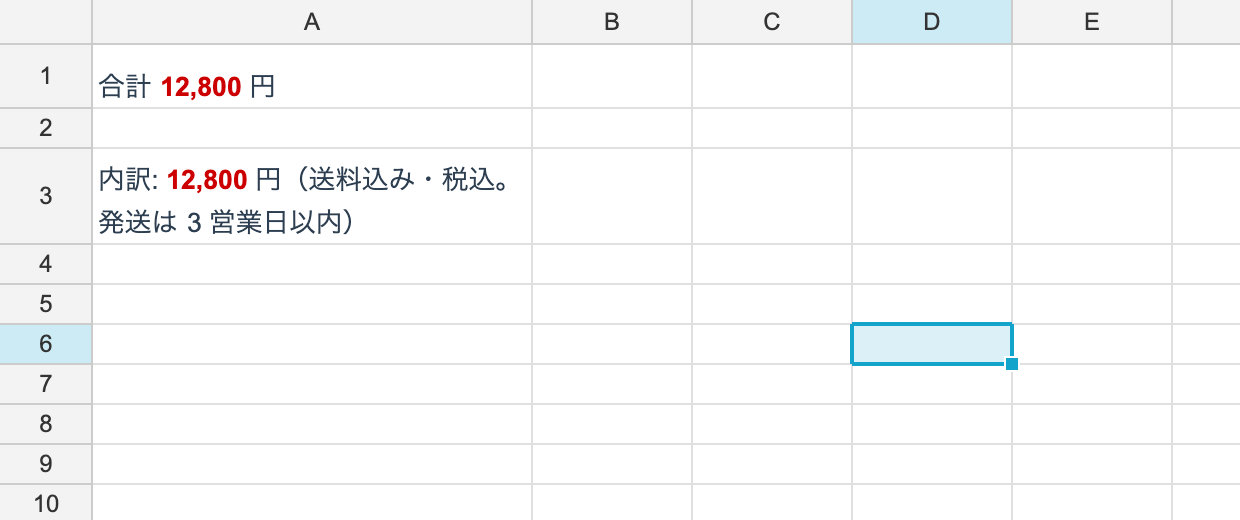
RichText lets formatting change per character inside a single cell. Each stretch between
formatting changes is a run, and the text is the sequence of them.
The namespace is unvell.ReoGrid.Core.Text.
Building one
using unvell.ReoGrid.Core;
using unvell.ReoGrid.Core.Text;

var rt = new RichText(
[
	new RichTextRun { Text = "Total " },
	new RichTextRun { Text = "12,800", Bold = true, Color = 0xFFCC0000 },
	new RichTextRun { Text = " USD" },
]);

ws.SetRichText(0, 0, rt);
RichTextRun
As with StyleRecord, everything is nullable. A null property inherits from the cell’s
effective style.
| Property | Type |
|---|---|
Text | string |
Bold / Italic / Underline | bool? |
FontFamily | string? |
FontSize | float? |
Color | uint? (ARGB) |
Background color, alignment and wrapping cannot vary per run. Those are per-cell, on
StyleRecord.
How lines are laid out
When several runs share a line, the baseline is a single one. Bold runs, runs at a different size, and Japanese runs all sit on the same bottom edge. A line’s height comes from its tallest run, so only lines containing a larger character grow.
Setting TextWrapMode on the cell wraps rich text too. The break points are decided from
the whole string, not from run boundaries, so a word whose formatting changes partway
through (a bold 12, followed by a plain 800) is never split at the formatting boundary.
When a break does land inside a run, that run is split and both halves keep their formatting.
Reading
if (ws.HasRichText(0, 0))
{
	RichText? rt = ws.GetRichText(0, 0);
	Console.WriteLine(rt!.PlainText);      // the text with formatting stripped

	foreach (RichTextRun run in rt.Runs)
		Console.WriteLine($"{run.Text} bold={run.Bold}");
}
HasRichText answers without building an object. Use it on iteration hot paths.
Converting to and from plain text
var rt = RichText.FromPlain("a plain string");
var copy = rt.Clone();                  // duplicate it run by run

ws.SetRichText(0, 0, null);             // drop the rich text
Runs is a mutable list. Modifying a RichText you fetched affects the cell it came from,
so Clone() it first if you intend to edit.
Relationship to the cell value
Rich text lives in a separate table from cell values.
- Once rich text is set, it is what the cell displays
- Calling
ws.SetFormula(...)removes the cell’s rich text automatically GetObjectValue/GetDisplayTextreturn thePlainTextequivalent
Where it is used
The grid renderer and the cell editor share the same layout code, which is why formatting can be changed per character while editing. The control-side API is:
control.ToggleEditingBold()/ToggleEditingItalic()/ToggleEditingUnderline()control.SetEditingTextColor(color)
See Cell Editing.
Persistence
Round-trips through both reogrid-json and XLSX. In XLSX it is read and written as a rich
string in the shared string table (a sequence of <r> elements).