
Rows and columns can be grouped and collapsed. This is Excel’s “Group” feature.
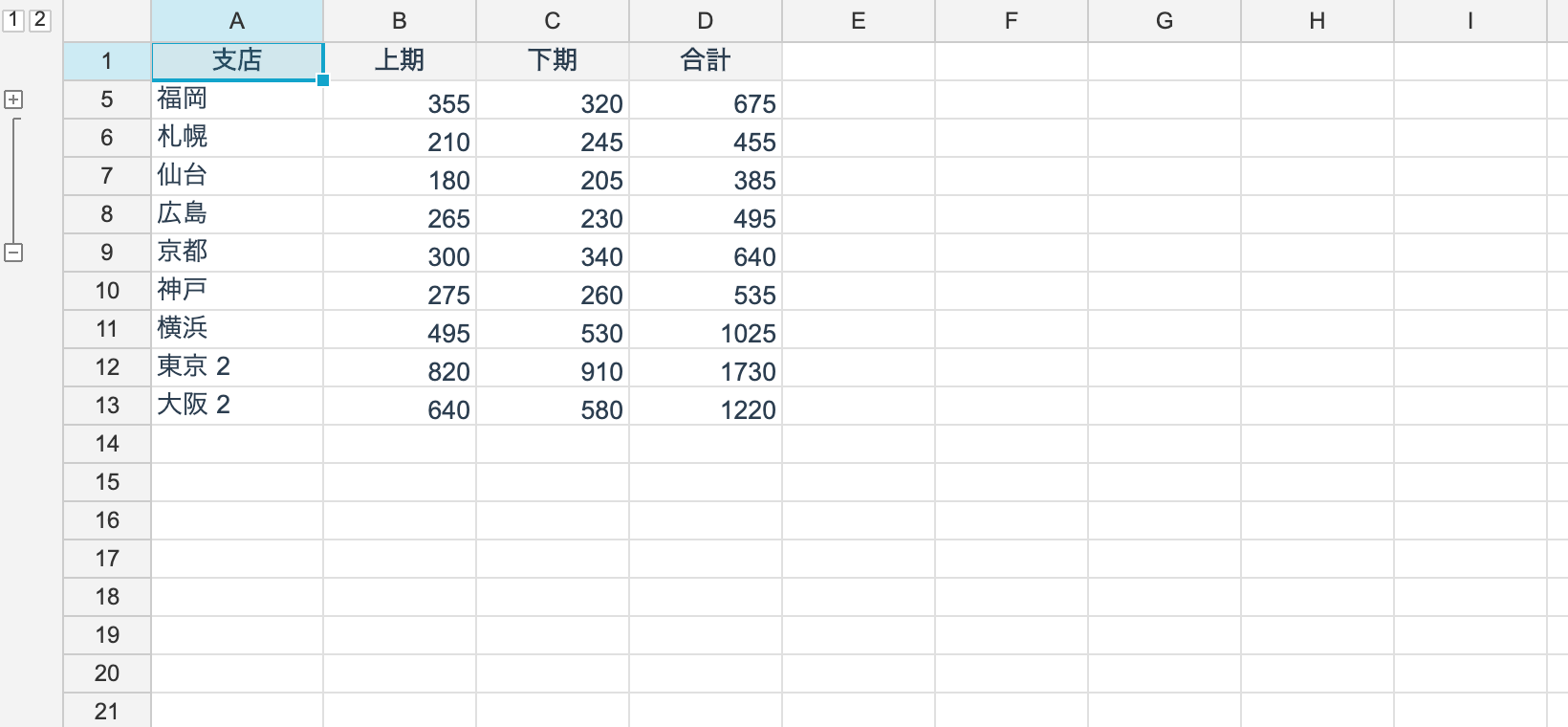
Grouping
// group rows 2 through 9
var group = ws.GroupRows(1, 8);

ws.RowOutlines.Collapse(group);
ws.RowOutlines.Expand(group);
ws.RowOutlines.Toggle(group);

ws.UngroupRows(1, 8);
Columns work the same way — ws.GroupColumns(col, count) /
ws.UngroupColumns(col, count).
Levels
Nesting groups creates levels. Nine levels at most.
int levels = ws.RowOutlines.LevelCount;
bool has = ws.HasRowOutlines;

ws.RowOutlines.CollapseToLevel(1);      // collapse to level 1

foreach (var (level, g) in ws.RowOutlines.AllGroups())
	Console.WriteLine($"L{level}: {g.Start}..{g.End} collapsed={g.Collapsed}");
HasRowOutlines answers without creating an OutlineManager. On a sheet that never used
outlines, the manager does not exist at all.
Where the summary line sits
By default the summary line is below the group (Excel’s default). Set SummaryAfter to
false to put it above.
ws.RowOutlines.SummaryAfter = false;Where the collapse button is drawn follows the same setting (ToggleIndex).
OutlineGroup
| Property | What it is |
|---|---|
Start | The first line |
Count | How many lines |
End | Start + Count |
Collapsed | Whether it is collapsed |
Drive groups through OutlineManager — writing Collapsed directly does not update the
rows’ visibility.
Relationship to hiding
Hiding caused by collapsing is managed by OutlineManager. HiddenLines tells you which
rows are currently hidden because of a collapse.
Members of OutlineManager
| Member | What it does |
|---|---|
AddGroup(start, count) / RemoveGroup(start, count) | Adds or removes a group |
Collapse(g) / Expand(g) / Toggle(g) | Collapsing |
CollapseToLevel(level) | Collapses down to a level |
LevelCount / MaxLevel / HasOutlines | The state of the hierarchy |
LevelOf(line) | The deepest level a line belongs to |
GroupsAtLevel(level) / AllGroups() | Enumerating groups |
FindGroup(level, start) | Finding a specific group |
HiddenLines | Lines hidden by a collapse |
Display
The control’s ShowOutlines property toggles the outline panel.
Persistence
Round-trips through both reogrid-json and XLSX. XLSX stores the level and collapsed state as row and column attributes, so Excel opens the file in the same state.
Limitations
Outline operations cannot be undone. Grouping and ungrouping are not recorded in the history yet. Editing values and inserting or deleting rows undo as usual.