
Assign a cell type and the cell renders as a checkbox or a dropdown instead of text, and starts responding to clicks. Input forms and progress tables can be built on the sheet itself, without writing a custom control.
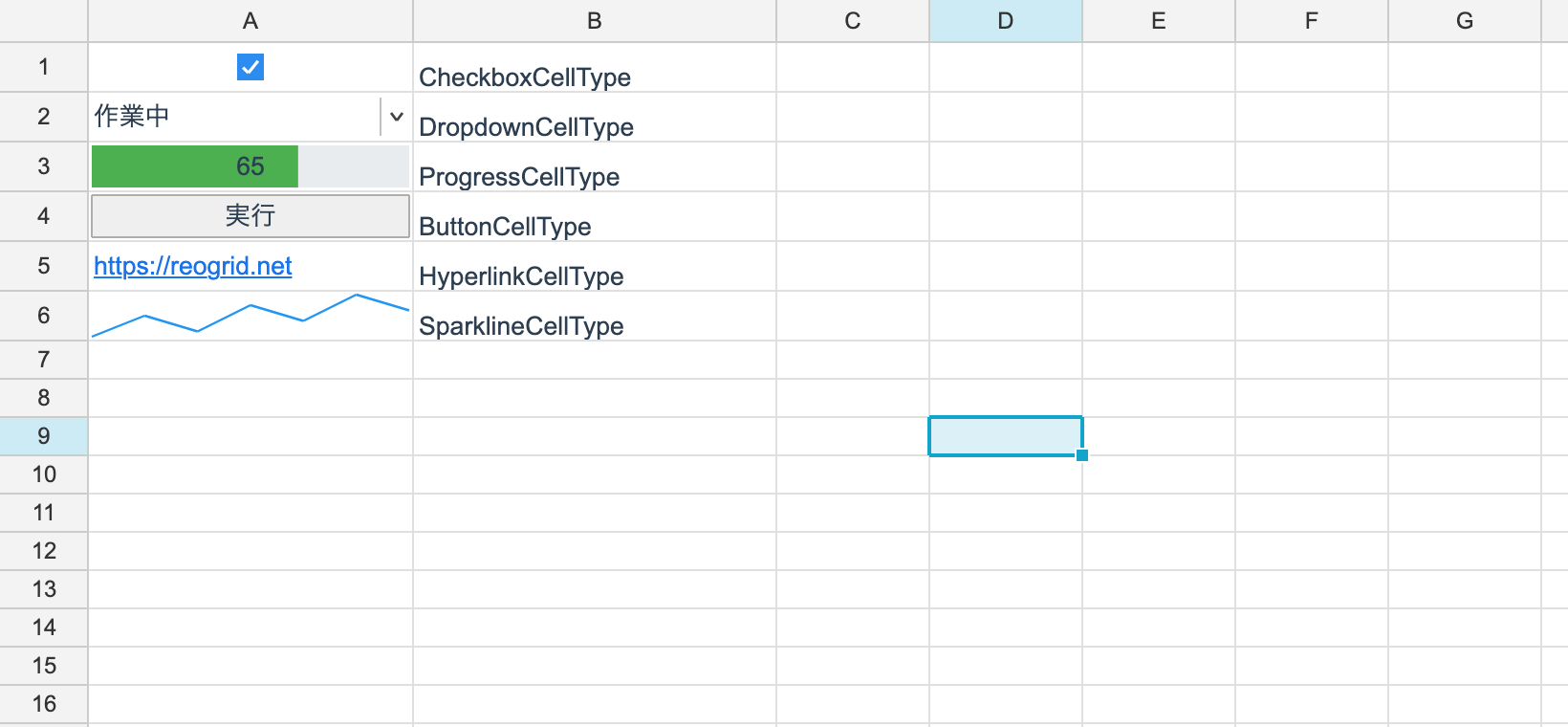
There are six. See Built-in Cell Types for the details.
| Cell type | Looks like | Value |
|---|---|---|
| Checkbox | a checkbox | bool |
| Dropdown | a pick list | string |
| Progress bar | a filled bar | double |
| Button | a push button | string (the label) |
| Hyperlink | link text | string (the URL) |
| Sparkline | a line inside the cell | string (comma-separated numbers) |
Assigning one
You can assign per cell or per range.
using unvell.ReoGrid.Core;
using unvell.ReoGrid.Core.CellTypes;

// Assign to a whole column at once. A wide range costs no more than one cell
ws.SetCellType(RangePosition.Parse("A1:A1048576"), CheckboxCellType.Instance);

// a single cell
ws.SetCellType(2, 1, CheckboxCellType.Instance);
ws.Cell("C3").SetCellType(new ProgressCellType(max: 100));

ws.SetCellType(2, 1, null);      // clear it
Do not hesitate to assign to a whole column. Deciding a cell type per column — a “check” column, a “status” column — is exactly what this is built for: naming a million rows costs no more memory and no more time than naming one cell. Drawing and hit-testing only happen for cells that are on screen.
Inserting or deleting rows and columns moves the assigned range along with them.
Putting a value in
A cell type decides look and interaction only. Whether a box is checked, which option is
selected, how far a bar has filled — all of it is an ordinary cell value you set with
SetBoolean / SetText / SetNumber.
// A cell type only decides look and interaction. The value is an ordinary cell value
ws.SetCellType(0, 0, CheckboxCellType.Instance);
ws.SetBoolean(0, 0, true);                    // checked

ws.SetCellType(1, 0, new DropdownCellType(["A", "B"]));
ws.SetText(1, 0, "B");                        // the selected option

ws.SetCellType(2, 0, new ProgressCellType(max: 100));
ws.SetNumber(2, 0, 65);                       // 65% complete
Because these are ordinary cell values, the rest of the sheet works on them as usual.
- Formulas can aggregate them.
COUNTIF(A:A, TRUE)counts the checked boxes - Sorting and filtering work. Nothing needs to know about cell types
- They round-trip on save. The value and the cell type are saved separately
Removing the cell type leaves the value behind. After SetCellType(r, c, null), a cell that
was a checkbox displays as the text TRUE or FALSE.
Responding to clicks
Checkboxes, dropdowns and progress bars are handled by the control. There is no code for you to write.
- Checkbox — a click toggles between
trueandfalse, rewriting the cell value - Dropdown — a click opens the list, and the chosen string becomes the cell value
- Hyperlink — a click opens the default browser
The only one needing code on your side is the button. Handle the control’s
CellButtonClicked.
control.CellButtonClicked += (s, e) =>
{
    // e.Cell is the position of the cell that was clicked
    Console.WriteLine($"{e.Cell.Row},{e.Cell.Col}");
};
The event has the same name on all three of WinForms, WPF and Avalonia.
Headless (with no control), none of these interactions occur. Only the reading and writing of values happens.
Inspecting assignments
CellTypeDescriptor? type = ws.GetCellType(0, 0);
if (type != null)
	Console.WriteLine(type.TypeName);

int entries = ws.CellTypes.Count;      // number of assigned ranges (not of cells)
bool any = ws.HasCellTypes;
GetCellType returns the cell type in effect for that cell, or null when there is none.
ws.CellTypes.Count is the number of assignments you made, not the number of cells
carrying a type. Assign once to a whole column and it is 1.
Persistence
Cell types round-trip through reogrid-json. XLSX has no equivalent concept, so exporting to XLSX keeps only the values and loses the cell types.
When a dropdown has to survive a trip through XLSX, use a
data validation list rather than a cell type: it round-trips as
<dataValidations>, so it stays a working dropdown in Excel.
Your own cell types
When the six are not enough, write your own. A date picker, a star rating, a color swatch — implement the drawing and the click response and it behaves like any other.
See Custom Cell Types.