Workbook Events
| Event | When |
|---|
| WorksheetCreated | When a new worksheet instance has been created |
| WorksheetInserted | When a worksheet has been inserted into the workbook |
| WorksheetRemoved | When a worksheet has been removed from the workbook |
| BeforeWorksheetNameChange | Before the worksheet name changes; set the IsCancelled property to abort this operation |
| WorksheetNameChanged | When the worksheet name has been changed |
| WorksheetNameBackColorChanged | When the background color of a worksheet tab has been changed |
| WorksheetNameTextColorChanged | When the text color of a worksheet tab has been changed |
| SettingsChanged | When any workbook setting has been changed |
| ExceptionHappened | When an internal exception occurs in any worksheet |
Action Events
| Event | When |
|---|
| BeforeActionPerform | Before any action is performed |
| ActionPerformed | When any action has been performed |
| Undid | When an action is undone |
| Redid | When an action is redone |
Worksheet Events
Worksheet events are available on worksheet instances. To get a worksheet instance, use the CurrentWorksheet or Worksheets[index] property of the workbook (grid control). See Worksheet.
Cell Events
| Event | When |
|---|
| BeforeCellEdit | Before any cell enters edit mode |
| AfterCellEdit | When any cell has been edited by the user |
| CellDataChanged | When a cell’s data has been changed |
| CellMouseEnter | When the mouse moves into a cell (the cell becomes hovered) |
| CellMouseLeave | When the mouse leaves a hovered cell |
| CellMouseDown | When a mouse button is pressed inside a cell |
| CellMouseUp | When a mouse button is released inside a cell |
| CellMouseMove | When the mouse moves inside a cell |
For cell edit events, see cell edit.
Keyboard Events
| Event | When |
|---|
| BeforeCellKeyDown | When the user presses any key on the worksheet (before native behaviors) |
| AfterCellKeyDown | When the user presses any key on the worksheet (after native behaviors) |
| CellKeyUp | When the user releases any key on the worksheet |
Row and Column Events
| Event | When |
|---|
| RowInserted | When rows are inserted |
| RowDeleted | When rows are deleted |
| ColInserted | When columns are inserted |
| ColDeleted | When columns are deleted |
| RowsHeightChanged | When row height changes |
| ColumnsWidthChanged | When column width changes |
| RowFiltered | When a filter is applied to rows |
| RowSorted | When rows are sorted |
Range Events
| Event | When |
|---|
| RangeDataChanged | When a data update operation on a range is performed |
| RangeMerged | When a range is merged |
| RangeUnmerged | When a range is unmerged |
| RangeStyleChanged | When styles have been set |
| BeforeRangeCopy | Before the selected range is copied |
| BeforeRangeMove | Before the selected range is moved |
| AfterRangeCopy | After a range copy operation |
| AfterRangeMove | After a range move operation |
Border Events
| Event | When |
|---|
| BorderAdded | When borders have been set |
| BorderRemoved | When borders have been removed |
Selection Events
| Event | When |
|---|
| SelectionRangeChanged | After the selection range changes |
| SelectionRangeChanging | Fired while the selection is changing by mouse |
| SelectionModeChanged | When the selection mode changes |
| SelectionStyleChanged | When the selection style changes |
| SelectionForwardDirectionChanged | When the selection forward direction changes |
| SelectionMovedForward | When the selection moves to the next position |
| HoverPosChanged | When the mouse moves over cells |
| FocusPosChanged | When the focused cell changes |
Learn more about Selection.
Outline Events
| Event | When |
|---|
| OutlineAdded | When an outline has been added to the spreadsheet |
| OutlineRemoved | When an outline has been removed from the spreadsheet |
| BeforeOutlineCollapse | When the user clicks the − button on an outline to collapse it |
| AfterOutlineCollapse | When an outline has been collapsed |
| BeforeOutlineExpand | When the user clicks the + button on an outline to expand it |
| AfterOutlineExpand | When an outline has been expanded |
For usage of outline events, see Group & Outline.
Freeze Events
| Event | When |
|---|
| CellsFrozen | When the worksheet has been frozen |
| CellsUnfrozen | When the worksheet has been unfrozen |
Learn more about freeze: see Freeze.
Generic Events
| Event | When |
|---|
| Scaled | When the control is scaled (zoomed in/out) |
| FileLoaded | When the control’s content is loaded from a file stream (loading from a given stream will not fire this event) |
| FileSaved | When the control’s content has been saved to a file stream (saving to a given stream will not fire this event) |
| Reset | When the control has been reset to its default state |
Clipboard Events
| Event | When |
|---|
| BeforeCopy | Before a copy operation |
| AfterCopy | After a range is copied to the clipboard |
| BeforePaste | Before a paste operation |
| AfterPaste | After a range is pasted from the clipboard |
| BeforeCut | Before a cut operation |
| AfterCut | After a range is cut by the user |
| OnPasteError | When an error occurs during a paste operation |
Examples
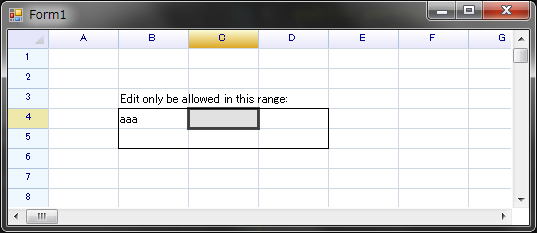
Set an editable range by handling an event
Many before-events provided by ReoGrid have an IsCancelled property, which can be set to true to instruct the control to cancel the subsequent operation. This is typically used to prevent cell editing or outline collapse/expand operations.
For example, to allow text editing only within a specified range:
// select a worksheet
var sheet = grid.CurrentWorksheet;

// create a range definition
var editableRange = new RangePosition(3,1,2,3);

// set borders to range
sheet.SetRangeBorder(editableRange, BorderPositions.Outside, RangeBorderStyle.BlackSolid);

// set text and handle events
sheet[2, 1] = "Edit only be allowed in this range:";
sheet.BeforeCellEdit += (s, e) => e.IsCancelled = !editableRange.Contains(e.Cell.GetPos());