
Multiple Format Support
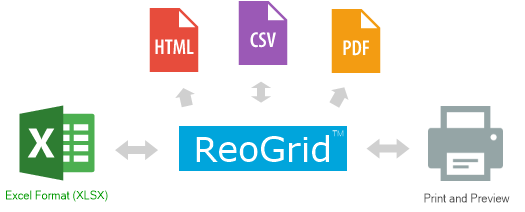
ReoGrid supports loading and saving the Excel xlsx file format, importing and exporting CSV files, outputting spreadsheets to a printer or print preview, and generating worksheets as HTML or PDF.
Workbook Input & Output API
The ReoGrid control itself acts as a workbook. Both the screen workbook control and the memory workbook share the same APIs.
var workbook = reoGridControl;

// To load an Excel workbook:
workbook.Load(path, IO.FileFormat.Excel2007);

// ReoGrid will automatically create and load all worksheets from the Excel file.
// To save an Excel file:
workbook.Save(path, IO.FileFormat.Excel2007);
Supported objects
Loading and saving the following objects from/to an Excel file is supported:
- Loading or saving the entire workbook (all worksheets)
- Setting the visibility of Row and column headers
- Cell styles (font, color, alignment, etc.)
- Cell data and data formats (number, currency, percent, etc.)
- Cell Borders
- Formulas (reference relations and calculation chain)
- Named range definitions
- Images
- Floating objects
- Charts
Not supported objects
Loading and saving the following objects is not yet supported:
- Paging and Print
- Outlines
- Conditional style triggers
- Pivot tables & database connections
- Some formula functions & VBA
Available function list
See Excel-Compatible Function List.
Memory Workbook
ReoGrid also provides an off-screen interface that can load and save spreadsheets without a GUI. This feature is typically used for importing and exporting Excel files and processing data in the background or on the server side.
Typical usage of memory workbook
Create a memory workbook instance, then load or save the spreadsheet in Excel format.
// create memory workbook
var workbook = ReoGridControl.CreateMemoryWorkbook();

// load Excel workbook from stream
workbook.Load(stream, FileFormat.Excel2007);
// save stream as Excel workbook
workbook.Save(stream, FileFormat.Excel2007);
Learn more about memory workbook.