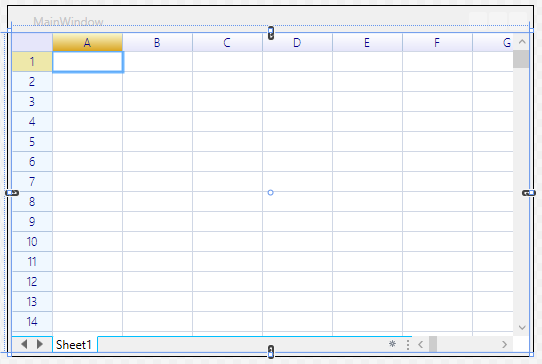
Install via NuGet
ReoGrid for Windows Forms
To install the ReoGrid Windows Forms standard edition, use the NuGet command:
PM> Install-Package unvell.ReoGrid.dllReoGrid for WPF
PM> Install-Package unvell.ReoGridWPF.dllInstall Visual Studio Toolbox Shortcut for Windows Forms
To add a shortcut to the Visual Studio toolbox, perform the following steps:
- Right-click on the Toolbox panel and click ‘Choose Items…’
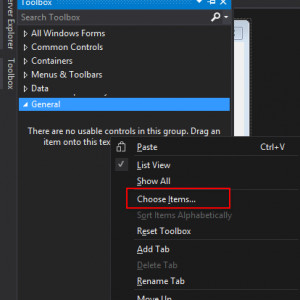
- Choose the ’.NET Framework Components’ tab
- Click the ‘Browse…’ button
- Choose ‘unvell.ReoGrid.dll’ in the open file dialog
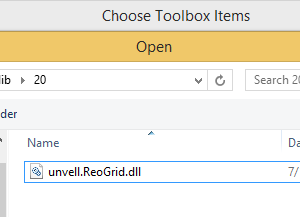
- Click the OK button to close the dialog
- Click on the ReoGridControl item that appears at the bottom of the toolbar to select it:
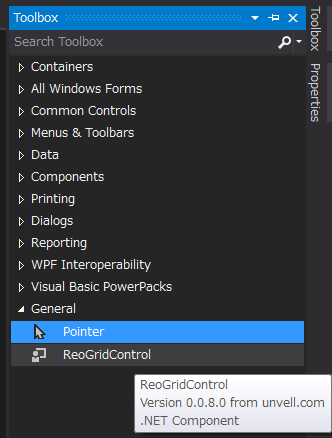
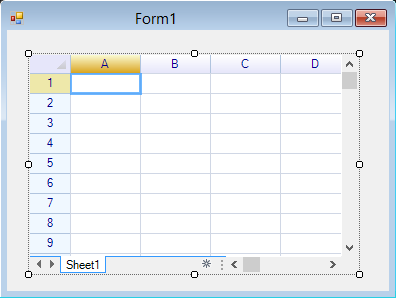
Select a range on the form designer; when the mouse is released, the ReoGrid spreadsheet component will be added as shown below:
Add Control by Code for Windows Forms
ReoGrid provides different feature-set editions, and each edition has different reference requirements. Add references according to the edition used in your application.
- Minimum Edition - Minimum feature set (no formula calculation supported)
- Standard Release Edition - Standard features (Recommended)
- Extension Edition - Extended features, including script language execution integration (like VBA)
| DLL Name | Description | Minimum Edition | Standard Release Edition | Extension Edition |
|---|---|---|---|---|
| unvell.ReoGrid.dll | ReoGrid component library | Required | Required | Required |
| unvell.ReoScript.dll | .NET script language engine | Required | ||
| Antlr3.Runtime.dll | ANTLR grammar tool runtime | Required | ||
| FastColoredTextBox.dll | Powerful syntax-highlighted text editor | Required |
If you are unsure which edition to use, the Standard Release Edition with a single DLL (unvell.ReoGrid.dll) is recommended.
Add Windows Forms Control in C#
- Import namespaces:
using unvell.ReoGrid;- Create a ReoGrid instance and add it to any Windows Forms container, such as a Form or Panel.
var grid = new unvell.ReoGrid.ReoGridControl()
{
  Dock = DockStyle.Fill,
};

this.Controls.Add(grid);  // add to form or panel
Learn more about workbook and worksheet.
Add Windows Forms Control in VB.NET
- Import namespaces:
Imports unvell.ReoGrid- Create a ReoGrid instance and add it to any Windows Forms container, such as a Form or Panel.
Dim grid As New MyReoGridControl() With {.Dock = DockStyle.Fill}
Me.Controls.Add(grid)
Add Control in XAML for WPF Applications
Add the ReoGrid DLL reference to the target project and edit the XAML file of the main window as shown below:
File MainWindow.xaml:
<Window
  xmlns="/schemas.microsoft.com/winfx/2006/xaml/presentation"
  xmlns:x="/schemas.microsoft.com/winfx/2006/xaml"
  **xmlns:rg="clr-namespace:unvell.ReoGrid;assembly=unvell.ReoGrid"**
  x:Class="WPFDemo.MainWindow" Title="MainWindow" Height="640" Width="800">
  <Grid>

    <rg:ReoGridControl x:Name="grid" ></rg:ReoGridControl>

  </Grid>
</Window>
Example: WPF Design Time