
Selection Range vs. Focus Cell
There are two active objects on a worksheet: the Selection Range and the Focus Cell.
Selection Range
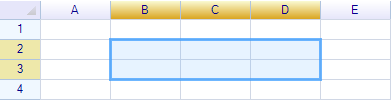
The selection range contains multiple cells and can be selected by the user via mouse and keyboard, as well as programmatically. It is typically used as an argument for range operations on the worksheet, such as setting styles and borders, deleting content, or copying content to the Clipboard. Below is the selection on range B2:D3.
Focus Cell
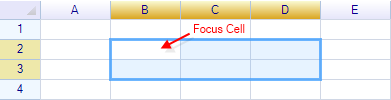
A highlighted cell without a filled background is shown as the focused cell:
Get or set selection
To get or set the selection of the worksheet, use the SelectionRange property of the worksheet:
C#:
var range = worksheet.SelectionRange;
worksheet.SelectionRange = new RangePosition("A1:D5");
VB.NET:
Dim range = worksheet.SelectionRange
worksheet.SelectionRange = new RangePosition("A1:D5")
Change selection style
To change the selection style, use the SelectionStyle property of the worksheet:
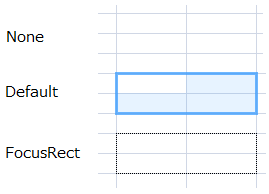
worksheet.SelectionStyle = WorksheetSelectionStyle.FocusRect;The following styles are supported:
Change selection mode
It is possible to change the selection mode for the worksheet:
worksheet.SelectionMode = WorksheetSelectionMode.Row;The following modes are supported:
| Enum Value | Description |
|---|---|
| None | Do not allow selecting anything on the worksheet. |
| Cell | Allow selecting only a single cell. |
| Range | Allow selecting cells or ranges. |
| Row | Always select one or more entire rows at a time. |
| Column | Always select one or more entire columns at a time. |
Detecting selection changes
To detect selection changes, use the SelectionChanged or SelectionChanging events:
C#
worksheet.SelectionChanged += (s, e) =>
  MessageBox.Show(worksheet.SelectionRange.ToAddress());
VB.NET
AddHandler worksheet.SelectionRangeChanged, Sub(s, e) _
  MessageBox.Show(e.Range.ToAddress())
SelectionChanged is invoked after the selection changes. If the end-user drags the mouse on the worksheet during a selection operation, only SelectionChanging will be invoked. The workflow is as follows:
- Click on the worksheet to start selecting a range (
SelectionChangedinvoked) - Drag the mouse to modify the selection range (
SelectionChanginginvoked) - Release the mouse to finish the select operation (
SelectionChangedinvoked)
Both events are only invoked once per actual selection change.
Native behaviors
ReoGrid always keeps the focus cell within the selection range. When the selection range changes, the focus cell also changes. Conversely, when the focus cell changes, the selection range also changes — in this case, the selection range equals the focus cell.
Change focus cell position
To change the focus cell position, use the FocusPos property of the worksheet.
C#:
var focusPos = sheet.FocusPos;            // get
sheet.FocusPos = new CellPosition("D5");  // set
VB.NET:
Dim focusPos = sheet.FocusPos            ' get
sheet.FocusPos = new CellPosition("D5")  ' set
Change focus cell move direction
By default, pressing the Enter key on the worksheet moves the focus cell to the right, which is the horizontal moving direction.
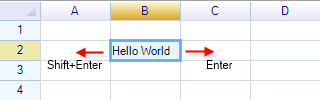
It is possible to change the moving direction to vertical, so that the focus cell moves to the cell in the next row instead:
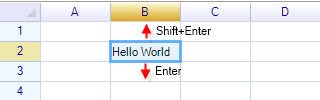
To change the focus cell move direction from horizontal to vertical:
worksheet.SelectionStyle = WorksheetSelectionStyle.FocusRect;BeforeSelectionRangeChange Event
The BeforeSelectionRangeChange event is fired when the end-user attempts to change the selection, but before the built-in operations are performed. Setting the IsCancelled property on the event argument prevents the built-in operations from executing.
This event also provides properties that allow user code to override the selected range. The example below shows how to limit the number of rows and columns in a selection operation.
Limit selection range maximum rows and columns
Add a handler to the BeforeSelectionRangeChange event:
worksheet.BeforeSelectionRangeChange += worksheet_BeforeSelectionRangeChange;Change the selection end position to limit the maximum number of rows to 5:
void worksheet_BeforeSelectionRangeChange(object sender, BeforeSelectionChangeEventArgs e)
{
  int rows = Math.Abs(e.StartRow - e.EndRow);

  if (rows >= 5)
  {
    if (e.EndRow > e.StartRow)
      e.EndRow = e.StartRow + 5 - 1;
    else
      e.EndRow = e.StartRow - 5 + 1;
  }
}