
To install ReoGrid into a .NET application, see installation.
Component Overview
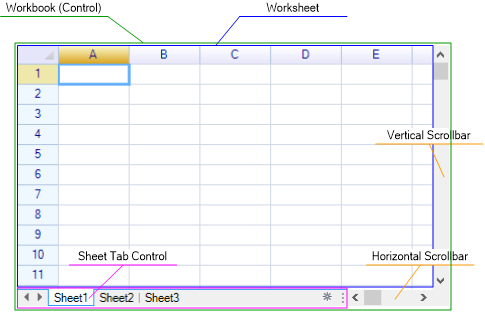
Commonly used objects:
Workbook and Worksheet
The control itself is also a workbook. A control (workbook) contains multiple worksheets.
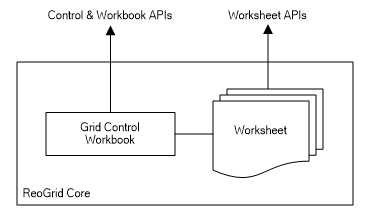
Call workbook APIs:
var grid = this.reoGridControl;
grid.fun();
Call worksheet APIs:
var sheet = grid.CurrentWorksheet;
sheet.fun();
Access Worksheet
The worksheet provides many methods for managing cell data, styles, borders, outlines, ranges, formula calculations, and more. The example below demonstrates how to set cell data by calling the worksheet API.
Set cell data using the worksheet index property:
// get the currently active worksheet instance
var sheet = grid.CurrentWorksheet;

// set cell data
sheet["A1"] = "hello world";
sheet[2, 1] = 10;
Or call the SetCellData method:
sheet.SetCellData(new CellPosition(2, 1), "hello world");Learn more about worksheet.
Access by Performing Actions
Actions are the undo framework provided by ReoGrid core. Many operations can be performed by executing actions. Operations performed via actions can be reverted by calling the Undo method on the control. To perform operations using actions:
- Import this namespace:
using unvell.ReoGrid.Actions;
- Call the
DoActionmethod of the grid control:
grid.DoAction(grid.CurrentWorksheet, new xxxxAction(...));To undo or redo actions:
grid.Undo();
grid.Redo();
Repeat the last action and apply it to another range:
grid.RepeatLastAction(new RangePosition(2, 3, 5, 5));User applications can extend the script functions and objects to provide custom scripting features. See Customize Function.