
A workbook is the top-level container in ReoGrid. It holds multiple worksheets and manages file I/O, settings, and events.
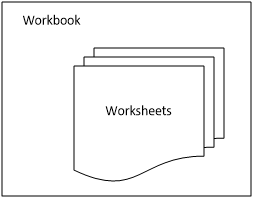
The component structure:
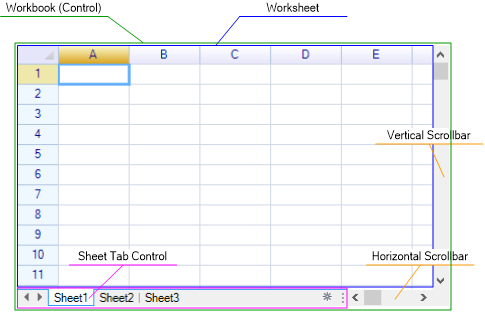
Control is Workbook
The ReoGrid control instance itself is a workbook. You can use it directly to access workbook-level functionality:
var workbook = reoGridControl1;Accessing Worksheets
Current Worksheet
Get the currently active worksheet:
var sheet = reoGridControl.CurrentWorksheet;Change the active worksheet:
reoGridControl.CurrentWorksheet = reoGridControl.Worksheets[2];Note:
CurrentWorksheetcannot be set tonull— the control must always have at least one active worksheet.
Access by Index or Name
// By zero-based index
var sheet1 = reoGridControl.Worksheets[0];

// By name
var sheet2 = reoGridControl.Worksheets["Sheet2"];
Find Worksheet Index
int index = reoGridControl.GetWorksheetIndex("Sheet2");
// or
int index = reoGridControl.GetWorksheetIndex(mySheet);
Find Worksheet by Name
var sheet = reoGridControl.GetWorksheetByName("Sheet2");Check Name Availability
bool available = reoGridControl.CheckWorksheetNameAvailable("NewSheet");Worksheet Count
int count = reoGridControl.WorksheetCount;
// or
int count = reoGridControl.Worksheets.Count;
Check if Empty
bool empty = reoGridControl.IsEmpty;Worksheet Management
Creating Worksheets
// Create with auto-assigned name (Sheet1, Sheet2, etc.)
var sheet = reoGridControl.CreateWorksheet();

// Create with a specified name
var sheet = reoGridControl.CreateWorksheet("MySheet");

// Create with name and duplicate-check
var sheet = reoGridControl.CreateWorksheet("MySheet", checkNameExists: true);

// NewWorksheet is an alias for CreateWorksheet
var sheet = reoGridControl.NewWorksheet("MySheet");
Note: Like Excel, ReoGrid does not allow two worksheets in a single workbook to have the same name.
Adding and Inserting Worksheets
// Add at the end
reoGridControl.AddWorksheet(sheet);

// Insert at a specific position (zero-based index)
reoGridControl.InsertWorksheet(1, sheet);

// Via the Worksheets collection
reoGridControl.Worksheets.Add(sheet);
reoGridControl.Worksheets.Insert(1, sheet);
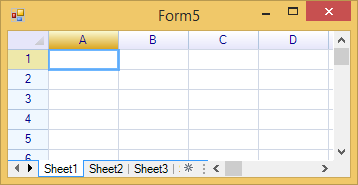
Worksheets are switched using the sheet tab control at the bottom of the spreadsheet:
Removing Worksheets
// Remove by index
reoGridControl.RemoveWorksheet(0);

// Remove by instance
reoGridControl.RemoveWorksheet(sheet);

// Via the Worksheets collection
reoGridControl.Worksheets.Remove(sheet);
reoGridControl.Worksheets.RemoveAt(0);
Copying Worksheets
// Copy the first worksheet and insert the copy at position 1
var copy = reoGridControl.CopyWorksheet(0, 1);

// Copy with a new name
var copy = reoGridControl.CopyWorksheet(0, 1, "CopiedSheet");

// Copy by worksheet instance
var copy = reoGridControl.CopyWorksheet(sheet, 2, "AnotherCopy");
Moving Worksheets
// Move the worksheet at index 0 to index 3
reoGridControl.MoveWorksheet(0, 3);

// Move by worksheet instance
reoGridControl.MoveWorksheet(sheet, 2);
Get Parent Workbook from Worksheet
var workbook = sheet.Workbook;Worksheets Collection
The Worksheets property returns a WorksheetCollection that supports full CRUD operations:
var worksheets = reoGridControl.Worksheets;

// Iterate all worksheets
foreach (var sheet in worksheets)
{
    Console.WriteLine(sheet.Name);
}

// Check if a worksheet exists
bool exists = worksheets.Contains(sheet);

// Get count
int count = worksheets.Count;

// Create directly from collection
var newSheet = worksheets.Create("NewSheet");

// Clear all worksheets
worksheets.Clear();
Worksheet Name and Tab Appearance
Change Worksheet Name
sheet.Name = "Sales Data";Tab Background Color
Customize the background color of the worksheet’s tab:
sheet.NameBackColor = new SolidColor(Color.LightBlue);Tab Text Color
Customize the text color of the worksheet’s tab:
sheet.NameTextColor = new SolidColor(Color.DarkBlue);Read-Only Mode
Set the entire workbook to read-only mode:
reoGridControl.Readonly = true;Workbook Settings
// Set a setting
reoGridControl.SetSettings(WorkbookSettings.View_ShowSheetTabControl, false);

// Check a setting
bool hasSheetTab = reoGridControl.HasSettings(WorkbookSettings.View_ShowSheetTabControl);

// Get all settings
var settings = reoGridControl.GetSettings();
Available WorkbookSettings
| Setting | Description |
|---|---|
View_ShowSheetTabControl | Show the sheet tab control at the bottom |
View_ShowScrolls | Show both horizontal and vertical scrollbars |
View_ShowHorScroll | Show the horizontal scrollbar |
View_ShowVerScroll | Show the vertical scrollbar |
Control Appearance
Customize the visual appearance of the grid control using the ControlAppearanceStyle:
var appearance = reoGridControl.ControlStyle;

// Change selection border width
appearance.SelectionBorderWidth = 2.0f;

// Change grid line width
appearance.GridLineWidth = 0.5f;

// Change individual colors
appearance[ControlAppearanceColors.GridBackground] = new SolidColor(Color.White);
appearance[ControlAppearanceColors.GridLine] = new SolidColor(Color.LightGray);
appearance[ControlAppearanceColors.SelectionBorder] = new SolidColor(Color.Blue);
appearance[ControlAppearanceColors.SelectionFill] = new SolidColor(60, 0, 0, 255);

// Column header colors
appearance[ControlAppearanceColors.ColHeadNormalStart] = new SolidColor(Color.WhiteSmoke);
appearance[ControlAppearanceColors.ColHeadNormalEnd] = new SolidColor(Color.LightGray);
appearance[ControlAppearanceColors.ColHeadText] = new SolidColor(Color.Black);

// Row header colors
appearance[ControlAppearanceColors.RowHeadNormal] = new SolidColor(Color.WhiteSmoke);
appearance[ControlAppearanceColors.RowHeadText] = new SolidColor(Color.Black);

// Sheet tab colors
appearance[ControlAppearanceColors.SheetTabBackground] = new SolidColor(Color.White);
appearance[ControlAppearanceColors.SheetTabText] = new SolidColor(Color.Black);
appearance[ControlAppearanceColors.SheetTabSelected] = new SolidColor(Color.Blue);
Appearance Color Keys
| Color Key | Description |
|---|---|
GridBackground | Worksheet background |
GridText | Default text color |
GridLine | Grid line color |
SelectionBorder | Selection outline color |
SelectionFill | Selection fill color |
ColHeadNormalStart/End | Column header gradient (normal state) |
ColHeadHoverStart/End | Column header gradient (hover state) |
ColHeadSelectedStart/End | Column header gradient (selected state) |
ColHeadFullSelectedStart/End | Column header gradient (fully selected) |
ColHeadText | Column header text color |
RowHeadNormal | Row header background (normal state) |
RowHeadHover | Row header background (hover state) |
RowHeadSelected | Row header background (selected state) |
RowHeadFullSelected | Row header background (fully selected) |
RowHeadText | Row header text color |
SheetTabBorder | Sheet tab border color |
SheetTabBackground | Sheet tab background |
SheetTabText | Sheet tab text color |
SheetTabSelected | Active sheet tab color |
OutlinePanelBorder | Outline panel border |
OutlinePanelBackground | Outline panel background |
OutlineButtonBorder | Outline expand/collapse button border |
OutlineButtonText | Outline button text |
LeadHeadNormal | Lead header (top-left corner) normal color |
LeadHeadHover | Lead header hover color |
LeadHeadSelected | Lead header selected color |
For more details, see Control Appearance.
File I/O (Save and Load)
Save
// Save to file (format auto-detected from extension)
reoGridControl.Save("workbook.xlsx");

// Save with explicit format
reoGridControl.Save("workbook.xlsx", FileFormat.Excel2007);

// Save with encoding
reoGridControl.Save("workbook.csv", FileFormat.CSV, Encoding.UTF8);

// Save to stream
reoGridControl.Save(stream, FileFormat.Excel2007);
Load
// Load from file
reoGridControl.Load("workbook.xlsx");

// Load with explicit format
reoGridControl.Load("workbook.xlsx", FileFormat.Excel2007);

// Load with encoding
reoGridControl.Load("workbook.csv", FileFormat.CSV, Encoding.UTF8);

// Load from stream
reoGridControl.Load(stream, FileFormat.Excel2007);
For more details, see Import & Export.
Resetting a Workbook
Reset the workbook to its initial state (clears all worksheets and content):
reoGridControl.Reset();Exception Handling
Notify the workbook of exceptions for centralized error handling:
reoGridControl.NotifyExceptionHappen(sheet, exception);
reoGridControl.NotifyExceptionHappen(sheet, exception, cellPosition);
Events
Worksheet Management Events
| Event | Event Args | Description |
|---|---|---|
WorksheetCreated | WorksheetCreatedEventArgs | A new worksheet was created |
WorksheetInserted | WorksheetInsertedEventArgs | A worksheet was inserted (provides Index) |
WorksheetRemoved | WorksheetRemovedEventArgs | A worksheet was removed (provides Index) |
BeforeWorksheetNameChange | WorksheetNameChangingEventArgs | Before a worksheet name changes (provides NewName) |
WorksheetNameChanged | WorksheetNameChangingEventArgs | After a worksheet name changed |
WorksheetNameBackColorChanged | WorksheetEventArgs | Tab background color changed |
WorksheetNameTextColorChanged | WorksheetEventArgs | Tab text color changed |
File I/O Events
| Event | Event Args | Description |
|---|---|---|
WorkbookLoaded | EventArgs | After a workbook file is loaded |
WorkbookSaved | EventArgs | After a workbook file is saved |
Other Events
| Event | Event Args | Description |
|---|---|---|
SettingsChanged | EventArgs | After workbook settings change |
ExceptionHappened | ExceptionHappenEventArgs | An exception occurred (provides Exception, Worksheet, CellPosition) |
Example: Listen to Events
reoGridControl.WorksheetCreated += (s, e) =>
{
    Console.WriteLine($"Created worksheet: {e.Worksheet.Name}");
};

reoGridControl.WorksheetInserted += (s, e) =>
{
    Console.WriteLine($"Inserted worksheet '{e.Worksheet.Name}' at index {e.Index}");
};

reoGridControl.WorksheetRemoved += (s, e) =>
{
    Console.WriteLine($"Removed worksheet at index {e.Index}");
};

reoGridControl.ExceptionHappened += (s, e) =>
{
    Console.WriteLine($"Error in {e.Worksheet?.Name}: {e.Exception.Message}");
};
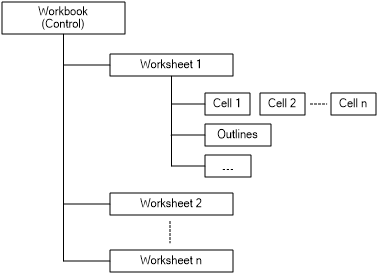
Component Object Structure
Sheet Tab Control
Both Windows Forms and WPF editions provide a built-in sheet tab UI control. Learn more about the Sheet Tab Control.
Memory Workbook
ReoGrid provides a memory workbook instance — a collection of worksheets without a GUI. See Memory Workbook.
Related Topics
- Worksheet — Worksheet operations and features
- Import & Export — File I/O (Excel, CSV, RGF)
- Control Appearance — Customizing visual appearance
- Sheet Tab Control — Sheet tab UI
- Memory Workbook — Non-GUI workbook