
Freeze panes allow you to lock rows and/or columns so they remain visible while the user scrolls. This is useful for keeping headers or labels in view when working with large datasets.
Basic Freeze
Freeze rows and columns at a specified cell position:
var sheet = grid.CurrentWorksheet;

// Freeze at row 5 (rows 0–4 are frozen at the top)
sheet.FreezeToCell(5, 0);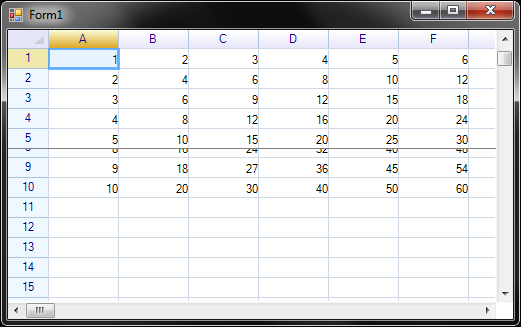
FreezeToCell Overloads
| Signature | Description |
|---|---|
FreezeToCell(CellPosition pos) | Freeze at the specified cell position |
FreezeToCell(string address) | Freeze at an address (e.g., "B5") |
FreezeToCell(int row, int col) | Freeze at row and column indices |
FreezeToCell(CellPosition pos, FreezeArea area) | Freeze at position with specific area |
FreezeToCell(int row, int col, FreezeArea area) | Freeze at indices with specific area |
Examples
// Freeze at address
sheet.FreezeToCell("B5");

// Freeze at CellPosition
sheet.FreezeToCell(new CellPosition(5, 1));

// Freeze at row 3, column 2
sheet.FreezeToCell(3, 2);
Freeze Areas
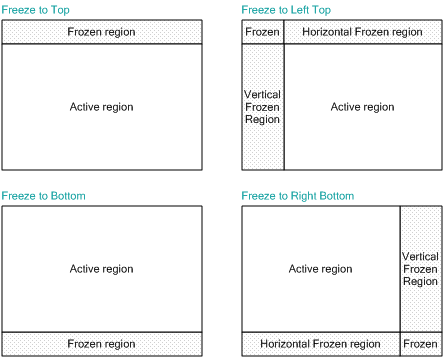
ReoGrid supports freezing at one or two adjacent edges. Use the FreezeArea enum to specify where the frozen region appears:
| FreezeArea Value | Description |
|---|---|
None | No freeze |
Left | Freeze columns on the left |
Top | Freeze rows at the top |
Right | Freeze columns on the right |
Bottom | Freeze rows at the bottom |
LeftTop | Freeze left columns and top rows (default) |
LeftBottom | Freeze left columns and bottom rows |
RightTop | Freeze right columns and top rows |
RightBottom | Freeze right columns and bottom rows |
Example: Freeze at Right-Bottom
sheet.FreezeToCell(5, 5, FreezeArea.RightBottom);Example: Freeze Only Rows at Top
sheet.FreezeToCell(3, 0, FreezeArea.Top);Example: Freeze Only Columns on Left
sheet.FreezeToCell(0, 2, FreezeArea.Left);Unfreeze
Remove all freeze settings:
sheet.Unfreeze();Properties
| Property | Type | Description |
|---|---|---|
FreezeArea | FreezeArea | Current frozen area type (read-only) |
FreezePos | CellPosition | Current freeze position (read-only) |
IsFrozen | bool | Whether the worksheet is currently frozen (read-only) |
// Get current freeze state
FreezeArea area = sheet.FreezeArea;
CellPosition pos = sheet.FreezePos;
bool frozen = sheet.IsFrozen;
Check if Freeze is Possible
Before freezing, verify that the worksheet supports it:
if (sheet.CanFreeze())
{
    sheet.FreezeToCell(3, 2);
}
CanFreeze() returns false when the worksheet’s current state does not support freeze (e.g., when a custom viewport controller is in use).
Events
| Event | Type | Description |
|---|---|---|
CellsFrozen | EventHandler | Raised after the worksheet is frozen |
CellsUnfrozen | EventHandler | Raised after the worksheet is unfrozen |
sheet.CellsFrozen += (s, e) =>
{
    Console.WriteLine($"Frozen at {sheet.FreezePos}, area: {sheet.FreezeArea}");
};

sheet.CellsUnfrozen += (s, e) =>
{
    Console.WriteLine("Worksheet unfrozen");
};
Frozen Region Too Large
If the frozen region is larger than the entire control, the active (scrollable) region becomes invisible.
This can happen when:
- A normal frozen region is specified, but the control is resized too small
- A frozen region that is too large is specified
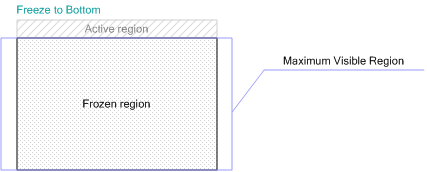
For example, if a grid has 100 rows and the maximum visible rows is 30, freezing to row 60 at the bottom requires 40 rows in the frozen area — exceeding the visible region and making the active area invisible.
Note: Always ensure the freeze position leaves enough room for the active scrollable area. Consider validating with
CanFreeze()before applying.
Use with Multiple Row Headers
Freeze panes work with multi-row column headers. When the worksheet is scrolled, frozen columns and their multi-row headers remain visible. See Multiple Row Header.
Related Topics
- Rows, Columns & Headers — Row and column operations
- Multiple Row Header — Multi-row column headers with freeze
- Worksheet Settings — Settings that affect behavior