ユーザーがダブルクリックまたは F2 キーを押すと、セルは編集モードに入ります。ReoGridはセルの上にテキストボックスをオーバーレイして入力を取得します。
名前空間
using unvell.ReoGrid;
編集の開始
ワークシートの StartEdit を使用してセルの編集を開始します。別のセルが既に編集モードの場合、ReoGridはそのセッションを先に終了します。
// Edit the currently selected cell
sheet.StartEdit();

// Edit the selected cell with initial text
sheet.StartEdit("initial text");

// Edit by position
sheet.StartEdit(new CellPosition("A1"));
sheet.StartEdit(new CellPosition("A1"), "initial text");

// Edit by row and column index
sheet.StartEdit(2, 3);
sheet.StartEdit(2, 3, "initial text");
StartEditのオーバーロード
| シグネチャ | 説明 |
|---|---|
StartEdit() | 現在選択されているセルを編集 |
StartEdit(string newText) | 選択されたセルを初期テキストを表示して編集 |
StartEdit(CellPosition pos) | 指定された位置のセルを編集 |
StartEdit(CellPosition pos, string newText) | 指定された位置のセルを初期テキスト付きで編集 |
StartEdit(int row, int col) | 指定された行と列インデックスのセルを編集 |
StartEdit(int row, int col, string newText) | 指定された行と列のセルを初期テキスト付きで編集 |
すべてのオーバーロードは bool を返します。編集モードが正常に開始された場合は true、それ以外(セルが読み取り専用、BeforeCellEdit がキャンセルされた場合など)は false を返します。
セルインスタンスからの編集開始
var cell = sheet.Cells["A1"];
cell.StartEdit();
編集の終了
EndEdit を使用して編集を終了します。EndEditReason は変更をコミットするか破棄するかを制御します。
// End editing normally (commit changes)
sheet.EndEdit();
sheet.EndEdit(EndEditReason.NormalFinish);

// Cancel editing (discard changes)
sheet.EndEdit(EndEditReason.Cancel);

// End editing with custom data (overrides user input)
sheet.EndEdit("Override Value");
sheet.EndEdit("Override Value", EndEditReason.NormalFinish);
EndEditのオーバーロード
| シグネチャ | 説明 |
|---|---|
EndEdit(EndEditReason reason = EndEditReason.NormalFinish) | 指定された理由で編集を終了 |
EndEdit(object data) | ユーザー入力の代わりにカスタムデータで編集を終了 |
EndEdit(object data, EndEditReason reason) | カスタムデータと指定された理由で編集を終了 |
すべてのオーバーロードは bool を返します。ワークシートが編集モードにあり、操作が正常に完了した場合に true を返します。
セルインスタンスからの編集終了
var cell = sheet.Cells["A1"];
cell.EndEdit("new data");
EndEditReason列挙型
| 値 | 説明 |
|---|---|
NormalFinish | ユーザーが通常通り編集を完了(Enter、Tab、他の場所をクリック)。変更がコミットされます。 |
Cancel | ユーザーが編集をキャンセル(Escape)。変更が破棄されます。 |
編集状態プロパティ
// Check if any cell is currently being edited
bool isEditing = sheet.IsEditing;

// Get the cell currently being edited (null if not editing)
Cell editingCell = sheet.EditingCell;

// Get or set the current text in the edit text box
string editText = sheet.CellEditText;
sheet.CellEditText = "modified text";
| プロパティ | 型 | 説明 |
|---|---|---|
IsEditing | bool | いずれかのセルが現在編集モードかどうか(読み取り専用) |
EditingCell | Cell | 現在編集中のセル、または null(読み取り専用) |
CellEditText | string | 編集テキストボックス内の現在のテキスト(読み書き) |
読み取り専用セル
個々のセルの編集を防止します。
var cell = sheet.Cells["A1"];
cell.IsReadOnly = true;
ワークシート全体を読み取り専用にします。
sheet.SetSettings(WorksheetSettings.Edit_Readonly, true);
包括的な保護オプションについては保護とロックを参照してください。
入力動作の設定
// Disable automatic data formatting after input
sheet.SetSettings(WorksheetSettings.Edit_AutoFormatCell, false);

// Disable the friendly percent helper (appends % during editing)
sheet.SetSettings(WorksheetSettings.Edit_FriendlyPercentInput, false);

// Disable auto-adjust row height when font size increases
sheet.SetSettings(WorksheetSettings.Edit_AutoAdjustRowHeight, false);
すべてのワークシート設定については設定を参照してください。
イベント
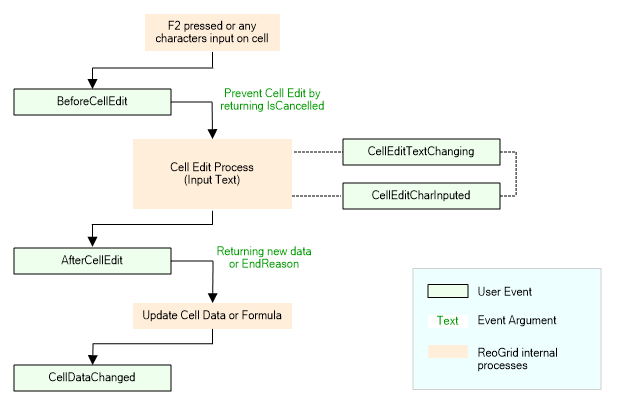
ReoGridは編集モードの前、途中、後にイベントを発生させます。編集のキャンセル、テキストの検証、ユーザー入力の変換が可能です。
BeforeCellEdit
編集ボックスが表示される直前に発生します。IsCancelled = true を設定して編集をブロックできます。
sheet.BeforeCellEdit += (s, e) =>
{
    // Block editing for specific cells
    if (e.Cell.Column == 0)
        e.IsCancelled = true;

    // Change the initial text shown in the edit box
    e.EditText = "default value";
};
CellBeforeEditEventArgsのプロパティ:
| プロパティ | 型 | 説明 |
|---|---|---|
Cell | Cell | 編集されようとしているセル |
IsCancelled | bool | true に設定して編集を防止 |
EditText | string | 編集フィールドに表示するテキスト(変更可能) |
CellEditTextChanging
編集テキストが変更されたとき(入力、貼り付け、IME入力)に発生します。編集中にテキストの置換や検証に使用します。
sheet.CellEditTextChanging += (s, e) =>
{
    // Replace specific input with predefined data
    if (e.Text.Equals("specific input"))
    {
        e.Text = "predefined data";
    }
};
CellEditTextChangingEventArgsのプロパティ:
| プロパティ | 型 | 説明 |
|---|---|---|
Cell | Cell | 編集中のセル |
Text | string | 現在の編集テキスト(変更可能 — 設定して置換) |
CellEditCharInputed
文字入力ごとに発生します。文字とカーソル位置の詳細を提供します。
sheet.CellEditCharInputed += (s, e) =>
{
    Console.WriteLine($"Char: {(char)e.InputChar}, Position: {e.CaretPositionInLine}");
};
注意: WPFでは、このイベントで文字の置換はサポートされていません。代わりに
CellEditTextChangingを使用してください。 CellEditCharInputEventArgsのプロパティ:
| プロパティ | 型 | 説明 |
|---|---|---|
Cell | Cell | 編集中のセル |
InputChar | int | 入力文字コード(変更可能) |
CaretPositionInLine | int | 現在の行内のキャレット位置(読み取り専用) |
LineIndex | int | 編集テキスト内の行インデックス(読み取り専用) |
InputText | string | 完全な現在の編集テキスト(読み取り専用) |
AfterCellEdit
ユーザーが編集を終了した後に発生します。結果のデータを変更したり、書式を変更したり、編集をキャンセルして元に戻したりできます。
sheet.AfterCellEdit += (s, e) =>
{
    // Override the data
    e.NewData = ProcessInput(e.NewData);

    // Change the data format for the new data
    e.DataFormat = CellDataFormatFlag.Number;

    // Or cancel to revert to the original value
    // e.EndReason = EndEditReason.Cancel;
};
CellAfterEditEventArgsのプロパティ:
| プロパティ | 型 | 説明 |
|---|---|---|
Cell | Cell | 編集されたセル |
NewData | object | 新しいデータ値(変更可能 — 設定してユーザー入力を上書き) |
EndReason | EndEditReason | 編集が終了した理由(変更可能 — Cancel に設定して元に戻す) |
DataFormat | CellDataFormatFlag | 新しいデータに適用するデータ書式(変更可能) |
CellValidation
編集テキストに対して検証が実行された後に発生します。検証結果を提供し、有効/無効ステータスの上書きを許可します。
sheet.CellValidation += (s, e) =>
{
    if (!e.IsValid)
    {
        Console.WriteLine($"Validation failed: {e.Failures.Count} failure(s)");
    }

    // Override the validation result
    e.IsValid = true;
};
CellValidationEventArgsのプロパティ:
| プロパティ | 型 | 説明 |
|---|---|---|
Cell | Cell | 検証中のセル |
Failures | IList<IValidationFailure> | 検証失敗のリスト(nullまたは空は有効を意味する) |
IsValid | bool | 入力が有効かどうか(変更可能 — 設定して上書き) |
検証ルールの設定についてはデータ検証を参照してください。
CellDataChanged
セルデータが実際に変更されたときに発生します。ユーザーの編集とプログラムによる更新(SetCellData、貼り付けなど)の両方で発生します。データ変更を観察する最終フックです。
sheet.CellDataChanged += (s, e) =>
{
    Console.WriteLine($"Cell {e.Cell.Address} changed to: {e.Cell.Data}");
};
注意:
CellDataChangedはユーザーがEscapeキーを押して編集をキャンセルした場合には発生しません。対話的およびプログラムによるデータ変更の両方で発生します。
一般的なパターン
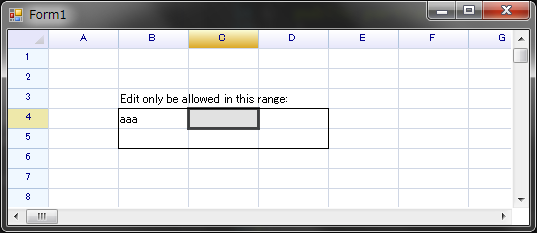
範囲内のみの編集を制限
var editableRange = new RangePosition(3, 1, 2, 3);

sheet.SetRangeBorders(editableRange, BorderPositions.Outside, RangeBorderStyle.BlackSolid);
sheet[2, 1] = "Edit only allowed in this range:";

sheet.BeforeCellEdit += (s, e) =>
    e.IsCancelled = !editableRange.Contains(e.Cell.Position);
入力の自動大文字化
sheet.CellEditTextChanging += (s, e) =>
{
    e.Text = e.Text.ToUpper();
};
無効な入力の検証と拒否
sheet.AfterCellEdit += (s, e) =>
{
    if (e.Cell.Column == 2 && !int.TryParse(e.NewData?.ToString(), out _))
    {
        e.EndReason = EndEditReason.Cancel;  // Revert to original value
    }
};