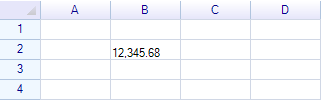
カスタムセルデータフォーマッターを使用してセルデータを書式設定することができます。セルデータフォーマッターは以下のインターフェースで定義されています。
public interface IDataFormatter
{
  // Return a formatted string for the specified cell
  string FormatCell(ReoGridCell cell);

  // Determines whether to check all unformatted cells
  bool PerformTestFormat(); // Usually needs to return true
}
カスタムセルデータフォーマッターの作成
セルデータフォーマッターを作成するには、IDataFormatter インターフェースを実装するクラスを作成します。
class MyDataFormatter : IDataFormatter
{
  public string FormatCell(ReoGridCell cell)
  {
   double val = cell.GetData<double>();
   return val < 0 ? string.Format("[{0}]", (-val).ToString("###,###,##0.00")) : val.ToString("###,###,###.00");
  }

  public bool PerformTestFormat()
  {
    return true;
  }
}
このフォーマッタークラスを適用するには:
DataFormatterManager.Instance.DataFormatters.Add(CellDataFormatFlag.Custom, new MyDataFormatter());
このフォーマッターを使用するには:
cell.DataFormat = CellDataFormatFlag.Custom;
cell.Data = 12345.6789;