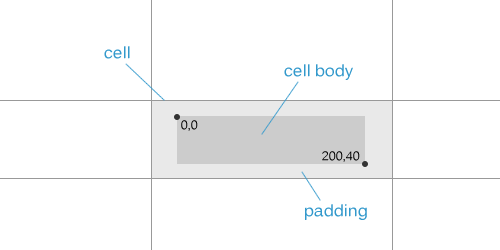
ReoGridはカスタムセルタイプを作成するための ICellBody インターフェースと CellBody 基底クラスを提供しています。セルボディはセル内に埋め込まれ、セルの寸法に準拠し、レンダリング、マウス、キーボードイベントを処理します。
名前空間
using unvell.ReoGrid.CellTypes;
using unvell.ReoGrid.Events;
using unvell.ReoGrid.Rendering;
クイックスタート
CellBody を継承するクラスを作成し、必要なメソッドをオーバーライドしてセルにアタッチします。
class MyCellBody : CellBody
{
    public override void OnPaint(CellDrawingContext dc)
    {
        dc.DrawCellBackground();
        // Custom drawing here
        dc.DrawCellText();
    }
}

// Attach to a cell
sheet["C3"] = new MyCellBody();
// Or:
sheet.Cells["C3"].Body = new MyCellBody();
セルボディを削除します。
sheet.Cells["C3"].Body = null;
CellBody基底クラス
CellBody クラスはすべての ICellBody メンバーのデフォルト実装を提供します。必要なメソッドのみをオーバーライドしてください。
プロパティ
| プロパティ | 型 | 説明 |
|---|---|---|
Cell | Cell | 親セル(OnSetup 後に利用可能) |
ライフサイクルメソッド
| メソッド | 戻り値 | 説明 |
|---|---|---|
OnSetup(Cell cell) | void | ボディがセルにアタッチされたときに呼び出される。ここで参照を保存 |
OnSetData(object data) | object | セルデータが設定されたときに呼び出される。変更されたデータまたは元のデータを返す |
OnStartEdit() | bool | 編集モード前に呼び出される。false を返すと編集を防止 |
OnEndEdit(object data, EndEditReason reason) | object | 編集終了後に呼び出される。変更されたデータまたは元のデータを返す |
OnEditTextChanged(string text, bool textAppend) | (string, string) | 編集中にテキストが変更されたときに呼び出される。(text, selectedText) または (null, null) を返す |
OnEditKeyDown(string text, KeyCode e) | string | 編集中にキーが押されたときに呼び出される。新しいテキストまたは null を返す |
OnGotFocus() | void | セルがフォーカスを取得したときに呼び出される |
OnLostFocus() | void | セルがフォーカスを失ったときに呼び出される |
Clone() | ICellBody | このセルボディのコピーを作成 |
レンダリングメソッド
| メソッド | 戻り値 | 説明 |
|---|---|---|
OnPaint(CellDrawingContext dc) | void | セルボディをレンダリング。デフォルトは背景+テキストを描画 |
DrawBackground(CellDrawingContext dc) | void | デフォルトのセル背景を描画 |
GetBodyBounds() | Rectangle | セル内のボディ境界を取得(パディングを考慮) |
GetTextAvailableBounds(style) | Rectangle | テキスト領域の境界を取得 |
CalcCellContentWidth(cell, width) | float | コンテンツ幅を計算 |
CalcCellContentHeight(cell, height) | float | コンテンツ高さを計算 |
マウスメソッド
すべて bool を返します。true を返すとイベントを消費し、false でデフォルト動作になります。
| メソッド | 説明 |
|---|---|
OnMouseDown(CellMouseEventArgs e) | マウスボタンが押された |
OnMouseUp(CellMouseEventArgs e) | マウスボタンが離された |
OnMouseMove(CellMouseEventArgs e) | マウスが境界内で移動した |
OnMouseEnter(CellMouseEventArgs e) | マウスが境界に入った |
OnMouseLeave(CellMouseEventArgs e) | マウスが境界を出た |
OnMouseWheel(CellMouseEventArgs e) | マウスホイールがスクロールされた(void) |
キーボードメソッド
| メソッド | 戻り値 | 説明 |
|---|---|---|
OnKeyDown(KeyCode e) | bool | キーが押された。true を返すと消費 |
OnKeyUp(KeyCode e) | bool | キーが離された。true を返すと消費 |
動作プロパティ
| プロパティ | 型 | デフォルト | 説明 |
|---|---|---|---|
DisableWhenCellReadonly | bool | true | セルが読み取り専用のときにボディを無効化 |
AutoCaptureMouse() | bool | true | マウスダウン後にマウスイベントをキャプチャ |
CellDrawingContext
CellDrawingContext は OnPaint の描画サーフェスを提供します。
| メンバー | 型 | 説明 |
|---|---|---|
Cell | Cell | レンダリングされるセル |
Graphics | IGraphics | プラットフォーム非依存のグラフィックスコンテキスト |
Worksheet | Worksheet | 親ワークシート |
DrawMode | DrawMode | 現在のレンダリングモード |
DrawCellBackground(bool calcScale) | void | デフォルトのセル背景を描画 |
DrawCellText() | void | デフォルトのセルテキストを描画 |
ContentCellBody基底クラス
コンテンツ領域を持つセルボディ(チェックボックスやラジオボタンなど)の場合、ContentCellBody を継承します。
| メソッド | 説明 |
|---|---|
GetContentSize() | 推奨コンテンツサイズを返す(デフォルト: 17x17) |
GetContentBounds() | セルスタイルに基づいて配置されたコンテンツ境界を取得(HAlign/VAlign) |
OnContentPaint(CellDrawingContext dc) | コンテンツ領域を描画するためにオーバーライド |
オーナー描画
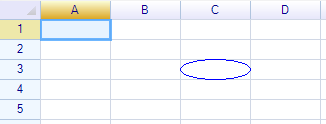
楕円の描画
class EllipseCell : CellBody
{
    public override void OnPaint(CellDrawingContext dc)
    {
        var bounds = GetBodyBounds();
        dc.Graphics.DrawEllipse(Pens.Blue,
            new Rectangle(0, 0, bounds.Width, bounds.Height));
    }
}
デフォルトの背景とテキストの描画
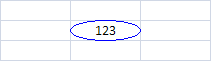
DrawCellBackground() と DrawCellText() を呼び出してデフォルトのレンダリングを含めます。
public override void OnPaint(CellDrawingContext dc)
{
    dc.DrawCellBackground();
    // Custom drawing between background and text
    dc.DrawCellText();
    // Additional drawing on top
}
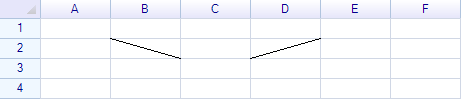
対角線の描画
class DiagonalLineCell : CellBody
{
    public bool FromTopLeft { get; set; } = true;

    public override void OnPaint(CellDrawingContext dc)
    {
        var bounds = GetBodyBounds();
        if (FromTopLeft)
            dc.Graphics.DrawLine(Pens.Black, new Point(0, 0),
                new Point(bounds.Right, bounds.Bottom));
        else
            dc.Graphics.DrawLine(Pens.Black, new Point(0, bounds.Bottom),
                new Point(bounds.Right, 0));
    }
}

sheet["B2"] = new DiagonalLineCell();
sheet["D2"] = new DiagonalLineCell { FromTopLeft = false };
セル編集の無効化
OnStartEdit から false を返して編集を防止します。
class ReadOnlyBody : CellBody
{
    public override bool OnStartEdit() => false;
}
編集結果の変更
OnEndEdit から変更されたデータを返します。
class UpperCaseBody : CellBody
{
    public override object OnEndEdit(object data, EndEditReason reason)
    {
        if (data is string s)
            return s.ToUpperInvariant();
        return data;
    }
}
マウスイベントの処理
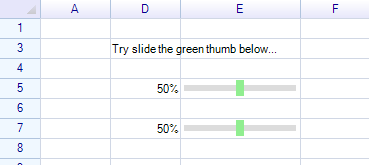
class ClickableProgressCell : CellBody
{
    public override bool OnMouseDown(CellMouseEventArgs e)
    {
        var bounds = GetBodyBounds();
        int value = (int)Math.Round(e.RelativePosition.X * 100f / bounds.Width);
        Cell.Worksheet.SetCellData(e.CellPosition, value);
        return true; // consume the event
    }

    public override void OnPaint(CellDrawingContext dc)
    {
        dc.DrawCellBackground();
        var bounds = GetBodyBounds();
        int value = Cell?.Data is int v ? v : 0;
        float width = bounds.Width * value / 100f;
        dc.Graphics.FillRectangle(new Rectangle(0, 0, width, bounds.Height),
            SolidColor.LightGreen);
        dc.DrawCellText();
    }
}
キーボードイベントの処理
class KeyHandlerCell : CellBody
{
    public override bool OnKeyDown(KeyCode e)
    {
        if (e == KeyCode.Space)
        {
            // Toggle value
            Cell.Data = !(Cell.Data is true);
            return true;
        }
        return false;
    }
}
数式によるデータバインディング
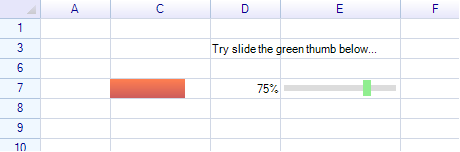
数式を使用して2つのセルのデータをバインドし、セルボディが別のセルに反応するようにします。
sheet["C3"] = new ClickableProgressCell();
sheet["C7"] = "=C3";  // C7 mirrors C3's value
データ変更の傍受
OnSetData をオーバーライドして、データが保存される前に検証または変換します。
class ClampedCell : CellBody
{
    public override object OnSetData(object data)
    {
        if (data is double d)
            return Math.Clamp(d, 0.0, 1.0);
        return data;
    }
}
セルボディの境界
ボディの境界はセルサイズからパディングを引いて計算されます。GetBodyBounds() メソッドはセルの左上隅を基準とした Rectangle を返します。
public override void OnPaint(CellDrawingContext dc)
{
    var bounds = GetBodyBounds();
    // bounds.X, bounds.Y = padding offset
    // bounds.Width, bounds.Height = available area
}
利用可能な領域を変更するには、セルのパディングスタイルを調整します。
sheet.Cells["C3"].Style.Padding = new PaddingValue(5, 5, 5, 5);
クラス階層
組み込みセルタイプはさまざまなレベルで CellBody を拡張しています。
ICellBody (interface)
  └─ CellBody (base class)
       ├─ ContentCellBody (content region with alignment)
       │    ├─ CheckBoxCell
       │    └─ RadioButtonCell
       ├─ ButtonCell
       │    └─ ImageButtonCell
       ├─ DropdownCell (abstract — panel infrastructure)
       │    ├─ DropdownListBaseCell
       │    │    ├─ DropdownListCell
       │    │    └─ ComboListCell
       │    ├─ ColumnDropdownListCell
       │    └─ DatePickerCell
       ├─ ProgressCell
       │    └─ NegativeProgressCell
       ├─ HyperlinkCell
       └─ ImageCell
関連トピック
- 組み込みセルタイプ — すべての組み込みセルボディタイプ
- ドロップダウンリストセル — ドロップダウン選択
- コンボリストセル — 編集可能なコンボボックス
- カスタムドロップダウンセルの作成方法 — カスタムドロップダウンチュートリアル