
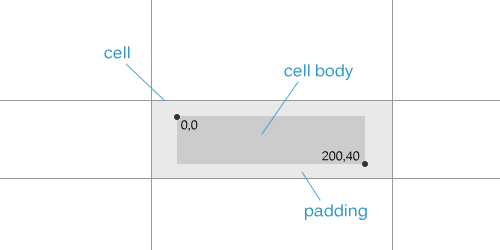
ReoGrid provides the ICellBody interface and CellBody base class for creating custom cell types. A cell body is embedded within a cell, conforming to the cell’s dimensions and handling rendering, mouse, and keyboard events.
Namespace
using unvell.ReoGrid.CellTypes;
using unvell.ReoGrid.Events;
using unvell.ReoGrid.Rendering;
Quick Start
Create a class that inherits from CellBody, override the methods you need, and attach it to a cell:
class MyCellBody : CellBody
{
    public override void OnPaint(CellDrawingContext dc)
    {
        dc.DrawCellBackground();
        // Custom drawing here
        dc.DrawCellText();
    }
}

// Attach to a cell
sheet["C3"] = new MyCellBody();
// Or:
sheet.Cells["C3"].Body = new MyCellBody();
Remove a cell body:
sheet.Cells["C3"].Body = null;CellBody Base Class
The CellBody class provides default implementations for all ICellBody members. Override only the methods you need.
Properties
| Property | Type | Description |
|---|---|---|
Cell | Cell | The parent cell (available after OnSetup) |
Lifecycle Methods
| Method | Return | Description |
|---|---|---|
OnSetup(Cell cell) | void | Called when the body is attached to a cell. Store references here |
OnSetData(object data) | object | Called when cell data is set. Return modified data or the original |
OnStartEdit() | bool | Called before edit mode. Return false to prevent editing |
OnEndEdit(object data, EndEditReason reason) | object | Called after edit ends. Return modified data or the original |
OnEditTextChanged(string text, bool textAppend) | (string, string) | Called during editing when text changes. Return (text, selectedText) or (null, null) |
OnEditKeyDown(string text, KeyCode e) | string | Called during editing when a key is pressed. Return new text or null |
OnGotFocus() | void | Called when the cell gets focus |
OnLostFocus() | void | Called when the cell loses focus |
Clone() | ICellBody | Create a copy of this cell body |
Rendering Methods
| Method | Return | Description |
|---|---|---|
OnPaint(CellDrawingContext dc) | void | Render the cell body. Default draws background + text |
DrawBackground(CellDrawingContext dc) | void | Draw the default cell background |
GetBodyBounds() | Rectangle | Get the body bounds within the cell (respects padding) |
GetTextAvailableBounds(style) | Rectangle | Get the text area bounds |
CalcCellContentWidth(cell, width) | float | Calculate content width |
CalcCellContentHeight(cell, height) | float | Calculate content height |
Mouse Methods
All return bool — return true to consume the event, false for default behavior.
| Method | Description |
|---|---|
OnMouseDown(CellMouseEventArgs e) | Mouse button pressed |
OnMouseUp(CellMouseEventArgs e) | Mouse button released |
OnMouseMove(CellMouseEventArgs e) | Mouse moved within bounds |
OnMouseEnter(CellMouseEventArgs e) | Mouse entered bounds |
OnMouseLeave(CellMouseEventArgs e) | Mouse left bounds |
OnMouseWheel(CellMouseEventArgs e) | Mouse wheel scrolled (void) |
Keyboard Methods
| Method | Return | Description |
|---|---|---|
OnKeyDown(KeyCode e) | bool | Key pressed. Return true to consume |
OnKeyUp(KeyCode e) | bool | Key released. Return true to consume |
Behavior Properties
| Property | Type | Default | Description |
|---|---|---|---|
DisableWhenCellReadonly | bool | true | Disable the body when the cell is read-only |
AutoCaptureMouse() | bool | true | Capture mouse events after mouse down |
CellDrawingContext
The CellDrawingContext provides the drawing surface for OnPaint:
| Member | Type | Description |
|---|---|---|
Cell | Cell | The cell being rendered |
Graphics | IGraphics | Platform-independent graphics context |
Worksheet | Worksheet | The parent worksheet |
DrawMode | DrawMode | Current rendering mode |
DrawCellBackground(bool calcScale) | void | Draw the default cell background |
DrawCellText() | void | Draw the default cell text |
ContentCellBody Base Class
For cell bodies with a content region (like checkboxes and radio buttons), inherit from ContentCellBody:
| Method | Description |
|---|---|
GetContentSize() | Return the preferred content size (default: 17x17) |
GetContentBounds() | Get content bounds, aligned based on cell style (HAlign/VAlign) |
OnContentPaint(CellDrawingContext dc) | Override to paint the content region |
Owner Drawing
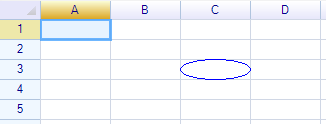
Drawing an Ellipse
class EllipseCell : CellBody
{
    public override void OnPaint(CellDrawingContext dc)
    {
        var bounds = GetBodyBounds();
        dc.Graphics.DrawEllipse(Pens.Blue,
            new Rectangle(0, 0, bounds.Width, bounds.Height));
    }
}
Drawing Default Background and Text
Call DrawCellBackground() and DrawCellText() to include the default rendering:
public override void OnPaint(CellDrawingContext dc)
{
    dc.DrawCellBackground();
    // Custom drawing between background and text
    dc.DrawCellText();
    // Additional drawing on top
}
Drawing a Diagonal Line
class DiagonalLineCell : CellBody
{
    public bool FromTopLeft { get; set; } = true;

    public override void OnPaint(CellDrawingContext dc)
    {
        var bounds = GetBodyBounds();
        if (FromTopLeft)
            dc.Graphics.DrawLine(Pens.Black, new Point(0, 0),
                new Point(bounds.Right, bounds.Bottom));
        else
            dc.Graphics.DrawLine(Pens.Black, new Point(0, bounds.Bottom),
                new Point(bounds.Right, 0));
    }
}

sheet["B2"] = new DiagonalLineCell();
sheet["D2"] = new DiagonalLineCell { FromTopLeft = false };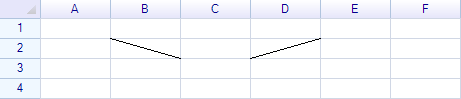
Disable Cell Edit
Return false from OnStartEdit to prevent editing:
class ReadOnlyBody : CellBody
{
    public override bool OnStartEdit() => false;
}
Modify Edit Results
Return modified data from OnEndEdit:
class UpperCaseBody : CellBody
{
    public override object OnEndEdit(object data, EndEditReason reason)
    {
        if (data is string s)
            return s.ToUpperInvariant();
        return data;
    }
}
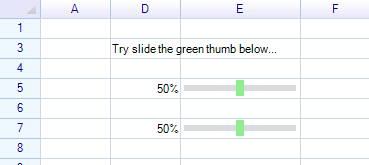
Handle Mouse Events
class ClickableProgressCell : CellBody
{
    public override bool OnMouseDown(CellMouseEventArgs e)
    {
        var bounds = GetBodyBounds();
        int value = (int)Math.Round(e.RelativePosition.X * 100f / bounds.Width);
        Cell.Worksheet.SetCellData(e.CellPosition, value);
        return true; // consume the event
    }

    public override void OnPaint(CellDrawingContext dc)
    {
        dc.DrawCellBackground();
        var bounds = GetBodyBounds();
        int value = Cell?.Data is int v ? v : 0;
        float width = bounds.Width * value / 100f;
        dc.Graphics.FillRectangle(new Rectangle(0, 0, width, bounds.Height),
            SolidColor.LightGreen);
        dc.DrawCellText();
    }
}
Handle Keyboard Events
class KeyHandlerCell : CellBody
{
    public override bool OnKeyDown(KeyCode e)
    {
        if (e == KeyCode.Space)
        {
            // Toggle value
            Cell.Data = !(Cell.Data is true);
            return true;
        }
        return false;
    }
}
Data Binding with Formulas
Bind two cells’ data using a formula so the cell body reacts to another cell:
sheet["C3"] = new ClickableProgressCell();
sheet["C7"] = "=C3";  // C7 mirrors C3's value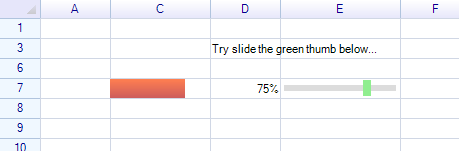
Intercept Data Changes
Override OnSetData to validate or transform data before it’s stored:
class ClampedCell : CellBody
{
    public override object OnSetData(object data)
    {
        if (data is double d)
            return Math.Clamp(d, 0.0, 1.0);
        return data;
    }
}
Cell Body Bounds
The body bounds are calculated from the cell size minus padding. The GetBodyBounds() method returns a Rectangle relative to the cell’s top-left corner:
public override void OnPaint(CellDrawingContext dc)
{
    var bounds = GetBodyBounds();
    // bounds.X, bounds.Y = padding offset
    // bounds.Width, bounds.Height = available area
}
To change the available area, adjust the cell’s padding style:
sheet.Cells["C3"].Style.Padding = new PaddingValue(5, 5, 5, 5);Class Hierarchy
Built-in cell types extend CellBody at various levels:
ICellBody (interface)
  └─ CellBody (base class)
       ├─ ContentCellBody (content region with alignment)
       │    ├─ CheckBoxCell
       │    └─ RadioButtonCell
       ├─ ButtonCell
       │    └─ ImageButtonCell
       ├─ DropdownCell (abstract — panel infrastructure)
       │    ├─ DropdownListBaseCell
       │    │    ├─ DropdownListCell
       │    │    └─ ComboListCell
       │    ├─ ColumnDropdownListCell
       │    └─ DatePickerCell
       ├─ ProgressCell
       │    └─ NegativeProgressCell
       ├─ HyperlinkCell
       └─ ImageCell
Related Topics
- Built-in Cell Types — All built-in cell body types
- Dropdown List Cell — Dropdown selection
- Combo List Cell — Editable combo box
- How to Create Custom Drop-down Cell — Custom dropdown tutorial