
ReoGrid provides a method named IterateCells that is used to iterate through all valid cells. ReoGrid uses a paging-indexed two-dimensional array to manage all cells in memory. The IterateCells method can skip empty cells, empty index-pages, and merged cells to achieve better performance.
Define:
public void IterateCells(string addressOrName, Func<int, int, ReoGridCell, bool> iterator);
public void IterateCells(RangePosition range, Func<int, int, ReoGridCell, bool> iterator);
public void IterateCells(int row, int col, int rows, int cols, Func<int, int, ReoGridCell, bool> iterator);
Usage (C#):
sheet.IterateCells(range, (row, col, cell) =>
{
  // return true to continue iterating, return false to abort
  return true;
});
Usage (VB.NET):
sheet.IterateCells(range, Function(row, col, cell)
  ' return true to continue iterating, return false to abort
  Return True
End Function)
Skip conditions
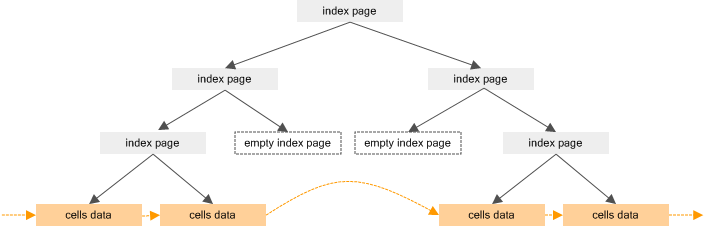
The IterateCells method skips the following objects:
- Empty cells - A cell with no data and no custom styles set will be skipped during iteration.
- Empty index-pages - An index-page with no cells attached will be skipped during iteration.
- Invalid cells - A cell that has been merged into another cell becomes invalid and is skipped by this method.
Sample
A sample that sums values within a specified range (the code-behind of the sum function):
public static double Sum(Worksheet sheet, RangePosition range)
{
  double val = 0;

  sheet.IterateCells(range, (row, col, cell) =>
  {
    if (ScriptRunningMachine.IsNumber(cell.Data))
    {
      val += ScriptRunningMachine.GetDoubleValue(cell.Data);
    }
    return true;
  });

  return val;
}