
ReoGridEditor is an open-source project that provides a Microsoft Excel-like user interface for creating and editing spreadsheets. ReoGridEditor uses the ReoGrid spreadsheet component extension edition.
Overview
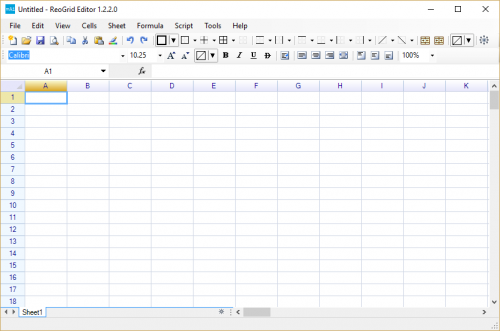
The following is the appearance of the ReoGridEditor main window.
Get Binary and Source Code
Binary Executable
Download the release package and extract the archive folder named ReoGrid-_version_-Demo-Binary.
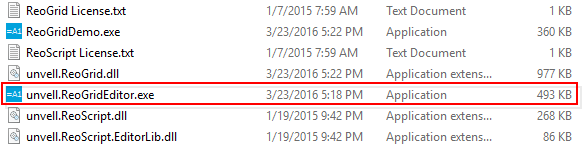
Double-click to execute the file unvell.ReoGridEditor.exe; the main window of ReoGridEditor will appear.
Source Code
Download the release package and extract the archive file named ReoGrid-_version_-Demo-Editor-Source.zip.
Build
To build ReoGridEditor, perform the following steps:
- Open the solution file
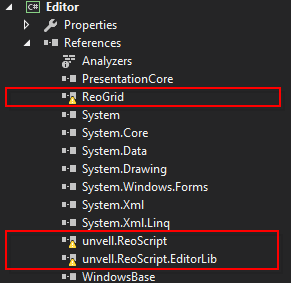
Editor2013.slnusing Visual Studio 2012/2013/2015 or later. - Remove the reference items marked with warnings from the reference list.
- Extract the folder
ReoGrid-_version_-Demo-Binaryfrom the downloaded release package. - Add the following DLLs as project references:
- unvell.ReoGrid.dll
- unvell.ReoScript.dll
- unvell.ReoScript.EditorLib.dll
- Build the project.
Edit Spreadsheet
Open and save spreadsheet
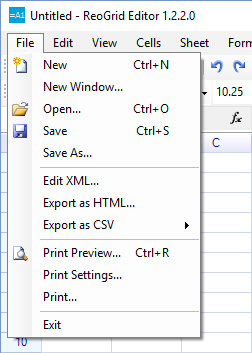
Open and save files using the Open and Save menu items.
Supported File Formats
ReoGridEditor uses ReoGrid to open and save files. The following formats are supported:
| Load | Save | Import | Export | |
|---|---|---|---|---|
| Excel 2007 (Open Office XML) | Yes | Yes | ||
| RGF (ReoGrid Format) | Yes | Yes | Yes | Yes |
| CSV | Yes | Yes | ||
| HTML | Yes |
Table Definitions:
- Load Read an entire workbook and all worksheets from a file
- Save Write an entire workbook and all worksheets to a file
- Import Read a specified worksheet into the current workbook
- Export Write a specified worksheet from the current workbook
Managing Named Ranges
ReoGrid Editor also provides a Named Range Management window for reviewing and modifying existing named ranges:
Accessing the Named Range Window: To open the Named Range Management window, navigate through the ReoGrid Editor menu by selecting Formula > Named Range. This opens a window listing all defined named ranges in the current worksheet.
Editing and Deletion: Within the Named Range Management window, users can edit the cell range associated with a named range or delete named ranges that are no longer needed. This centralized management tool ensures that named ranges remain relevant and accurately reflect the worksheet data.
Named ranges are a powerful feature in ReoGrid Editor, enabling more readable formulas and easier data referencing. By using the Address Bar to define named ranges and the Named Range Management window for ongoing maintenance, users can significantly enhance their data organization and formula creation workflows.
Open Source .NET UI Controls
ReoGridEditor provides many user controls under an open-source license, such as Font Box, Color Picker, Border Editor, and Rotation Angle Editor. These UI controls can be used freely in other applications.