
Built-in Clipboard Support
- Copy tab-delimited plain text between ReoGrid and other spreadsheet applications
- Copy worksheet content, including data, styles, and borders, between two ReoGrid worksheets
Tabbed plain-text
Tab-delimited plain text is the common format used to transfer data between spreadsheet applications. Excel uses this format to put data as plain text on the clipboard:
A1 \\t B1 \\t C1 \\n
A2 \\t B2 \\t C2 \\n
A3 \\t B3 \\t C3 \\n
Copy data from Excel into Notepad.
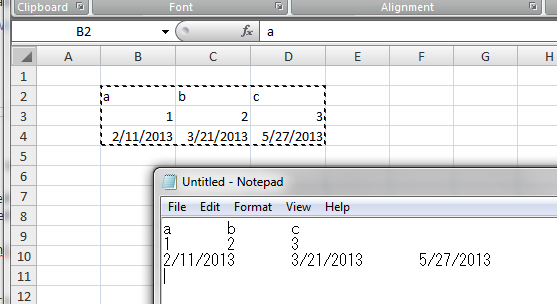
Get the tab-delimited plain text from the Clipboard:
string text = Clipboard.GetText();ReoGrid provides a method to help parse the tab-delimited format into an object array:
object[,] data = RGUtility.ParseTabbedString(text);Then set this object array on the worksheet:
worksheet.SetRangeData(sheet.SelectionRange, data);Convert range data into tabbed string
Use the StringifyRange method of the worksheet to convert a selected range into a tab-delimited string.
string tabbedStr = worksheet.StringifyRange(worksheet.SelectionRange);Manually paste from tabbed string
Use the PasteFromString method to paste a tab-delimited string from the Clipboard onto the worksheet. The return value appliedRange is the final range that was affected.
var appliedRange = worksheet.PasteFromString(new CellPosition("A1"), Clipboard.GetText());Prevent built-in clipboard operations
The worksheet automatically processes clipboard operations when Ctrl+C, Ctrl+V, or Ctrl+X is received from the user. To prevent the built-in operations, handle the clipboard events and set IsCancelled to true.
Events during clipboard operations:
- BeforeCopy
- AfterCopy
- BeforePaste
- AfterPaste
- BeforeCut
- AfterCut
All Before-prefixed events have the IsCancelled property that can prevent the default clipboard operations. For example:
worksheet.BeforePaste += (s, e) => e.IsCancelled = true;Call clipboard methods
Methods to check whether a clipboard operation can be performed:
| Method | Description |
|---|---|
| bool CanCopy() | Check whether content can be copied to the clipboard |
| bool CanPaste() | Check whether content from the clipboard can be pasted into the worksheet (identifiable data exists in the clipboard) |
| bool CanCut() | Check whether content can be cut and placed on the clipboard |
Methods to perform clipboard operations:
bool Copy();
bool Paste();
bool Cut();
For example:
worksheet.Copy();Manually copy and paste range
Use the GetPartialGrid method to get the content of a range, and the SetPartialGrid method to copy that content to a specified range.
var content = worksheet.GetPartialGrid("A1:B2");
worksheet.SetPartialGrid("C1:D2", content);